
TL;DR:
- A push notification strategy is a deliberate system governing message content, timing, and targeting to boost user engagement and retention. It relies on permission optimization, segmentation, personalization, timing, and reliable delivery, with triggered messages achieving higher open rates. Properly managing frequency and respecting user preferences prevents opt-outs and fosters long-term app engagement.
A push notification strategy is a planned, deliberate approach to sending targeted messages to app users with the goal of improving engagement and retention. Without one, you are broadcasting into the void. Apps with structured strategies achieve 2–3 times higher Day-30 retention than those using ad hoc notifications. That single figure explains why push notification strategy has moved from a nice-to-have into a core discipline for any marketing professional or business owner running a mobile product. The standard industry term is "push notification strategy," and it covers everything from permission timing and segmentation to frequency control and personalised content.
What is a push notification strategy and why does it matter?
A push notification strategy is the full system governing which messages you send, to whom, when, and how often. It is not a content calendar for your app. It is a decision framework that sits across your entire user lifecycle.
The importance of push notifications lies in their directness. A push lands on the lock screen, bypassing email inboxes and social feeds entirely. That directness is also the risk. Push notifications are high-stakes UX elements where bad timing or irrelevant content can trigger an app uninstall. The channel rewards precision and punishes laziness.
Effective push notification methods share three properties: they are relevant to the individual user, they arrive at the right moment, and they respect the user's stated preferences. Miss any one of these and you erode trust faster than you build it.
What are the key components of an effective push strategy?
Every push notification strategy rests on five foundational elements. Get these right and everything else follows.

Permission optimisation is the starting point. Push notifications require user opt-in on both iOS and Android 13+, so no opt-in means no delivery. The optimal moment to request iOS permission is after a significant user action, using a custom "soft ask" modal before the system prompt appears. Correct timing of the iOS permission prompt can raise opt-in rates from 30–40% to 55–70% in the same user cohort. That is a 25 percentage point swing from one tactical change.
Message taxonomy keeps your strategy coherent. Three key message types define the field:
- Transactional messages (order confirmations, password resets): highest priority, always send, no frequency cap applies.
- Behavioural triggers (abandoned cart, milestone reached, re-engagement): mid priority, triggered by user actions, 2–4 times higher open rates than broad promotions.
- Promotional messages (sales, announcements): lowest priority, subject to strict frequency caps and audience segmentation.
Segmentation by behaviour and lifecycle stage determines relevance. A new user needs onboarding prompts. A lapsed user needs a re-engagement sequence. Sending a promotional discount to someone who opened the app ten minutes ago is a waste of a message and a test of their patience.
Timing intelligence means delivering each message at the moment each individual user is most likely to engage. Machine learning segmentation and predictive timing improve open rates by 20–35% without changing the message content at all. The message stays the same; the delivery time shifts to match each user's engagement peak.
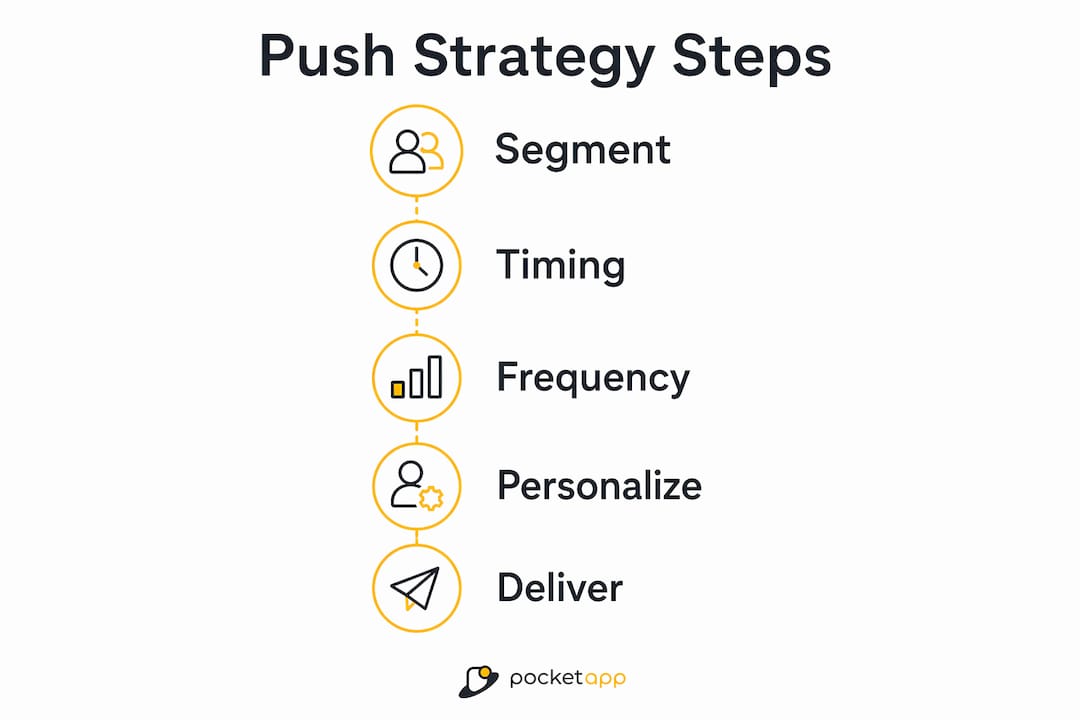
Frequency control protects the channel. Sending more than three low-relevance notifications per day is a primary driver of opt-outs and app uninstalls. Set frequency caps per segment and per message type before you launch any campaign.
Pro Tip: Build suppression rules into your strategy from day one. If a user has not opened your last five pushes, suppress promotional messages and switch to a re-engagement sequence instead of continuing to blast.
How do you personalise push notifications for maximum engagement?
Personalisation in push notifications goes well beyond inserting a first name. Behaviour-based personalisation references what a user has actually done inside your app, and that specificity is what drives results.
Behavioural trigger notifications targeted to specific user actions achieve 2–4 times higher open rates than broad promotional messages. The mechanism is simple: the message is relevant because it responds to something the user just did or failed to complete. An abandoned cart reminder referencing the exact product left behind outperforms a generic "come back" message every time.
Practical personalisation techniques include:
- Referencing the last product a user viewed, with its name and price.
- Triggering a message when a user reaches a loyalty milestone (for example, "You are 50 points from Gold status").
- Sending a re-engagement message after a defined period of inactivity, tailored to the category the user engaged with most.
- Adjusting message tone based on lifecycle stage: warm and instructional for new users, concise and reward-focused for power users.
Top marketing teams apply machine learning to user behaviour for precise segmentation and optimise notification timing individually, moving away from broadcast schedules entirely. This approach requires investment in data infrastructure, but the returns in open rate and retention justify it. For retail contexts in particular, advanced segmentation and timing produce measurable lifts in conversion from notification to purchase.
Contextual, personalised notifications anchored in user lifecycle stages drive better re-engagement than generic broadcasts. The framing shift is from "what do we want to say?" to "what does this user need to hear right now?"
How should you manage timing and frequency in push campaigns?
Timing and frequency management is where most push notification campaigns fail. The theory is straightforward; the execution requires discipline.
Per-user optimal send times are calculated from historical engagement patterns. If a user consistently opens your app between 7:30 AM and 8:00 AM on weekdays, that is your window. Sending at 2:00 PM because it suits your campaign schedule ignores the data you already have.
Follow these steps to build a timing and frequency framework:
- Establish quiet hours per region. Never send between 10:00 PM and 7:00 AM local time unless the message is transactional and time-critical.
- Set frequency caps by message type. Transactional messages are uncapped. Behavioural triggers cap at one per trigger event. Promotional messages cap at two to three per week per user.
- Build automated journeys, not one-off blasts. An onboarding sequence might send a welcome message on day one, a feature highlight on day three, and a social proof message on day seven. Each message has a purpose within the arc.
- Define re-engagement sequences separately. A user who has been inactive for 14 days needs a different cadence from an active user. Start with one message, wait 48 hours, then send a second with a different value proposition.
- Review and adjust caps quarterly. User behaviour shifts. A cap that worked in Q1 may cause fatigue by Q3 if your content volume has increased.
Pro Tip: Test send times by splitting your audience into cohorts and measuring open rates by hour of delivery. After four weeks, you will have enough data to set per-segment optimal windows rather than relying on industry averages.
Automated journeys consistently outperform one-off blasts because they match message content to where the user is in their relationship with your product. A single promotional push is a transaction. A well-designed journey builds habit.
What are the technical and operational requirements for push delivery?
A push notification strategy is only as good as the infrastructure delivering it. Technical failures, such as duplicate messages or missed deliveries, destroy user trust faster than poor content does.
The table below outlines the core technical components and their operational purpose:
| Component | Purpose |
|---|---|
| Ingestion layer | Receives notification requests and queues them by priority tier |
| Preference check | Validates user opt-in status and category settings before routing |
| Idempotency keys | Prevents duplicate notifications at ingestion, provider API, and content hashing stages |
| Retry mechanism | Uses exponential backoff to reattempt failed deliveries without flooding the provider |
| Fallback waterfall | Escalates from push to SMS or email if delivery or read confirmation is not received |
| Analytics pipeline | Captures delivery, open, and conversion events for A/B testing and optimisation |
Advanced push infrastructures implement idempotency keys and multi-tier retry mechanisms to ensure delivery reliability and avoid duplicate notifications. Duplicates are not just annoying; they signal to users that the system is broken and accelerate opt-outs.
Fallback waterfalls for critical notifications escalate from push to SMS or email based on delivery and read confirmations. This prevents blind resends that waste resources and irritate users who did receive the original message.
User preference centres allowing per-category and per-channel controls increase user satisfaction and engagement with notifications by up to five times compared to non-customisable setups. Giving users control over what they receive is not a concession. It is a retention tactic. Users who configure their preferences are signalling intent to stay engaged. Separating "what to notify about" from "how to receive it" in your settings architecture produces better opt-in rates and higher long-term satisfaction. For a deeper look at how UX decisions affect retention, Pocketapp's guide on improving app UX covers the broader design principles that support notification strategy.
Key takeaways
A push notification strategy succeeds when permission, personalisation, timing, frequency, and reliable delivery work together as a single system rather than isolated tactics.
| Point | Details |
|---|---|
| Permission timing is decisive | Using a soft-ask modal before the system prompt can lift iOS opt-in rates from 30–40% to 55–70%. |
| Message taxonomy prevents fatigue | Separating transactional, behavioural, and promotional messages keeps frequency caps manageable and relevant. |
| Behavioural triggers outperform blasts | Trigger-based notifications achieve 2–4 times higher open rates than broad promotional messages. |
| Frequency caps protect the channel | Sending more than three low-relevance notifications per day is a primary driver of opt-outs and uninstalls. |
| User preference centres multiply engagement | Giving users per-category control lifts engagement by up to five times versus fixed notification setups. |
Push strategy in 2026: what I have learned the hard way
Push notifications are the most unforgiving channel in mobile marketing. Email forgives a bad subject line. Push does not. One irrelevant message at the wrong time and the user is gone, often permanently.
The mistake I see most often is treating push as a broadcast tool rather than a conversation layer. Teams set up a weekly promotional blast, watch open rates decline over three months, and conclude that push "doesn't work for their audience." The channel works. The strategy does not. The fix is always the same: tighter segmentation, triggered sequences, and a genuine preference centre.
The second mistake is ignoring the technical layer entirely. A marketing team can build a perfect content strategy and still lose users to duplicate notifications caused by missing idempotency controls. Strategy and infrastructure are not separate workstreams. They are the same problem.
What actually works in 2026 is treating each user's notification history as a signal. If they open behavioural triggers but ignore promotions, suppress promotions and double down on triggers. Let the data reshape the strategy continuously rather than reviewing it once a quarter. The teams doing this are seeing measurable gains in app engagement that compound over time.
Push is a privilege, not a right. Users granted you access to their lock screen. Respect that access and they will stay. Abuse it and no re-engagement sequence will bring them back.
— Paul
Pocketapp's approach to mobile engagement and push strategy
Building a push notification strategy that actually retains users requires more than a good plan. It requires an app architecture designed to support segmentation, preference management, and reliable delivery from the ground up.

Pocketapp has delivered over 300 mobile projects for clients including WWF, Dechra, and Crocus, across retail, healthcare, and consumer engagement sectors. The team builds mobile apps with notification infrastructure, user preference centres, and analytics pipelines built in from the start, not bolted on afterwards. If you are planning a new app or rearchitecting an existing one to support a proper push strategy, speak to the Pocketapp team about what a bespoke build looks like for your audience and retention goals.
FAQ
What is a push notification strategy?
A push notification strategy is a planned framework governing which messages to send, to which users, at what time, and how often. It covers permission optimisation, segmentation, personalisation, timing, and frequency control.
How do push notifications improve user retention?
Apps with structured push notification strategies achieve 2–3 times higher Day-30 retention than those using unscheduled or ad hoc notifications, primarily because relevant, timely messages bring users back before they disengage permanently.
How often should you send push notifications?
Sending more than three low-relevance notifications per day is a primary driver of opt-outs and uninstalls. Transactional messages are uncapped, but promotional messages should be capped at two to three per week per user segment.
What is the difference between a push notification and a behavioural trigger?
A push notification is the delivery mechanism; a behavioural trigger is the logic that fires a notification in response to a specific user action, such as abandoning a cart or reaching a milestone. Triggered notifications achieve 2–4 times higher open rates than broad promotional messages.
Why do users opt out of push notifications?
Users opt out primarily because of irrelevant content, excessive frequency, or poor timing. Providing a preference centre with per-category controls reduces opt-outs and increases long-term engagement by giving users control over what they receive.