
Mobile release management is the disciplined pipeline that turns finished code into a store-approved binary, then into a phased rollout you can watch, pause, or halt. As the Bitrise guide to app release processes frames it, the work spans planning, code freeze, building artefacts, multi-stage testing, store submission, phased rollout, and post-release monitoring. Treat store review and rollback limits as your primary constraint from day one, and lean on established release practice frameworks for the operational detail.
TL;DR:
- Automated signing should be the first process to automate because it is the most common failure point and easiest to fix permanently.
- Phased rollouts should start at 5 to 10% of users and stay at each stage for at least 24 hours to accurately monitor for issues.
- Automatic halt rules should be set for crash-free sessions, new exception types, and sharp drops in core business metrics to enable quick incident response.
- Signatures, certificates, and provisioning profiles need to be managed centrally in secure stores with regular rotation to prevent cryptic rejection errors.
- Effective release management requires clear ownership, rapid decision-making, and detailed logs of actions and triggers, not complex tools or vague policies.
Table of Contents
- Why mobile release management differs from web release
- What are the core stages of the mobile release pipeline?
- How should teams automate mobile release pipelines?
- What causes code signing failures and how do you fix them?
- How do multi-stage testing and beta programmes prevent bad releases?
- How do phased rollouts and store controls limit risk?
- What metrics should trigger a release halt?
- What does an effective release runbook look like?
- How Pocketapp applies release engineering in practice
- What release engineering maturity actually looks like
- Get hands-on help building your release pipeline
- Sources
- FAQ
Why mobile release management differs from web release
Web teams can push a fix in minutes. Mobile teams cannot, and that single fact reshapes every decision in the release plan.
App store review adds an unpredictable delay before any build reaches users. Apple's review times fluctuate day to day, and Google Play's automated checks can still flag a build for manual review without warning. You cannot promise a precise launch date with certainty; you can only build in a buffer to accommodate review delays.
Rollback does not exist in the way web engineers expect it to. There is no instant revert. As the Shake guide to release management puts it, a broken mobile release is fixed forward: you ship a new binary, then wait again for review and adoption. That reality alone justifies investing in feature flags and server-side kill switches long before you need them.
Binaries also persist on devices in a way web code never does. A user on an old version is running old logic against your current backend, sometimes for weeks, which means backward compatibility is not optional.
Four structural differences drive most of the operational choices that follow:
- Review latency and unpredictability — you are shipping through a gate you do not control.
- Forward-fix rollback — recovery means a new release, not a revert.
- Persistent old binaries — users linger on outdated versions far longer than on web.
- Slow adoption tail — new versions typically take 7 to 30 days to reach most active users, which delays how quickly you can trust your metrics.
Submissions also need policy-compliance artefacts attached, from privacy manifests to data-use disclosures, and missing one is a common cause of rejection.
What are the core stages of the mobile release pipeline?
Every mature team runs some version of the same seven-stage pipeline, even when the tooling underneath differs wildly. The Bitrise breakdown of mobile release management lays out the stages that most engineering organisations converge on independently.
- Planning — product and engineering agree scope, target release date, and rollback thresholds. Owned jointly by the product owner and release manager.
- Code freeze — the release branch locks; only critical fixes merge. Owned by engineering leads, enforced by branch protection rules.
- Build artefact creation — CI produces the signed binary (IPA or AAB) from the frozen branch. Owned by the CI/CD pipeline, not a developer's laptop.
- Multi-stage testing — automated suites, then manual exploratory testing, then beta cohorts. Owned by QA, gated by acceptance criteria.
- Store submission — the artefact goes to App Store Connect or the Google Play Console with metadata and compliance documents. Owned by the release manager.
- Phased rollout — the build ships to a small percentage of users first, expanding on healthy signals. Owned by the release manager, with engineering on call.
- Post-release monitoring — crash rates, exceptions, and business metrics are tracked against thresholds that trigger a pause or halt. Owned by whoever is on the incident rota.
Build in a buffer of a few days between submission and your intended go-live to accommodate store review times. Review times vary, and a coordinated marketing push with no binary approved yet is an entirely avoidable failure. This is also where designing your project workflow around clear stage ownership pays off, because ambiguous ownership is the single most common reason releases stall between stages.
How should teams automate mobile release pipelines?
Automate the parts of the pipeline that are repetitive, error-prone, and time-critical first. That means build creation, code signing, artefact promotion, and store submission hooks, in roughly that order.
A typical automated flow looks like this: code merges trigger a CI build, the CI system signs the binary automatically using stored credentials, the signed artefact gets promoted to a release-candidate channel for QA and beta testers, and once it passes acceptance criteria, a submission job pushes it to the store consoles with metadata attached. No manual file transfers, no developer manually clicking through a portal at 11pm.
Four tool classes cover most of this:
- CI/CD platforms handle build orchestration and testing triggers.
- Release orchestration tools manage artefact promotion between environments and track version state.
- OTA update tooling pushes JavaScript or configuration changes without a full store release, useful for React Native and similar stacks.
- Feature-flag and monitoring services give you a rollback mechanism that does not depend on Apple or Google's review queue.
Each class trades speed for control differently. OTA tooling is fast but limited to non-native changes; feature flags are the fastest true kill switch you have, but only if they are instrumented before the release ships, not after something breaks. Cross-platform frameworks add another variable here, since some support OTA patches more cleanly than others.
Store your signing certificates and API keys in a dedicated secrets manager, never in source control or CI environment variables that get logged. Rotate credentials on a schedule, not only when someone leaves the team.
Pro Tip: Automate signing before you automate anything else. It is the single most common point of pipeline failure, and it is also the easiest to fix permanently once you commit to it.
What causes code signing failures and how do you fix them?
Signing is where mobile releases break more often than anywhere else in the pipeline, largely because it depends on artefacts that expire, get revoked, or drift out of sync between people. The Luciq analysis of mobile release management identifies certificate and provisioning-profile management as a recurring point of pipeline breakage, and automating it is one of the highest-leverage fixes available.
Three artefacts matter most: the distribution certificate, the provisioning profile, and the entitlements file. TestFlight builds, App Store distribution builds, and enterprise-distributed builds each need their own profile configuration, and mixing them up produces cryptic rejection errors that waste hours.

Credentials should live in a shared, access-controlled store, not on an individual engineer's keychain. When CI holds the signing identity centrally, you remove the single point of failure that appears the moment that one person goes on holiday.
When signing breaks, a short runbook saves real time:
- Expired certificate — regenerate in the developer portal, update the CI secret, rebuild.
- Mismatched bundle ID — confirm the app identifier in the build config matches the provisioning profile exactly.
- Missing entitlements — check the entitlements file against the capabilities enabled in the developer portal for that App ID.
- Revoked profile — check whether a teammate regenerated a certificate elsewhere, which silently invalidates existing profiles.
How do multi-stage testing and beta programmes prevent bad releases?
The test pyramid still applies to mobile, but it needs two extra layers that web teams rarely bother with: manual exploratory testing on real devices, and staged beta distribution with a human sign-off between each stage.
- Unit and integration tests run on every commit, catching logic errors before a build is even created.
- Automated UI tests cover critical user flows on emulators and a small set of real device profiles.
- Manual exploratory testing catches the things automation misses, particularly on low-end devices, poor networks, and older OS versions.
- Internal alpha distributes to the team and close stakeholders through a tool such as App Center or TestFlight.
- External beta expands to real users, ideally segmented by device type and usage pattern rather than picked at random.
- Release candidate sign-off requires QA to confirm the build against a fixed checklist before submission.
That checklist should be short enough to actually get used. Cover crash-free rate against baseline, all core user flows completed without error, the privacy manifest matches current data collection, and cold-start performance within acceptable range. Teams that skip beta distribution entirely, moving straight from internal QA to a public release, tend to discover their worst bugs from angry reviews instead of controlled telemetry. A structured beta testing process closes that gap before it becomes a support ticket queue.
How do phased rollouts and store controls limit risk?
Both major platforms give you a native mechanism to limit exposure before a bad release reaches everyone, and ignoring it is one of the more avoidable mistakes teams make.
Apple's App Store Connect offers a seven-day phased release that gradually increases the percentage of users receiving the update, with a manual pause available at any point if something looks wrong. Google Play works differently: you set staged rollout percentages yourself, and Android vitals can trigger automatic halts when crash or ANR rates cross a threshold, without anyone needing to notice manually.
User adoption of a new version typically takes 7 to 30 days to reach the bulk of your active base, which means your first 48 hours of data reflects only your earliest, often most tolerant, adopters.
Practical rollout guidance:
- Start staged rollouts at 5 to 10% of users, not higher, regardless of how confident the team feels.
- Hold each stage for at least 24 hours before expanding, longer for apps with lower daily active use.
- Submit binaries 24 to 48 hours ahead of any coordinated marketing launch, since review latency is not something you control.
- Never expand a rollout stage without checking crash and exception data first, even under launch-day pressure.
What metrics should trigger a release halt?
Four signals matter more than the rest, and a mature team watches all of them together rather than any single metric in isolation: crash-free session rate, exception classes (particularly new exception types not seen in prior versions), ANR (application not responding) rate on Android, and the core business metric the release was meant to improve.
The Luciq analysis of release monitoring practice recommends automated halt rules tied to defined thresholds rather than relying on someone noticing a dashboard spike. A typical baseline for consumer apps uses a minimum crash-free session threshold, with regulated apps often requiring stricter targets due to higher risks.
Halt rules work best when they are automatic, not advisory:
- Crash-free sessions below threshold — pause the rollout automatically, notify the on-call engineer.
- New exception class appears at volume — flag for review even if the overall crash rate looks stable.
- ANR rate spikes on a specific device or OS version — segment the halt if the platform supports it, rather than stopping the entire rollout.
- Core business metric drops sharply — this is the signal most teams forget to wire into their monitoring, and it is often the first one that matters commercially.
Pro Tip: Log every halt decision, including who made it and what data triggered it. Six months later, that log is what tells you whether your thresholds are actually calibrated correctly.
What does an effective release runbook look like?
A runbook is only useful if it answers one question fast: who decides, and how quickly. Four roles typically appear on the decision ladder: the release manager on call, the engineering lead, the product owner, and a QA lead who can confirm whether a symptom is a regression or noise.
- Observe — monitoring detects an anomaly and alerts the on-call rota, ideally within 15 minutes of the signal appearing.
- Validate — the release manager confirms the anomaly is real and release-related, not an unrelated backend issue, within another 15 minutes.
- Act — the team pauses the rollout, triggers a kill switch, or halts entirely, with an effective pause achievable inside 5 minutes once the decision is made.
Every action gets logged with a timestamp, the decision-maker, and the data that justified it. Without that log, post-incident reviews turn into guesswork about what actually happened. A clear deployment strategy with pre-agreed SLOs removes the worst failure mode of any incident: a room full of engineers arguing about who gets to make the call while the crash rate keeps climbing.
How Pocketapp applies release engineering in practice
Across client projects, a pre-submission checklist is run covering signing validity, privacy manifest accuracy, crash-reporting instrumentation, and rollback readiness before any build reaches a store console. It is deliberately short enough that teams actually complete it under launch pressure.
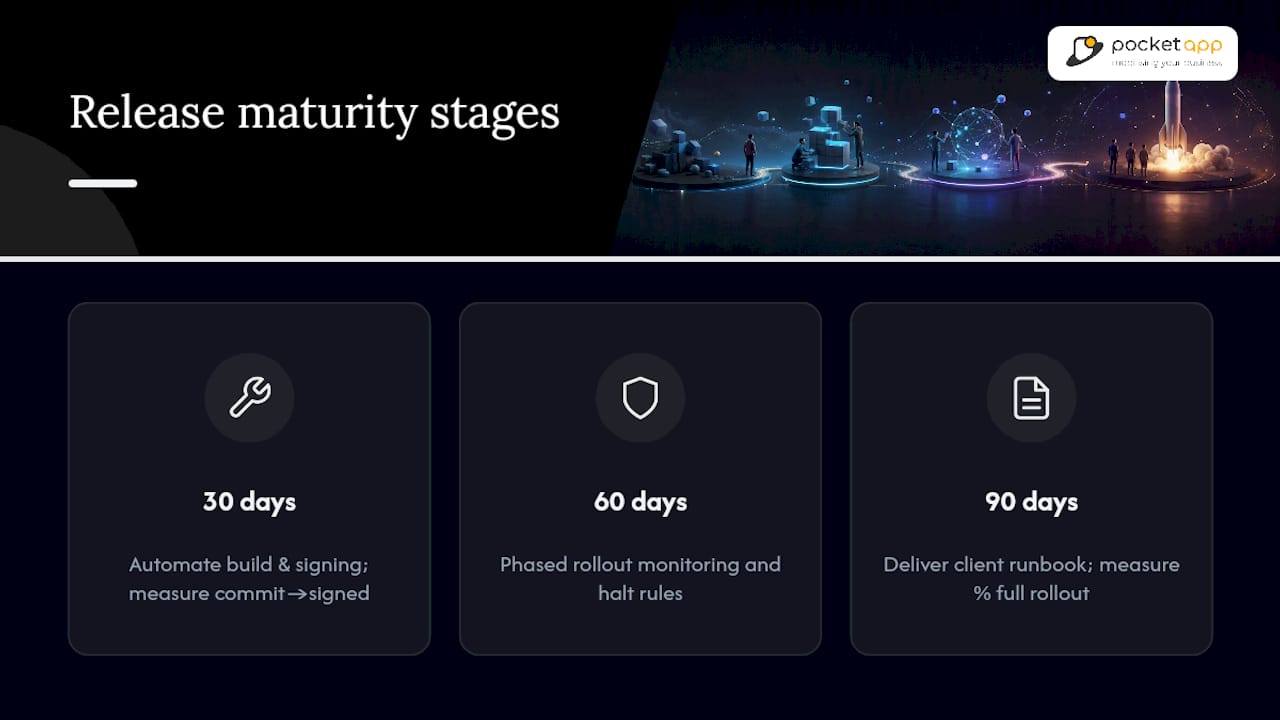
For engagements focused on release maturity, work typically sequences across roughly 30, 60, and 90 days: first automating build and signing, then wiring up phased rollout monitoring and halt rules, then delivering a documented runbook the client's own team owns going forward. Progress gets measured against concrete milestones, such as time from commit to signed artefact, or the percentage of releases that reach full rollout without a manual pause, rather than vague notions of "smoother releases."
What release engineering maturity actually looks like
Most teams overestimate their release maturity because they have never had a release fail badly enough to expose the gaps. A maturity ladder is more useful than a maturity score: at the bottom, releases are manual and nobody owns rollback decisions; in the middle, builds are automated but monitoring is passive; at the top, halts trigger automatically and every decision gets logged for review.
Aim to move up one rung within 90 days, not to reach the top in one sprint. Three starter moves matter more than any tool purchase: automate signing so it stops being a human dependency, instrument crash-free session tracking before your next release rather than after a bad one, and write down who is allowed to pause a rollout before you need the answer under pressure.
The organisational capability to produce policy-compliance evidence alongside engineering artefacts is what separates teams that ship confidently from teams that ship anxiously. Tool choice matters far less than most vendors would like you to believe. A team with a spreadsheet and a disciplined runbook will outperform a team with an expensive platform and no agreed decision ladder.
— Paul
Get hands-on help building your release pipeline
We offer a practical alternative to building release engineering capability from scratch, aiming to reduce the months of trial and error many in-house teams spend getting signing automation and rollout monitoring right the first time.

Where the sections above set out the pipeline, the automation patterns, and the runbook structure, We build that structure directly into client projects: CI/CD pipelines with automated signing, phased rollout monitoring wired to halt rules, and a documented runbook your team owns afterwards. Engagements commonly start with a consultation to map your current release process, proceed with a pilot covering one release cycle, then scale into full delivery once the pattern is proven. If your team is shipping releases manually, or has been burned by a signing failure at the worst possible moment, get in touch through Pocketapp's mobile app development service page to scope what a properly automated pipeline would look like for your app.
Sources
For teams building out their own pipeline documentation, a handful of primary sources cover the ground this guide draws on. The Bitrise guide to mobile release management sets out the seven-stage model referenced throughout this article. The Luciq analysis of release management goes deeper on monitoring practice and signing automation. Microsoft's App Center distribution documentation is a practical reference for beta channels and store connectors. The Shake guide to release management key steps covers the forward-fix nature of mobile rollbacks in more detail than most engineering teams appreciate until they need it.
- What is mobile release management? App release process
- Mobile app release management (Luciq)
- App Center distribution (Microsoft Docs)
- App release management key steps (Shake)
FAQ
What are the seven stages of app development for release management?
The commonly cited pipeline covers planning, code freeze, building artefacts, multi-stage testing, store submission, phased rollout, and post-release monitoring, as outlined by Bitrise.
What are the different types of release management?
Approaches range from fully manual releases with human sign-off at every stage, to hybrid pipelines with automated builds and manual store submission, to fully automated continuous delivery with staged rollout and automatic halt rules.
What is the process of release management?
It is the coordinated sequence of planning a release, freezing code, building and signing artefacts, testing across multiple stages, submitting to app stores, rolling out in phases, and monitoring the result closely enough to pause or halt if metrics degrade.
What are the responsibilities of a release manager?
A release manager owns the release calendar, coordinates code freeze and store submission timing, defines rollout percentages and halt thresholds, and holds the authority to pause or halt a rollout when monitoring signals breach agreed limits.
How long does it take for a new app version to reach most users?
User adoption of a new version typically takes 7 to 30 days to reach the bulk of active users, which is why early rollout data should be read cautiously.