
TL;DR:
- App deployment involves moving a built app from development to production with multiple critical steps.
- Platform-specific review times and staged rollouts are essential for successful mobile app releases.
- Using deployment strategies like Blue-Green and Canary minimizes risks and supports compliance needs.
Most business leaders assume that deploying a mobile app means hitting a publish button and waiting for downloads to roll in. The reality is considerably more demanding. App deployment is a structured, multi-stage process that carries real operational risk, regulatory implications, and direct impact on user experience. Get it wrong and you face costly rollbacks, compliance headaches, or a flood of one-star reviews before you have a chance to respond. This article walks you through what app deployment actually involves, the platform-specific workflows that matter for iOS and Android, the strategies that reduce risk, and the metrics that tell you whether your deployment is performing as it should.
Table of Contents
- Understanding app deployment: definitions and scope
- Mobile app deployment workflows: platforms and key steps
- Deployment strategies: Blue-Green, Canary, Rolling and automation
- Analytics, compliance and edge cases in app deployment
- A practical perspective: deployment mistakes UK businesses should avoid
- Take your app deployment further with expert help
- Frequently asked questions
Key Takeaways
| Point | Details |
|---|---|
| Deployment is strategic | Successful app deployment is more than just release—it's key to operational efficiency and user trust. |
| Choose the right method | Blue-Green, Canary, and Rolling strategies each suit different business and compliance needs. |
| Monitor performance metrics | Tracking DORA metrics ensures your deployment process supports business goals and minimises downtime. |
| Plan for platform differences | Deployment workflows and review times vary between iOS and Android; staged rollouts help mitigate risk. |
| Expert help boosts reliability | Professional deployment support reduces costly errors and ensures compliance for UK business apps. |
Understanding app deployment: definitions and scope
Before you can optimise something, you need to understand what it actually is. App deployment is the process of transferring a software application from development to production environments where end users can access it, involving building, testing, configuring, and releasing the application. That definition sounds straightforward, but the scope is wider than most people expect.
It helps to separate three terms that are often used interchangeably but mean different things:
- App development is the process of writing and building the application itself.
- App deployment is the process of moving that built application into a live environment.
- App release refers specifically to making the app available to users, which is the final step within deployment.
For mobile apps specifically, deployment spans several distinct environments. First, there is the development environment, where code is written and tested by engineers. Then comes staging, a near-identical replica of the production environment used for final quality checks. Finally, the app moves to production, the live environment where real users interact with it.
Understanding this scope matters enormously for business efficiency. Each environment transition is a checkpoint. Skipping or rushing any of them compresses the time available to catch defects, which almost always costs more to fix after launch than before. A bug found in staging costs a fraction of what it costs once thousands of users have encountered it.
The components of a full deployment cycle include:
| Component | Purpose |
|---|---|
| Build | Compile source code into a deployable binary |
| Test | Validate functionality, performance, and security |
| Configure | Set environment variables, permissions, and integrations |
| Release | Push the configured build to the target environment |
If you are still deciding what app types for business suit your needs, that choice directly shapes your deployment complexity. A native iOS app, a cross-platform build, and a progressive web app each follow different deployment paths. For a thorough walkthrough of the build phase itself, the step-by-step app development guide covers what happens before deployment begins. For a broader look at the detailed application deployment process, including infrastructure considerations, it is worth reviewing before you plan your next release.
Pro Tip: Never skip pre-release testing in staging, even under deadline pressure. The average cost of fixing a defect post-launch is four to five times higher than catching it beforehand.
Mobile app deployment workflows: platforms and key steps
With definitions clarified, let's explore the practical workflow for deploying mobile apps step-by-step.
Deploying to iOS and Android involves distinct platform requirements, and underestimating these differences is one of the most common mistakes UK project teams make. Here is a practical breakdown of the core steps for each platform:
- Prepare your build. For iOS, this means generating a signed ".ipa
binary via Xcode. For Android, you produce a signed.aab(Android App Bundle) or.apk` file. - Configure metadata. App name, description, screenshots, age ratings, and privacy disclosures must all be completed before submission.
- Submit for review. Both Apple and Google require apps to pass a review process before going live.
- Manage the release. Once approved, you control when and how the app rolls out to users.
One of the most business-critical facts here is review timing. App store review includes 24-48 hours for Apple, with Google typically faster, and release management using staged rollouts is standard practice. This means your project timeline must account for at least two working days of Apple review time, and potentially longer if your app is rejected and requires resubmission.
"Apple's review process typically takes 24 to 48 hours for standard submissions, though complex apps or those requiring additional scrutiny may take longer."
For a business leader's app guide perspective on planning these timelines into your product roadmap, it is worth reviewing before you commit to a launch date. You should also read up on launching secure apps to ensure your submission meets both store and regulatory requirements from day one.
| Factor | iOS (Apple App Store) | Android (Google Play) |
|---|---|---|
| Build format | .ipa | .aab / .apk |
| Review time | 24-48 hours | A few hours |
| Staged rollout | Available (phased release) | Available (percentage rollout) |
| Rejection rate | Higher scrutiny | Generally faster approval |
Staged rollouts deserve particular attention. Rather than releasing to 100% of users immediately, both platforms allow you to push to an initial subset, typically 5-15% of your user base. This gives your team time to monitor crash rates and performance before the full audience is exposed.
Deployment strategies: Blue-Green, Canary, Rolling and automation
Having covered platform processes, let's turn to the deployment strategies that shape your operational performance.
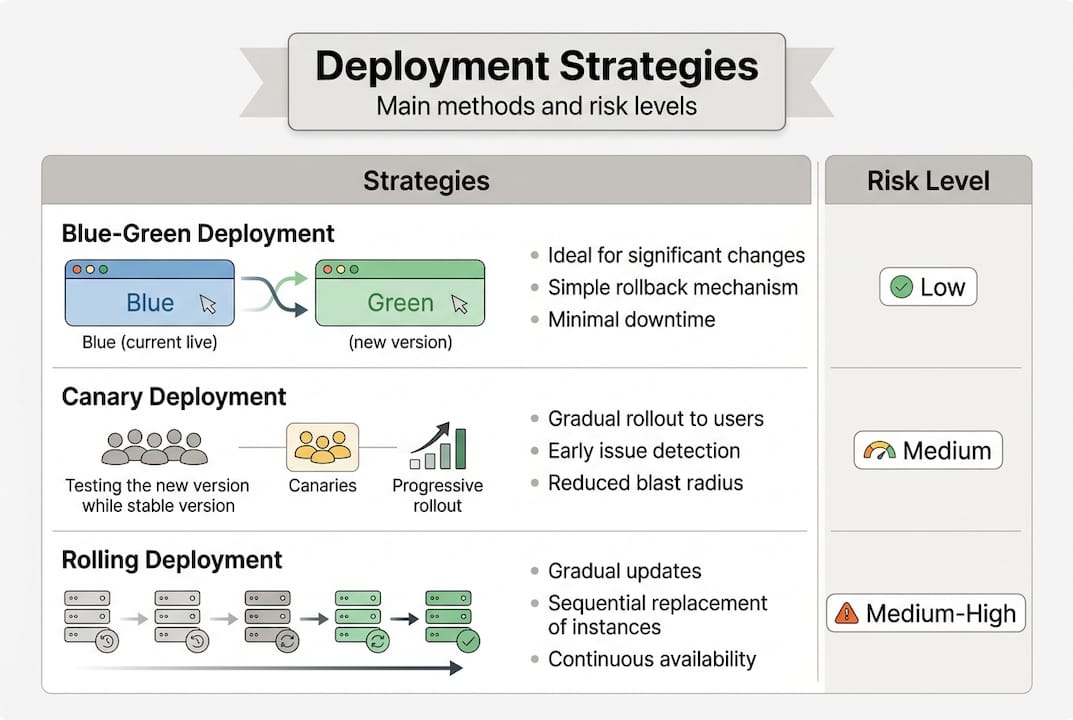
Choosing the right deployment strategy is not a purely technical decision. It has direct implications for business continuity, infrastructure cost, and your ability to recover quickly when something goes wrong. The three main strategies used by UK enterprises are Blue-Green, Canary, and Rolling.
Key deployment methodologies include Blue-Green (two identical environments with instant rollback via traffic switch), Canary (incremental rollout to a subset of users, from 2% to 100%), and Rolling (sequential instance replacement), all underpinned by CI/CD pipelines for automation.
Here is how they compare:
| Strategy | Rollback speed | Infrastructure cost | Risk level |
|---|---|---|---|
| Blue-Green | Instant | High (double infrastructure) | Low |
| Canary | Fast | Low to medium | Very low |
| Rolling | Moderate | Low | Medium |
Blue-Green works by maintaining two identical production environments. At any point, only one is live. When you deploy a new version, you switch traffic to the updated environment. If something fails, you switch back instantly. The trade-off is cost: you are running double the infrastructure.

Canary releases are ideal when you want to test a major feature update with a small percentage of real users before committing fully. If error rates spike in that initial cohort, you halt the rollout before it affects the wider audience.
Rolling deployments replace instances gradually, one at a time. This is cost-efficient but means both old and new versions run simultaneously during the transition, which can cause compatibility issues if not managed carefully.
For teams building cross-platform apps, choosing the right strategy becomes even more important, since a single codebase may deploy across iOS, Android, and web simultaneously. Solid business app development tips will reinforce the importance of automating these pipelines from the outset.
Pro Tip: Use Canary releases for major feature launches. Limiting initial exposure to 5-10% of users gives you real-world signal without putting your entire user base at risk.
Analytics, compliance and edge cases in app deployment
Effective strategy is incomplete without measurement and awareness of special cases. Here is how analytics and compliance fit in.
Once your deployment strategy is in place, you need a way to measure whether it is working. The industry standard framework is DORA metrics, which stands for DevOps Research and Assessment. These four metrics give you a clear picture of deployment health:
| DORA metric | Elite benchmark | Enterprise median |
|---|---|---|
| Deployment frequency | More than once per day | 2-4 times per month |
| Lead time for changes | Less than 1 day | 1-4 weeks |
| Change failure rate | 0-15% | Up to 30% |
| MTTR (mean time to restore) | Less than 1 hour | Up to 1 week |
DORA metrics benchmark elite performance at deployment frequency above once per day, lead time under one day, change failure rate between 0-15%, and MTTR under one hour, with enterprise teams often operating at 2-4 deployments per month. Tracking these benchmarks against your own team's performance reveals where your deployment pipeline is creating bottlenecks.
For a deeper look at engineering metrics and how to interpret them in a business context, it is worth reviewing the available frameworks before setting internal targets.
Compliance is a separate but equally important consideration. Regulated industries such as fintech and healthcare prefer Blue-Green deployment for compliance, and database schema migrations require backward compatibility to avoid data integrity issues. For UK businesses operating under GDPR or FCA regulations, deployment processes must include audit trails, data handling checks, and rollback procedures that satisfy regulatory requirements.
Steps to ensure compatibility during deployment:
- Run database migration scripts in a backward-compatible mode before switching traffic.
- Validate API version compatibility between the new app build and existing backend services.
- Test third-party integrations (payment gateways, identity providers) in staging before production release.
- Document all environment configuration changes for audit purposes.
- Confirm rollback procedures are tested and ready before go-live.
For UK businesses in regulated sectors, mobile app security practices should be embedded into every deployment stage, not treated as a final checklist item. Practical application development tips also reinforce the importance of building compliance into your process from the start.
A practical perspective: deployment mistakes UK businesses should avoid
All these approaches come alive in practice, and the lessons from real UK deployment projects are often more instructive than any framework.
The most consistent mistake we see is underestimating app store review timelines. A business commits to a marketing campaign with a fixed launch date, then discovers their iOS submission has been rejected for a minor metadata issue. The review clock resets. The campaign launches without the app. That is an entirely avoidable situation, and it happens repeatedly because teams treat review time as a formality rather than a genuine variable in their project plan.
The second most common error is skipping staged rollouts under pressure to "just go live." Releasing to 100% of users immediately removes your safety net. A performance issue that affects 5% of users in a staged rollout becomes a reputational crisis when it hits everyone at once.
UK-specific pressures add further complexity. GDPR compliance requirements mean that data handling changes within an app update must be reviewed carefully before deployment. Regulated sectors face additional scrutiny. These are not obstacles; they are reasons to build more rigour into your process from the outset.
Starting with effective app discovery before a single line of code is written means your deployment plan accounts for compliance, platform requirements, and rollout strategy from day one.
Pro Tip: Prioritise monitoring in the first 48 hours post-launch. Set up automated alerts for crash rates and API failures so your team can trigger a rollback before users begin leaving negative reviews.
Take your app deployment further with expert help
If efficient deployment matters to your business, here is how expert support can make the difference.
Deployment is where strategy meets execution, and the gap between a smooth launch and a costly rollback often comes down to experience. At Pocket App, we have delivered over 300 mobile projects across retail, healthcare, charity, and B2B sectors, and deployment rigour is built into every engagement.

Whether you need support with mobile app development services from discovery through to production, or you are looking for a partner who understands the nuances of app deployment for UK business, including compliance, cross-platform strategy, and post-launch monitoring, we are ready to help. Get in touch to discuss your next deployment with a team that has done it before.
Frequently asked questions
What is app deployment in a business context?
App deployment means moving a software application from development into a production environment where end users can access it, incorporating building, testing, configuring, and releasing steps.
How long does app store review take for iOS and Android?
iOS reviews typically take 24-48 hours, while Android reviews are generally faster, often completed within a few hours, though rejection and resubmission can extend timelines significantly.
What deployment strategy is best for regulated industries?
Blue-Green deployment is the preferred choice for regulated sectors such as fintech and healthcare, because it enables instant rollback and supports audit and compliance requirements.
What metrics help measure deployment performance?
DORA metrics, including deployment frequency, lead time for changes, change failure rate, and mean time to restore, provide a reliable framework for assessing how effectively your deployment pipeline is performing.