
Run a phased checklist that moves through pre-launch validation, store preparation, QA and release gating, coordinated launch week, and structured post-launch monitoring. The highest-impact tasks to lock down now are analytics instrumentation, a proper beta test with crash monitoring, finished store assets, and a stacked launch channel plan. Treat launch day as the start of a 60-day runway, not a finish line.
TL;DR:
- Proper analytics setup and crash monitoring should be completed at least 15 days before submission to accurately measure user behavior and detect critical issues early.
- Store assets like screenshots, localized copy, and privacy forms need to be prepared several weeks in advance, with metadata drafts ready before the final code freeze to prevent delays.
- Beta testing should run for multiple weeks with diverse device coverage, employing clear exit criteria such as crash-free sessions and retention benchmarks before the release gate.
- Launch coordination across all channels must be tightly timed within a 48 to 72-hour window to maximize organic momentum and unified messaging.
- Post-launch monitoring of retention, crash rates, and feedback should be intensive during the first 60 days to inform updates, refine messaging, and sustain growth.
Table of Contents
- Pre-launch essentials: validation, analytics and the legal groundwork
- What store listing assets need to be ready before submission?
- How much beta testing do you need before release?
- How do you coordinate launch across multiple channels?
- What should the launch-day timeline actually look like?
- Post-launch monitoring: what to track in the first 30 to 60 days
- The one-page checklist you can print and share
- Pocket App's launch runbook: what we've learned across 300+ projects
- Backup and recovery planning
- Localisation and internationalisation considerations
- Marketing and user acquisition strategy beyond launch week
- Customer support setup and FAQ preparation
- Server and infrastructure readiness
- Three rules I keep coming back to
- How Pocket App gets you from checklist to launch
- Sources
- FAQ
Pre-launch essentials: validation, analytics and the legal groundwork
Most launch failures trace back to work skipped in the six weeks before submission, not a bad launch day. The teams who land well have already validated demand, wired up their measurement stack, and cleared their legal paperwork before they touch App Store Connect.
Start with your value proposition, not your feature list. Write a single sentence describing what your app does and who it's for, then test that sentence on ten to fifteen people who match your target user. If you have to explain it twice, it's not ready. This sounds basic, but industry playbooks consistently flag vague positioning as the reason early waitlists convert poorly once the app actually ships.
A landing page with a waitlist does two jobs at once: it validates demand and it builds your first cohort of engaged testers. Track visitor-to-signup conversion from day one. A low conversion rate usually means your messaging or your audience targeting needs work before you spend money on paid acquisition later.
Here's the sequence worth following in the six weeks before submission:
- Days −45 to −31: finalise your value proposition, launch the landing page, and start collecting waitlist signups with a referral incentive.
- Days −30 to −15: instrument analytics (events, funnels, attribution) inside the build itself, before any external tester touches it.
- Days −14 to −7: finalise your privacy policy and terms of service, and map every third-party SDK against your store privacy declarations.
- Days −7 to −1: freeze new features, run final QA passes, and confirm your analytics events are firing correctly in a release build.
Analytics deserve their own line item because they're the thing teams retrofit too late. If you wait until after launch to add event tracking, you lose the ability to measure what actually drove your first users to convert or churn. Set up funnels for signup, onboarding completion, and your core action before a single beta tester installs the app, and pair that with a mobile app analytics strategy that ties events to retention cohorts rather than vanity totals.
Legal groundwork is unglamorous, but the App Store's most common first-submission rejections come from privacy declarations that don't match actual SDK behaviour. If your app uses a third-party analytics or advertising kit that collects device identifiers, your Apple privacy nutrition label or Google Data Safety form needs to say so explicitly. Reviewers check this against the binary, not against your intentions. It's worth running a full four-point pre-launch security check alongside this, covering data handling, encryption, and third-party access before you touch the submission form.
Pro Tip: Run a trademark search on your app name and icon before you commit to final branding. A quick check against a registry such as the UK Intellectual Property Office's search tool can save you a rebrand three weeks before launch.
What store listing assets need to be ready before submission?
Your App Store and Play Store listings are marketing documents that also happen to be technical submission requirements, and treating them as an afterthought is one of the most common causes of delay. Build these assets in parallel with development, not after the code freezes.
Start populating App Store Connect and Google Play Console entries several weeks before you plan to submit. Both platforms let you save drafts, so there's no reason to leave metadata until the night before.
The core assets to finish:
- Platform-specific screenshots and hero images sized to exact device specifications for each store (iOS and Android have different requirements per device class).
- App title, subtitle, and keyword field for iOS; title and short/long description for Google Play.
- Localised copy for every market you plan to launch in at day zero, not added later.
- Completed App Privacy (iOS) and Data Safety (Android) forms that match your actual SDK behaviour, not a generic template.
- At least two creative variants of your icon or first screenshot, ready for A/B testing once you have traffic.
- Feature-request copy, in case your app qualifies for editorial placement.
A 2026 launch playbook from Screenhance recommends producing a considerable number of visual assets across both stores before submission, covering screenshots, preview videos, and promotional graphics sized for each surface. This accounts for localisation variants and A/B test versions that increase the total assets needed.
The privacy form is worth flagging twice, because store rejection frequently stems from mismatched privacy declarations and SDK usage. If your app added a crash reporting SDK three days before submission and nobody updated the privacy form, that's a rejection waiting to happen. Map every SDK to its data collection behaviour before you fill in the form, not after.
Getting the listing itself right pays off long after launch week. A well-structured app store listing optimisation approach treats your metadata as a living asset you refine with real conversion data, not a one-time submission task.
How much beta testing do you need before release?
Run your beta long enough to surface critical path failures, not just enough to tick a box. A TestFlight or closed Play Store track with a sufficient number of testers over a couple of weeks gives you enough real-device coverage to catch the failures that matter, such as broken payment flows, onboarding drop-offs, and crashes on specific device models your simulator never tested.
Your release gate should be built around measurable exit criteria, not a gut feeling that things seem fine. Here's a working sequence:
- Recruit beta testers across a spread of device types and OS versions, prioritising the oldest supported devices where bugs cluster.
- Test every critical path manually on physical devices: signup, payment, core onboarding, and your primary user action.
- Wire up crash reporting and a live dashboard before the beta opens, not after the first crash report arrives.
- Set a defined crash-free session threshold (many teams use 99% or higher) as a hard gate, not a target to aspire to.
- Track beta-to-activation conversion and D1 retention as leading indicators of whether the wider audience will behave the same way.
- Document a rollback procedure and staff an on-call rota covering the first 72 hours after release.
ASOhack's 90-day playbook lays out concrete soft-launch exit criteria, including retention benchmarks and install-to-paid conversion thresholds, that teams can adapt as their own go/no-go rules rather than inventing metrics from scratch. Treating the release gate as objective evidence, not a wish list, is what actually reduces reputational risk once real users arrive.
Pro Tip: Write your rollback plan before you need it. A one-page runbook that says exactly who pulls the release, how, and who they notify, saves precious minutes when a critical bug surfaces two hours after launch.
How do you coordinate launch across multiple channels?
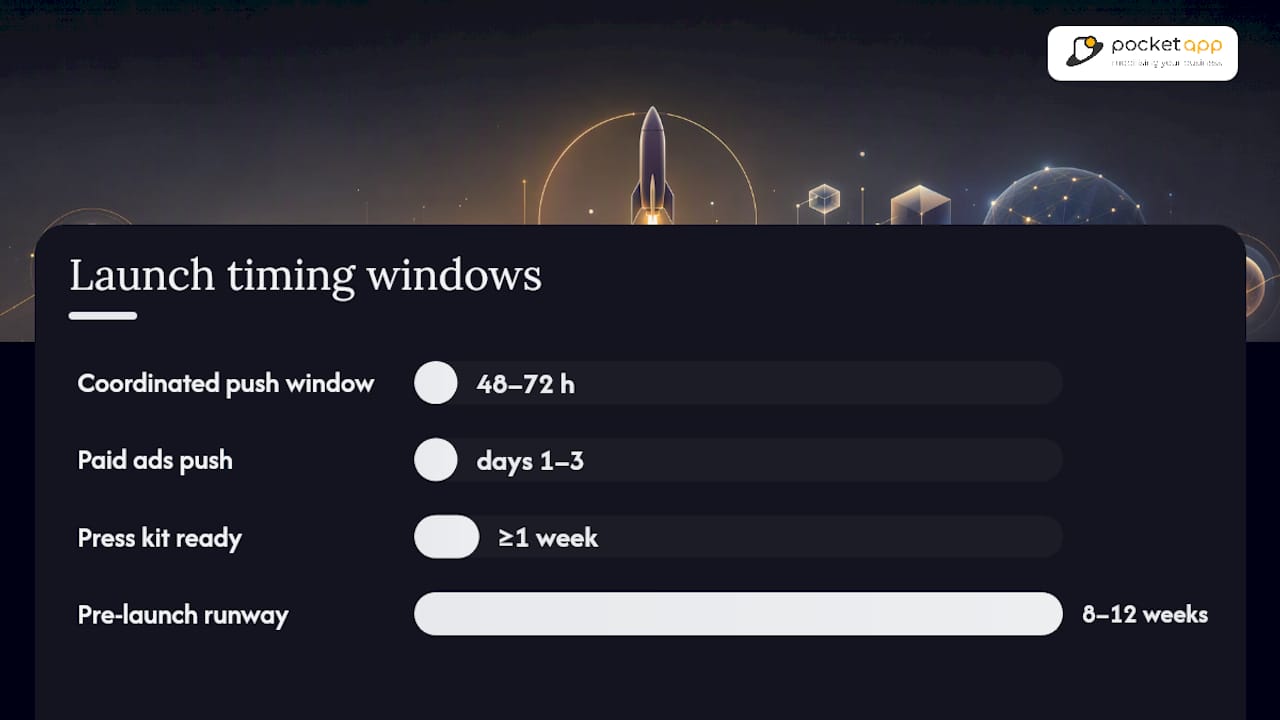
The apps that generate real launch-week noise treat every channel as one coordinated push rather than a scattered series of separate announcements. Your waitlist email, Product Hunt submission, social posts, influencer content, paid ads, and press outreach should all land inside a tight 48 to 72 hour window, each one reinforcing the others.
Screenhance's framework treats Product Hunt, the App Store, the Play Store, and social channels as coordinated surfaces that each need their own bespoke assets, sequenced into a single narrative rather than fired off independently. A screenshot that works on Product Hunt rarely works as an Instagram Story, and copy written for a press pitch reads oddly as a tweet.
Practical steps for the week itself:
- Email your waitlist first, with early access or a referral perk, so your first cohort of engaged users is already active before public channels go live.
- Schedule your Product Hunt submission for early morning in US Pacific time, since that's when the platform's voting activity peaks.
- Front-load paid ad budget into days one through three, when organic momentum is highest and your cost-per-install is likely lowest.
- Brief every influencer with a specific, singular call to action rather than a vague "check this out" ask.
- Prepare a press kit (screenshots, founder quote, one-paragraph pitch) at least a week ahead so journalists aren't waiting on assets.
- Build a small library of user-generated content templates before launch, so early testers have something easy to share.
TheViralApp's research points to an 8 to 12 week pre-launch runway as the sweet spot for building both a sizeable waitlist and a bank of shareable UGC, rather than trying to generate both from scratch in launch week itself.
What should the launch-day timeline actually look like?
The night before launch, run a full verification pass: confirm your scheduled release time in both stores, check that analytics events fire in the live build, and verify your support inbox and on-call rota are staffed for the next 24 hours.
Here's a workable hour-by-hour structure once launch day arrives:
- Early morning: confirm the app is live in both stores, submit to Product Hunt if that's part of your plan, and send your waitlist email.
- Mid-morning: post across social channels, stagger influencer content to avoid a single burst that fades fast, and monitor crash dashboards continuously.
- Midday: triage incoming support queries by pattern, not by order received, so you can spot a genuine bug versus a one-off complaint.
- Afternoon: brief the team on any recurring issues, decide whether a hotfix is needed, and hold paid ad spend steady rather than increasing it mid-crisis.
- Evening: review the day's numbers against your pre-set targets, and draft your day+1 update covering thanks, headline numbers, and any fixes shipped.
Avoid shipping feature changes on launch day itself. It's tempting to patch something small, but any change on day zero makes it harder to isolate what caused a spike in crashes or a drop in conversion. Avoid launching on a Friday too. Kickstart's playbook notes that a strict feature freeze before release combined with a mid-week launch gives your team a full working week to respond to issues before the weekend support gap.
Post-launch monitoring: what to track in the first 30 to 60 days
Launch week generates a spike. What happens over the following 30 to 60 days determines whether that spike becomes a real user base. Retention is the number that matters most, and it needs to be tracked at three distinct points.
Track D1, D7, and D30 retention alongside crash rate and your core conversion funnel every single day for the first month. A launch that looks successful on day one but shows D7 retention below 20% is telling you something the download count won't.
Feedback needs a structure too, or it becomes noise. Log every support ticket, app store review, and social mention in one place, then triage by pattern rather than reacting to the loudest single complaint. If three users mention the same onboarding confusion, that's a signal. One angry review about a feature you deliberately left out probably isn't.
- Ship a fast 1.0.1 patch for anything critical within the first 72 hours, even if it's a small fix.
- Set a recurring update cadence of every two to four weeks rather than going quiet after the initial patch.
- Refresh your store screenshots and description based on which messaging is actually converting, not your original launch guesses.
- Revisit paid acquisition spend only once you have enough retention data to know your real cost-per-retained-user.
- Pitch editorial features and follow-up press once you have genuine traction numbers to share, not just launch-day excitement.
| Metric | Check-in point | What it tells you |
|---|---|---|
| D1 retention | Day 1 after install | Whether onboarding actually works |
| D7 retention | Day 7 after install | Whether the app delivers on its core promise |
| D30 retention | Day 30 after install | Whether you have a sustainable user base |
| Crash-free sessions | Ongoing | Technical stability under real-world load |
| Conversion funnel | Weekly | Where users drop off between signup and core action |
Longer term, the apps that keep growing are the ones that turn their launch into content. A short post about what actually happened during launch week, including the mistakes, tends to earn more organic interest from other founders and press than a generic feature announcement ever will.
The one-page checklist you can print and share
Keep a condensed version pinned somewhere your whole team can see it. Pre-launch covers value proposition testing, landing page and waitlist, analytics instrumentation, and privacy/legal sign-off. Store prep covers screenshots, metadata, localisation, and privacy form accuracy. QA covers beta recruitment, critical path testing, crash dashboards, and defined exit criteria. Launch covers the channel stack, hour-by-hour timeline, and support staffing. Post-launch covers D1/D7/D30 retention, feedback triage, and your first patch cadence.
| Phase | Owner | Timing |
|---|---|---|
| Pre-launch validation | Product/founder | Days −45 to −15 |
| Store prep and ASO | Design/marketing | Days −30 to −7 |
| QA and release gate | Engineering/QA | Days −7 to −1 |
| Launch week | Whole team | Days 1 to 3 |
| Post-launch iteration | Product/engineering | Days +1 to +60 |
Pocket App's launch runbook: what we've learned across 300+ projects
Pocket App has taken apps through this exact sequence for clients across retail, charity, and healthcare, including organisations like WWF and Dechra. Our app launch strategy playbook expands on the discovery-workshop model referenced throughout this checklist, with templates your team can adapt directly. If you'd rather have a discovery workshop map this against your own build, that's a conversation worth having early.
Backup and recovery planning
A launch-day outage without a recovery plan turns a fixable bug into a trust problem. Before submission, confirm your database has automated, tested backups running on a schedule that matches how much data loss you could tolerate, typically measured in minutes for transactional apps and hours for content-heavy ones.
Test your restore process before launch, not during an incident. A backup nobody has restored from is a theory, not a safety net. Run at least one full restore drill in a staging environment and time how long it takes, because that duration is what you'll be quoting to users and stakeholders if something goes wrong.
Define your rollback path for the app binary itself, separate from your database recovery plan. If a release introduces a critical bug, you need a documented way to revert to the previous build quickly, whether that's a staged rollout you can halt or a fast-tracked expedited review request to the store. Both Apple and Google support phased rollouts that let you pause distribution to a wider audience if early metrics look wrong, which is worth configuring before launch day rather than discovering it exists mid-crisis.
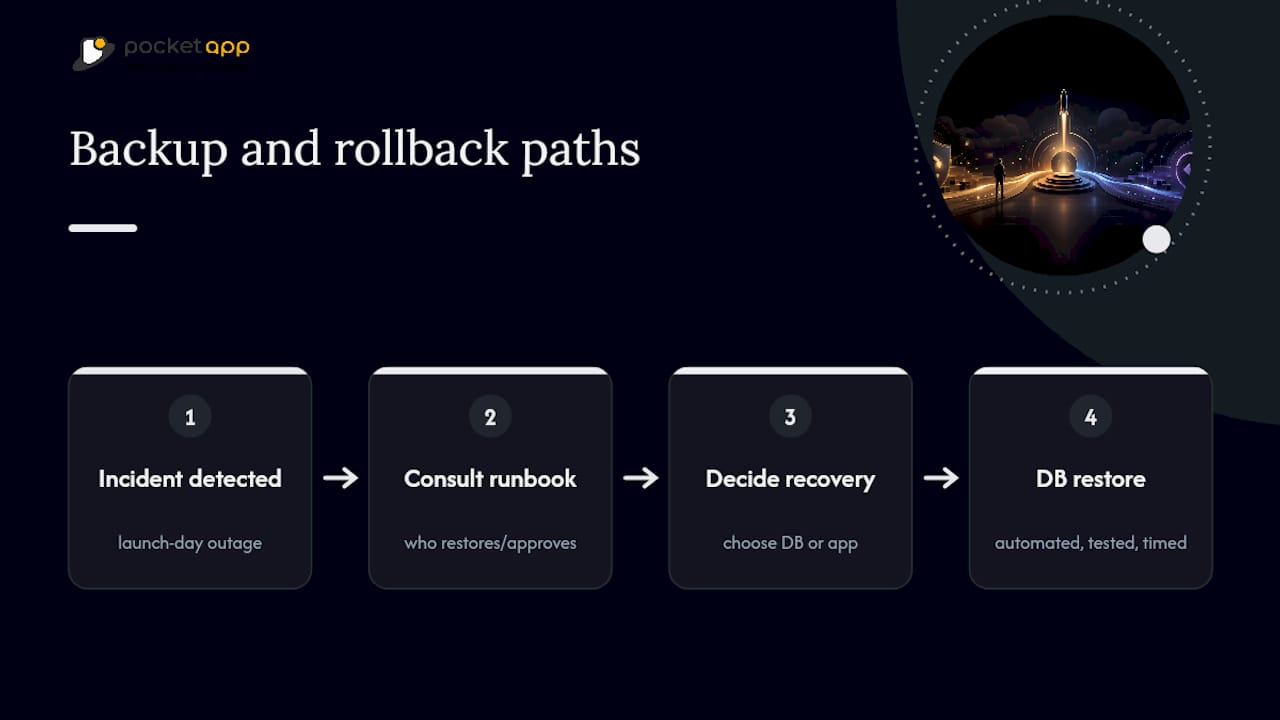
Keep a single document listing who has access to backups, who can trigger a restore, and who approves a rollback decision. During an actual incident is the worst time to be figuring out who holds the credentials.
Localisation and internationalisation considerations
Deciding which markets to launch in at day zero shapes several technical decisions you can't easily retrofit later. If international expansion is even a possibility within the first year, build your app with localisation infrastructure from the start, externalised strings, locale-aware date and currency formatting, rather than hardcoding English copy throughout.
Translation quality matters more than translation coverage. A store listing translated by a native speaker who understands your app's tone will outperform five markets covered by machine translation with no review. Prioritise the two or three markets where you have genuine evidence of demand, whether that's waitlist signups or App Store search data, rather than translating into every language your budget allows.
Legal and cultural review needs its own line item too. Privacy requirements vary meaningfully between markets, and a privacy policy written for one jurisdiction won't automatically satisfy another's disclosure requirements. Payment methods differ by region as well. An app that only supports card payments will underperform in markets where mobile wallets or local payment rails dominate.
Test your localised builds on real devices set to each target locale before submission, checking that layout doesn't break with longer translated strings and that right-to-left languages, if relevant, render correctly. This is a common source of last-minute rejections that's entirely avoidable with a proper QA pass.
Marketing and user acquisition strategy beyond launch week
Launch week generates attention. What happens in the following months determines whether your app builds a sustainable user base or fades once the initial spike passes. Treat launch week as the opening move in a longer acquisition strategy, not the whole strategy.
Once you have retention data from your first cohort, use it to decide where paid acquisition actually makes sense. Spending on ads before you know your retention curve means you're buying users you can't yet judge the value of. A channel that produced cheap installs during launch week might produce expensive, low-retention users once the initial hype-driven audience is gone.
Organic and referral growth deserve ongoing investment too, not just a one-off referral incentive at launch. If your app has a natural sharing mechanic, whether that's inviting collaborators or sharing results, build that into your product roadmap as a growth lever rather than treating growth purely as a marketing budget line.
Content built around your launch story, lessons learned, and product decisions tends to compound in ways paid ads don't. It earns backlinks, gets picked up by newsletters, and gives you material for ongoing press outreach long after your initial announcement has been forgotten. Revisit your ASO regularly too. Store algorithms reward apps with consistent update cadence and improving conversion rates, not just a strong debut.
Customer support setup and FAQ preparation
Support volume spikes hardest in the first 48 hours after launch, exactly when your team is also monitoring crash dashboards and triaging bugs. Set up your support channel, whether that's an in-app widget, email, or a help centre, before launch day, not as a reaction to the first wave of tickets.
Write your FAQ before launch by anticipating the questions your beta testers actually asked. Common onboarding confusion, subscription or payment queries, and account recovery questions make up the bulk of early support volume for most apps. A well-written FAQ page deflects a meaningful share of tickets before they ever reach a human.
Assign clear ownership for support during launch week specifically. If your team is small, decide in advance who monitors the support inbox during which hours, so coverage doesn't quietly lapse overnight when volume is still high in a different time zone. Set a response time target you can actually meet. A promise of "we respond within an hour" that you can't sustain past day two damages trust faster than a longer but honest response window.
Tag every support interaction by category as it comes in. This feeds directly into your post-launch feedback triage, letting you see whether a spike in tickets reflects a genuine bug pattern or an isolated misunderstanding worth a clearer help article rather than an engineering fix.
Server and infrastructure readiness
Nothing undermines a launch faster than an app that works perfectly in testing and buckles under real traffic. Load testing before launch isn't optional if you're expecting any meaningful spike, and even a modest Product Hunt feature can send far more concurrent traffic than your beta ever simulated.
Run load tests that simulate your expected peak, then double it. Launch traffic is unpredictable, and a viral social post or unexpected press pickup can multiply your projected numbers within hours. Test not just your API's response time under load but its behaviour at the point of failure. Does it degrade gracefully, or does it fall over entirely and take dependent services with it?
Confirm your infrastructure can scale automatically, whether that's serverless architecture that expands with demand or a manually configured auto-scaling group with sensible thresholds set in advance. Manually scaling servers during a live traffic spike is a stressful, error-prone way to spend launch day.
Check your third-party dependencies too. If your app relies on a payment processor, a push notification service, or an external API, confirm their status pages and rate limits, because your own infrastructure being solid doesn't help if a dependency buckles under your combined launch traffic. Document your uptime target and monitoring thresholds before launch, so you have a clear, agreed definition of what counts as an incident versus normal fluctuation.
Three rules I keep coming back to
Release gates only work if you actually enforce them. A team that defines crash-free thresholds and then launches anyway because the date is fixed has written a checklist for decoration, not decision-making.
Prepare your communications before you need them. The teams that handle a rough launch day well aren't the ones with no bugs. They're the ones with a support response and a day+1 update already drafted, so they're not writing under pressure.
Move fast on the first real fix, even if it's small. One app I've seen discussed in launch retrospectives shipped a patch within six hours of spotting a payment bug, and the goodwill from that speed outlasted the bug itself.
— Paul
How Pocket App gets you from checklist to launch
Running this checklist alongside a full-time build is where most small teams lose weeks they don't have. Pocket App runs discovery workshops that map your launch plan against a real delivery schedule, then carries the build through development, store submission, and post-launch support so your team isn't juggling QA, ASO, and infrastructure readiness alone.

Our discovery process starts with the same phased structure covered here: pre-launch validation, store asset production, release gating, and a coordinated launch week, but with a team that's done it across more than 300 projects in retail, charity, and healthcare. If you're weighing up whether to build this in-house or bring in support, book a discovery call and see what mobile app development delivery looks like against your actual timeline.
Sources
- App Launch Checklist (2026) — Publish to App Store & Google Play | Newly
- How to Launch an App in 2026: Step-by-Step Checklist
- The ultimate indie iOS app launch checklist - Kickstart Blog
- App Launch Strategy 2026: 30-60-90 Day Playbook That Works
FAQ
What is required to launch an app?
You need a tested build that passes store review guidelines, complete store listing assets and metadata, a privacy policy matching your actual data collection, analytics instrumentation, and a beta test confirming your critical paths work on real devices.
What are the main phases of a product launch checklist?
Rather than a fixed count of steps, most working checklists group into five phases: pre-launch validation, store and ASO preparation, testing and release gating, coordinated launch week, and post-launch monitoring, each with its own tasks and exit criteria.
What is the best app to create a checklist?
Standard project tools such as Notion, Trello, or a shared spreadsheet work well for tracking a launch checklist, since the value is in the phased structure and ownership columns rather than any specific software feature.
What are the stages of app development that lead into launch?
Development typically moves through discovery and planning, UX/UI design, prototyping, build and iteration, QA and testing, deployment, and post-launch support, a sequence Pocket App structures around discovery workshops and agile build cycles for exactly this reason.
How long before launch should I start preparing?
Most playbooks recommend a 45 to 90 day runway, with foundational work like value proposition testing and analytics setup starting 45 days out and audience building extending to 8 to 12 weeks for larger launches.