
TL;DR:
- The 2026 mobile app deployment process demands meticulous planning to meet stricter platform requirements, avoid delays, and ensure compliance.
- Implementing a comprehensive checklist, automated CI/CD pipelines with platform-specific stages, and active post-release monitoring are essential to reduce risks.
The app deployment process in 2026 is the sequence of steps that takes your mobile application from a verified build through code signing, store submission, and controlled release to end users on Apple's App Store and Google Play. Getting this sequence right is not optional. Platform requirements have tightened, review timelines carry real commercial risk, and the cost of a botched release, measured in crash rates, negative reviews, and emergency hotfixes, far exceeds the cost of preparation. Tools like Bitrise and CI/CD pipelines built around mobile-specific constraints now define what a professional release cycle looks like, and this guide covers every stage in practical terms.
What are the 2026 app store requirements affecting deployment?
App store compliance is the first hard constraint in any app deployment strategy. Both Apple and Google have updated their mandates for 2026, and non-compliance blocks publication entirely.
Google Play blocks submissions that do not target Android 16 (API level 36) for new apps and updates in 2026. This means any app still targeting API 34 or below will be rejected at the point of submission, not during review. The practical implication is that your build pipeline must validate the target SDK version before the binary even reaches the Play Console.
Apple's review process carries a different kind of risk. App Store reviews typically take 24 to 48 hours, but delays compound quickly during peak periods such as the weeks surrounding major iOS releases or the holiday season. A rejection restarts the review cycle entirely, which can cost you several days on a time-sensitive launch.
The most common causes of avoidable delays are:
- Incomplete or inconsistent metadata (app description, keywords, screenshots not matching the binary)
- Privacy policy URLs that return 404 errors at submission time
- Missing or outdated demo account credentials for apps with gated content
- Mismatched entitlements between the provisioning profile and the app binary
Pro Tip: Submitting an In-App Event one to two hours before your app binary reaches App Store Connect can route your submission into a faster reviewer pipeline, meaningfully reducing wait time on time-sensitive releases.
Treat submission timing as a scheduling decision. Submitting on a Tuesday or Wednesday morning, outside of major Apple event windows, consistently produces faster turnaround than Friday afternoon submissions that sit over the weekend.
What should your app deployment checklist include?
A production deployment checklist is the difference between a controlled release and a reactive one. The following sequence reflects best practice for production deployments and applies to both iOS and Android releases.
- Validate environment variables at build time. A missing API key or misconfigured endpoint that surfaces at runtime will crash the app for all users simultaneously.
- Run database migrations before deploying code. The new code must be compatible with the existing schema during the transition window.
- Enable feature flags to ship new functionality in a disabled state. This decouples your code release from your feature release.
- Configure error monitoring (tools like Sentry or Datadog) before go-live, not after the first crash report arrives.
- Establish health checks on critical endpoints so your monitoring system can detect degradation within minutes of release.
- Apply rate limiting on authentication endpoints to reduce exposure during the high-traffic window immediately after launch.
- Prepare a documented rollback plan before you submit, not during an incident.
- Run smoke tests on the critical user flow immediately after the build is live in production.
Pro Tip: Store your deployment checklist as a version-controlled document in the same repository as your application code. This way, every release references the checklist version that matches the codebase, and no step is silently skipped under deadline pressure.
The table below maps each checklist stage to its primary risk and the recommended tooling:
| Checklist stage | Risk mitigated | Recommended tooling |
|---|---|---|
| Environment variable validation | Runtime crashes from missing config | Doppler, AWS Secrets Manager |
| Database migration before deploy | Schema incompatibility breaking live app | Flyway, Liquibase |
| Feature flags enabled | Uncontrolled feature exposure | LaunchDarkly, Unleash |
| Error monitoring configured | Delayed incident detection | Sentry, Datadog |
| Rollback plan documented | Extended downtime during incidents | Fastlane rollback scripts |
Securing your app before launch also means validating that rate limiting and authentication controls are in place before any public release, not treated as post-launch hardening.
What is mobile CI/CD and why does it matter in 2026?
Mobile CI/CD is not simply web CI/CD applied to a different codebase. Mobile pipelines require mandatory stages that have no equivalent in web deployment: code signing, platform-specific build environments, real-device test execution, and store submission gates that can add 24 to 48 hours to the pipeline duration. Each of these stages must be handled explicitly or the pipeline will fail in production even when it passes locally.

The comparison below illustrates where mobile and web CI/CD diverge most significantly:
| Pipeline stage | Web CI/CD | Mobile CI/CD |
|---|---|---|
| Build environment | Any Linux container | iOS requires macOS and Xcode; Android requires SDK and Gradle |
| Code signing | TLS certificate management | iOS provisioning profiles and certificates; Android keystore files |
| Testing | Browser-based or headless | Real-device testing via services like BrowserStack or Firebase Test Lab |
| Distribution | Direct server deploy | TestFlight (iOS) or Google Play test tracks (Android) |
| Release gate | Immediate or scheduled | App store review adds 24 to 48 hours minimum |
Automated signing credentials stored centrally in the CI environment prevent credential drift, which is one of the most common causes of build failures in mobile teams. When a developer rotates a certificate locally and does not update the CI environment, every subsequent pipeline run fails until someone diagnoses the mismatch. Centralising credentials in a tool like Bitrise or through Fastlane's Match removes this failure mode entirely.
Key considerations for your mobile CI/CD pipeline:
- Use macOS build agents for iOS and Linux agents for Android to avoid cross-platform build failures
- Run UI tests on real devices rather than emulators for accurate gesture and performance results
- Automate distribution to TestFlight and Google Play internal tracks as part of every successful build
- Treat the store review window as a pipeline stage with its own SLA, not an afterthought
Pro Tip: Cross-platform teams should build and test Android in parallel with iOS from the earliest sprint, not as a secondary pass after iOS is complete. Platform-specific compatibility issues discovered late in the cycle are significantly more expensive to resolve.
What deployment strategies reduce risk at launch?
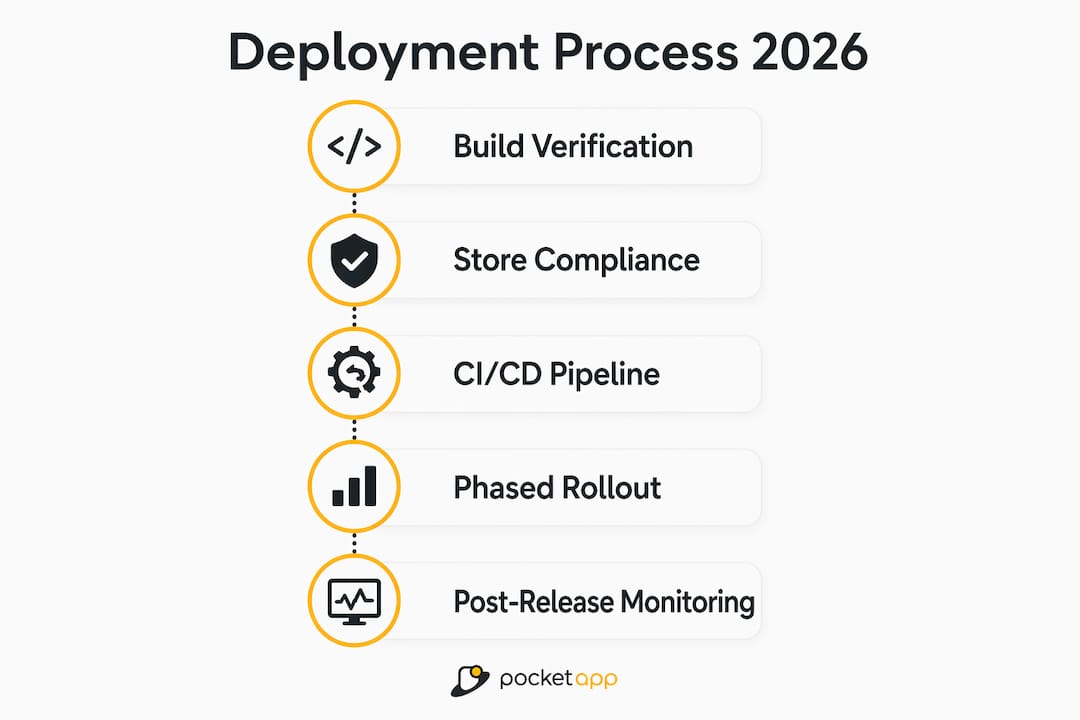
The most effective app release cycle in 2026 combines phased rollouts, feature flags for controlled releases, and post-release monitoring into a single governance framework. Each element addresses a different category of risk.
Phased rollouts on both Apple and Google platforms allow you to release to a percentage cohort of users before committing to a full release. Google Play supports percentage-based staged releases directly in the Play Console. Apple does not offer the same granular control, but combining a phased release with feature flags achieves a comparable result. The critical discipline here is defining your success criteria before you begin the rollout, not after you observe the first anomaly.
Feature flags decouple code deployment from feature activation entirely. You ship the code to 100% of users with the feature disabled, verify stability, then activate the feature for a controlled cohort. This means a problematic feature can be disabled in seconds without a resubmission to the App Store. For enterprise teams managing multiple release tracks, this is the single most impactful practice you can adopt.
Cloud-native infrastructure as code and policy as code enforce governance across automated deployments, reducing the manual intervention that introduces inconsistency at scale. When your infrastructure configuration is version-controlled and your deployment policies are machine-readable, compliance becomes a pipeline check rather than a post-release audit.
Post-release monitoring must be active before the rollout begins. Track crash rates, ANR (Application Not Responding) rates on Android, and user-reported issues in real time. Set alert thresholds that trigger a rollback decision automatically rather than waiting for a support ticket to surface the problem. For teams looking at app development trends in 2026, automated observability is now a baseline expectation, not a differentiator.
Key takeaways
A well-executed app deployment process in 2026 requires store compliance, a verified checklist, automated mobile CI/CD, and active post-release monitoring working together as a single system.
| Point | Details |
|---|---|
| Store compliance is non-negotiable | Google Play requires API level 36; Apple review delays compound after rejections. |
| Checklist prevents avoidable failures | Validate environment variables, run migrations first, and document rollback before submitting. |
| Mobile CI/CD has unique requirements | Code signing, macOS build agents, and real-device testing are mandatory pipeline stages. |
| Feature flags reduce release risk | Decoupling code deployment from feature activation allows instant rollback without resubmission. |
| Post-release monitoring is a pipeline stage | Set crash rate thresholds and alert rules before the rollout begins, not after. |
What I have learned from watching deployments go wrong
After working on over 300 mobile projects at Pocketapp, the pattern I see most often is not a technical failure. It is a process failure disguised as one. A team spends months building a well-architected app, then treats the submission metadata, the demo account credentials, and the privacy policy URL as administrative afterthoughts. The App Store reviewer hits a broken link or a missing demo video and rejects the binary. The team loses three days, not because the code was wrong, but because store submission assets were never treated as part of the deployment artefact.
My honest view is that automation solves the consistency problem but does not solve the discipline problem. Bitrise and Fastlane will faithfully execute whatever you tell them to execute. If your pipeline does not include a step that validates your App Store metadata against the current submission requirements, no amount of automation will catch that gap.
The teams I have seen handle launches well share one habit: they rehearse the deployment. They run the full pipeline against a staging environment, including the store submission steps, at least two weeks before the target release date. That rehearsal surfaces the credential issues, the metadata gaps, and the missing entitlements while there is still time to fix them without a crisis. If you take one thing from this article, make it that. Treat your first deployment rehearsal as the real deployment, and your actual release date becomes a formality.
— Paul
How Pocketapp supports your mobile app deployment

Pocketapp has delivered over 300 mobile applications for organisations including WWF, Dechra, and Crocus, managing the full journey from development through store submission and post-release monitoring. If your team is working through the complexities of a 2026 mobile app launch, Pocketapp's end-to-end service covers CI/CD pipeline configuration, App Store and Google Play submission, feature flag integration, and release governance. The goal is a deployment process that your team can repeat reliably, not one that depends on institutional knowledge held by a single developer. Get in touch to discuss how Pocketapp can support your next release.
FAQ
What is the app deployment process for mobile apps?
The app deployment process is the sequence of steps that takes a verified build through code signing, testing, store submission, and controlled release to end users. For mobile apps in 2026, this includes compliance with platform API requirements, CI/CD automation, and post-release monitoring.
How long does App Store review take in 2026?
App Store review typically takes 24 to 48 hours, though rejections restart the cycle and peak periods extend wait times significantly. Submitting an In-App Event before your binary can route submissions into a faster review pipeline.
What API level does Google Play require in 2026?
Google Play requires apps to target API level 36 (Android 16) for all new submissions and updates in 2026. Submissions targeting lower API levels are blocked at the Play Console before review begins.
What are feature flags and why are they used in app deployment?
Feature flags allow teams to ship code to production with new functionality disabled, then activate it for a controlled user cohort after verifying stability. This means a problematic feature can be turned off instantly without resubmitting to the App Store.
What makes mobile CI/CD different from web CI/CD?
Mobile CI/CD requires platform-specific build environments (macOS for iOS, Linux for Android), mandatory code signing, real-device testing, and store review gates that add 24 to 48 hours to the pipeline. These stages have no direct equivalent in web deployment pipelines.