
Managing mobile app development projects presents unique challenges for project managers and product owners. Coordinating cross-functional teams, balancing scope against timelines, and maintaining quality whilst adapting to changing requirements demand structured approaches and proven strategies. This guide provides practical frameworks for managing app projects from initial planning through successful delivery, helping you navigate common obstacles and deliver exceptional results that meet stakeholder expectations.
Table of Contents
- Preparing For Your App Project: What You Need Before Starting
- Executing The Project: Managing Teamwork And Development Progress
- Common Challenges And Troubleshooting In App Project Management
- Verifying Success: Monitoring, Testing, And Delivering Your App Project
- How Pocket App Supports Your App Project Management
- How To Manage App Projects: Frequently Asked Questions
Key takeaways
| Point | Details |
|---|---|
| Define scope early | Clear project scope and requirements reduce development risks and align team expectations from the start. |
| Adopt agile frameworks | Agile methods like Scrum enhance flexibility, improve collaboration, and enable rapid response to change. |
| Communicate consistently | Structured meetings, updates, and transparent progress tracking prevent misalignment and keep stakeholders informed. |
| Test thoroughly | Multiple testing phases including user acceptance testing ensure quality delivery and catch issues before launch. |
| Gather feedback continuously | Post-launch user insights drive iterative improvements and long-term app success. |
Preparing for your app project: what you need before starting
Successful app projects begin long before writing the first line of code. Proper preparation establishes the foundation for smooth execution and prevents costly mistakes downstream. Project managers who invest time in thorough planning reduce risks and set realistic expectations for all stakeholders.
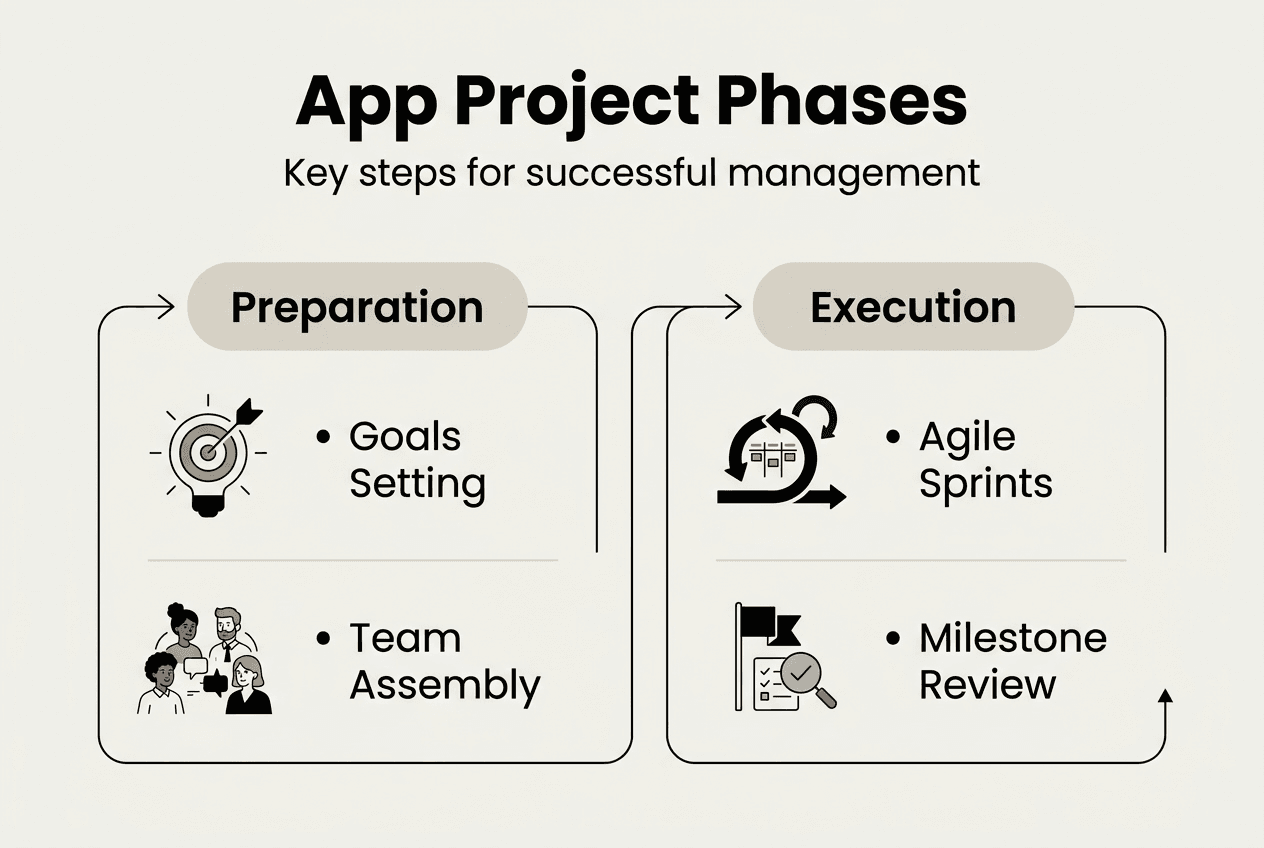
Start by defining crystal-clear project goals and detailed requirements. Vague objectives create confusion and lead to scope creep. Document specific features, user flows, and technical specifications in a requirements document that becomes your single source of truth. This clarity helps your team understand exactly what success looks like and prevents misunderstandings later.
Assembling the right team is equally critical. You need a balanced mix of mobile developers, UX/UI designers, quality assurance specialists, and stakeholder representatives. Each role brings essential perspectives to the project. Consider whether you need iOS specialists, Android experts, or cross-platform developers based on your target audience. Include business analysts who can translate stakeholder needs into technical requirements.
Selecting appropriate tools sets your team up for efficient collaboration. Choose project management platforms that match your workflow, whether that's Jira for agile teams, Trello for visual task management, or Asana for hybrid approaches. Communication tools like Slack or Microsoft Teams keep conversations organised and searchable. Version control systems such as Git ensure code integrity and enable parallel development.
Outline clear milestones and deliverables with realistic timelines. Break the project into manageable phases such as discovery, design, development, testing, and deployment. Each phase should have specific deliverables and acceptance criteria. Build buffer time into your schedule for unexpected challenges because mobile development always presents surprises.
Budget allocation requires careful consideration of direct costs like developer salaries and indirect expenses such as software licences, testing devices, and third-party services. Include contingency reserves of 15-20% to handle scope changes or technical complications. Resource planning extends beyond money to include developer availability, design capacity, and stakeholder time for reviews and approvals.
Essential preparation checklist:
- Document detailed functional and technical requirements
- Identify target platforms and device specifications
- Select development methodology and tools
- Define success metrics and KPIs
- Establish communication protocols and meeting cadence
- Create risk register with mitigation strategies
| Preparation element | Key considerations | Typical timeline |
|---|---|---|
| Requirements gathering | Stakeholder interviews, user research, competitor analysis | 2-4 weeks |
| Team assembly | Role definitions, skill assessment, resource allocation | 1-2 weeks |
| Tool selection | Platform evaluation, integration testing, team training | 1 week |
| Planning and scheduling | Milestone mapping, dependency analysis, buffer allocation | 1-2 weeks |
Pro Tip: Create a project charter that summarises goals, scope, team structure, and success criteria in a single document. Share this with all stakeholders and refer back to it when making decisions or resolving disputes.
Executing the project: managing teamwork and development progress
Once preparation is complete, execution demands active management and continuous coordination. Agile frameworks enhance flexibility and team collaboration through iterative development cycles. Implementing agile practices transforms how your team works together and responds to change.

Sprints form the backbone of agile development. These time-boxed periods, typically two to four weeks, create natural rhythm and accountability. Each sprint begins with planning where the team commits to specific deliverables. Daily stand-ups keep everyone synchronised on progress, blockers, and plans. Sprint reviews demonstrate working features to stakeholders, whilst retrospectives help the team improve processes continuously.
Maintain a prioritised product backlog that serves as your project roadmap. User stories describe features from the end user perspective, making requirements tangible and testable. Regularly groom the backlog to refine stories, estimate effort, and adjust priorities based on stakeholder feedback or market changes. This living document ensures the team always works on the highest-value items.
Agile execution workflow:
- Sprint planning session to select and commit to user stories
- Daily stand-ups for progress updates and blocker identification
- Development work with continuous integration and code reviews
- Sprint review demonstrating completed features to stakeholders
- Sprint retrospective to identify improvements for next cycle
Fostering open communication prevents misunderstandings and builds trust. Encourage team members to raise concerns early rather than waiting for problems to escalate. Create psychological safety where people feel comfortable admitting mistakes or asking for help. Regular one-on-ones with team members provide opportunities to address individual challenges and maintain morale.
Project management software provides visibility into progress and potential issues. Tools like Jira or Azure DevOps track user stories, bugs, and technical tasks through customisable workflows. Burndown charts show whether the team is on track to complete sprint commitments. Kanban boards visualise work in progress and identify bottlenecks. These tools generate reports that keep stakeholders informed without requiring constant status meetings.
Managing scope changes requires structured processes to prevent chaos. Establish a change control board that evaluates requested changes against project goals, timelines, and budgets. Not every good idea deserves immediate implementation. Document each change request with business justification, effort estimate, and impact analysis. Approved changes flow into the backlog with appropriate priority rather than disrupting current sprint work.
Regular demos and feedback sessions create alignment between development teams and stakeholders. Show working software frequently, even if features are incomplete. Early feedback catches misunderstandings before significant effort is wasted. Stakeholders who see progress regularly develop realistic expectations and maintain confidence in the team.
Pro Tip: Implement feature flags in your codebase to deploy incomplete features to production without exposing them to users. This technical practice enables continuous integration whilst maintaining release flexibility, following proven app development tips for business success.
Common challenges and troubleshooting in app project management
Even well-planned projects encounter obstacles that threaten timelines, budgets, or quality. Recognising common pitfalls and having troubleshooting strategies ready helps you respond effectively when challenges arise. Poor communication and unclear requirements cause many app projects to fail.
Scope creep remains the most persistent challenge in app development. Stakeholders request additional features, designers propose improvements, and developers suggest technical enhancements. Each change seems reasonable in isolation but collectively they derail projects. Combat scope creep by enforcing your change control process rigorously. Every new request must demonstrate clear business value and accept timeline or budget impacts. Maintain a "future enhancements" list for good ideas that don't fit current scope.
Team conflicts emerge from personality clashes, unclear responsibilities, or competing priorities. Address conflicts promptly through direct conversation rather than letting resentment build. Clarify role boundaries and decision-making authority to prevent territorial disputes. When technical disagreements arise, establish objective criteria for evaluating options rather than allowing debates to become personal. Sometimes bringing in a neutral third party helps resolve persistent conflicts.
Project delays stem from optimistic estimates, unforeseen technical complexity, or resource constraints. When delays appear inevitable, communicate early with stakeholders rather than hoping to catch up. Adjust priorities to deliver core features on time whilst deferring nice-to-have elements. Increase transparency around what's causing delays and what actions you're taking to mitigate them. Sometimes adding resources helps, but be aware that new team members need time to become productive.
Common troubleshooting strategies:
- Review and tighten requirements when scope creep threatens timelines
- Facilitate team workshops to rebuild collaboration after conflicts
- Conduct technical spike investigations to de-risk complex features
- Escalate resource constraints to senior leadership with specific requests
- Revisit and adjust sprint commitments based on actual team velocity
Communication breakdowns create the most damage because they compound other problems. Stakeholders who don't understand technical constraints make unrealistic demands. Developers who don't grasp business context build the wrong solutions. Prevent communication issues through structured touchpoints like weekly stakeholder updates, bi-weekly steering committee meetings, and monthly executive briefings. Document decisions and share meeting notes to create shared understanding.
"The single biggest problem in communication is the illusion that it has taken place. In app projects, assume nothing and verify everything through written confirmation and demonstration."
Risk management plans help you anticipate problems before they occur. Maintain a risk register that identifies potential issues, assesses their likelihood and impact, and defines mitigation strategies. Review risks regularly during sprint planning or steering meetings. High-priority risks deserve proactive mitigation whilst lower risks simply need monitoring. Common risks include third-party API changes, platform updates breaking functionality, key team member departure, or shifting regulatory requirements.
Technical debt accumulates when teams take shortcuts to meet deadlines. Whilst some tactical debt is acceptable, excessive debt slows future development and increases bug rates. Allocate 15-20% of each sprint to addressing technical debt through refactoring, updating dependencies, or improving test coverage. This investment maintains development velocity over the long term, avoiding the trap highlighted in common app development mistakes.
Pro Tip: Conduct pre-mortem exercises where the team imagines the project has failed and works backwards to identify what went wrong. This technique surfaces risks and concerns that people might not raise in traditional planning discussions, following insights from key points new app developers should consider.
Verifying success: monitoring, testing, and delivering your app project
Delivering a high-quality app requires rigorous testing and verification before launch. Thorough testing and feedback loops are essential for successful app launches. Multiple testing phases catch different types of issues and build confidence in your release.
Unit testing validates individual components and functions in isolation. Developers write unit tests alongside production code to verify that each piece behaves correctly. These automated tests run continuously during development, catching regressions immediately. High unit test coverage provides a safety net for refactoring and reduces debugging time.
Integration testing examines how different components work together. Mobile apps integrate with backend APIs, third-party services, device features like cameras or GPS, and platform-specific capabilities. Integration tests verify these connections function correctly across different scenarios and edge cases. Test both happy paths and error conditions to ensure graceful failure handling.
User acceptance testing involves real users validating that the app meets their needs and expectations. Recruit beta testers who represent your target audience and observe how they interact with the app. Their feedback reveals usability issues, confusing workflows, or missing features that developers and designers might overlook. UAT should happen before final release to allow time for addressing critical findings.
Testing phase sequence:
- Unit testing during feature development for component validation
- Integration testing after feature completion for system verification
- Performance testing under realistic load conditions
- User acceptance testing with representative end users
- Security testing to identify vulnerabilities and data risks
- Regression testing before each release to prevent reintroduced bugs
| Testing approach | Best for | Limitations |
|---|---|---|
| Automated testing | Regression prevention, continuous integration, repetitive scenarios | Initial setup effort, maintenance overhead, cannot assess UX |
| Manual testing | Exploratory testing, usability evaluation, edge case discovery | Time-consuming, inconsistent coverage, human error |
| Hybrid approach | Comprehensive quality assurance combining efficiency and insight | Requires both automated and manual testing expertise |
Deployment planning ensures smooth rollout to production environments. Create deployment checklists covering app store submission requirements, server configuration, database migrations, and rollback procedures. Staged rollouts release the app to small user percentages initially, allowing you to monitor performance and catch issues before full release. Feature flags enable you to activate or deactivate functionality without redeploying code.
Monitoring tools provide real-time visibility into app performance and user behaviour after launch. Crash reporting services like Firebase Crashlytics or Sentry alert you to exceptions and errors users encounter. Analytics platforms track user engagement, feature adoption, and conversion funnels. Performance monitoring identifies slow screens, memory leaks, or excessive battery consumption that degrade user experience.
Gathering user feedback post-launch drives continuous improvement. In-app feedback mechanisms let users report issues or suggest enhancements directly. App store reviews provide unfiltered user opinions, both positive and negative. User interviews and surveys offer deeper insights into how people use your app and what frustrates them. This feedback informs your product roadmap and prioritisation for future releases.
Establish key performance indicators that measure app success against business objectives. Common KPIs include daily active users, session duration, retention rates, conversion rates, and customer satisfaction scores. Track these metrics consistently and compare against benchmarks or targets. Use analytics to understand which features drive engagement and which go unused, informing data-driven decisions about future development.
Pro Tip: Implement gradual rollout strategies where you release updates to 10% of users first, monitor for issues over 24-48 hours, then expand to 50%, and finally 100%. This approach minimises the impact of undiscovered bugs whilst maintaining rapid iteration.
How Pocket App supports your app project management
Managing complex app projects successfully requires expertise across strategy, design, development, and delivery. Pocket App brings comprehensive capabilities to support every phase of your app project. With over 300 completed projects across diverse industries, we understand the challenges project managers face and provide proven solutions.
Our agile delivery approach ensures flexibility and transparency throughout development. You'll work with dedicated teams who combine technical excellence with strong communication skills. From initial discovery workshops through post-launch support, we guide your project with structured processes that deliver quality outcomes on schedule.

Whether you need support with development of mobile apps, expert app design services, or comprehensive leading app development services, our experienced teams help you navigate complexity and achieve your goals. We become an extension of your team, bringing specialised mobile expertise whilst respecting your project management processes and stakeholder relationships.
How to manage app projects: frequently asked questions
How can agile methods improve app project management?
Agile methods improve app project management by enabling rapid adaptation to changing requirements and fostering continuous stakeholder collaboration. Iterative sprints deliver working software frequently, allowing teams to gather feedback early and adjust priorities based on real user needs rather than assumptions. This flexibility reduces wasted effort on features that don't deliver value whilst maintaining focus on high-priority capabilities.
What tools are best for tracking app development progress?
The best tools for tracking app development progress include Jira for agile teams managing sprints and backlogs, Trello for visual task management, and Azure DevOps for integrated planning and deployment pipelines. Choose tools that match your team's workflow preferences and integrate with your existing systems. Effective tools provide visibility into task status, team capacity, and project health without creating administrative overhead that slows development.
How to handle scope changes during an app project?
Handle scope changes through a structured change control process that evaluates each request against project goals, timelines, and budgets before approval. Document the business justification, effort estimate, and impact on existing commitments for every proposed change. Approved changes enter the prioritised backlog rather than disrupting current sprint work, maintaining team focus whilst accommodating necessary adjustments.
What are common pitfalls to avoid in app project management?
Common pitfalls include unclear requirements leading to rework, inadequate testing resulting in poor quality releases, and insufficient stakeholder communication causing misaligned expectations. Avoid these by investing time in thorough planning, implementing comprehensive testing strategies, and establishing regular stakeholder touchpoints. Technical debt accumulation and unrealistic timelines also derail projects, so allocate time for quality improvements and build buffer into schedules.
How important is user feedback after app launch?
User feedback after app launch is critical for long-term success because it reveals real-world usage patterns, pain points, and enhancement opportunities that testing cannot fully predict. Continuous feedback loops enable data-driven prioritisation of updates and improvements that increase user satisfaction and retention. Apps that incorporate user insights evolve to better serve their audience, whilst those that ignore feedback risk declining engagement and negative reviews.