
TL;DR:
- A retail app launch requires careful planning, coordination, and timing to maximize user activation and revenue growth. Effective pre-launch marketing, thorough testing, and synchronized multi-channel efforts are essential for success. Avoiding common pitfalls like delayed submission and fragmented marketing ensures a smooth, impactful launch aligned with peak trading periods.
A retail app launch is the coordinated process of aligning development, marketing, and operational readiness to deliver a working product to customers and meet defined business goals. Get it wrong and you waste months of development effort on a release that nobody notices. Get it right and you create a compounding growth engine that drives loyalty, repeat purchases, and measurable revenue. This guide covers every stage of the process, from pre-launch prerequisites to post-launch retention, with specific tools, timelines, and tactics drawn from current 2026 best practice.
How to plan a retail app launch: prerequisites and tools
The foundation of any retail app launch strategy is clarity on what you are trying to achieve before a single line of code is written. Define your business goals in concrete terms: target monthly active users, conversion rate from browse to purchase, or average order value through the app. Vague goals produce vague results.
Key prerequisites before you begin:
- Business goals and KPIs: Set measurable targets such as a 30% activation rate within 72 hours of install.
- Audience research: Identify your core customer segments, their devices, and their shopping behaviour.
- Competitive analysis: Review the top five competitor apps on the App Store and Google Play. Note their ratings, review themes, and feature gaps.
- Analytics setup: Integrate Mixpanel or Firebase from day one to track user journeys, not just download counts.
- Crash monitoring: Add Crashlytics to catch technical failures before they reach real customers.
- ASO tools: Use platforms such as AppFollow or Sensor Tower to research keywords and monitor rankings.
- Review App Store and Google Play policies: Both stores have specific submission requirements. Missing a technical requirement delays approval by days.
The table below maps each tool to its role in the launch process.
| Tool | Primary Role |
|---|---|
| Mixpanel | User behaviour analytics and funnel tracking |
| Firebase | Real-time database, crash reporting, and A/B testing |
| Crashlytics | Crash monitoring and stability reporting |
| AppFollow / Sensor Tower | App Store Optimisation (ASO) and keyword research |
| TestFlight | iOS beta distribution and pre-launch testing |
Pro Tip: Apple's App Store review process typically takes 24–72 hours, but can extend significantly around peak retail periods. Build at least two weeks of buffer into your submission timeline to avoid missing critical trading dates.
Security and compliance checks belong in this phase too. Reviewing launch security considerations early prevents costly rework later in the process.
What are the step-by-step stages of a retail app launch?
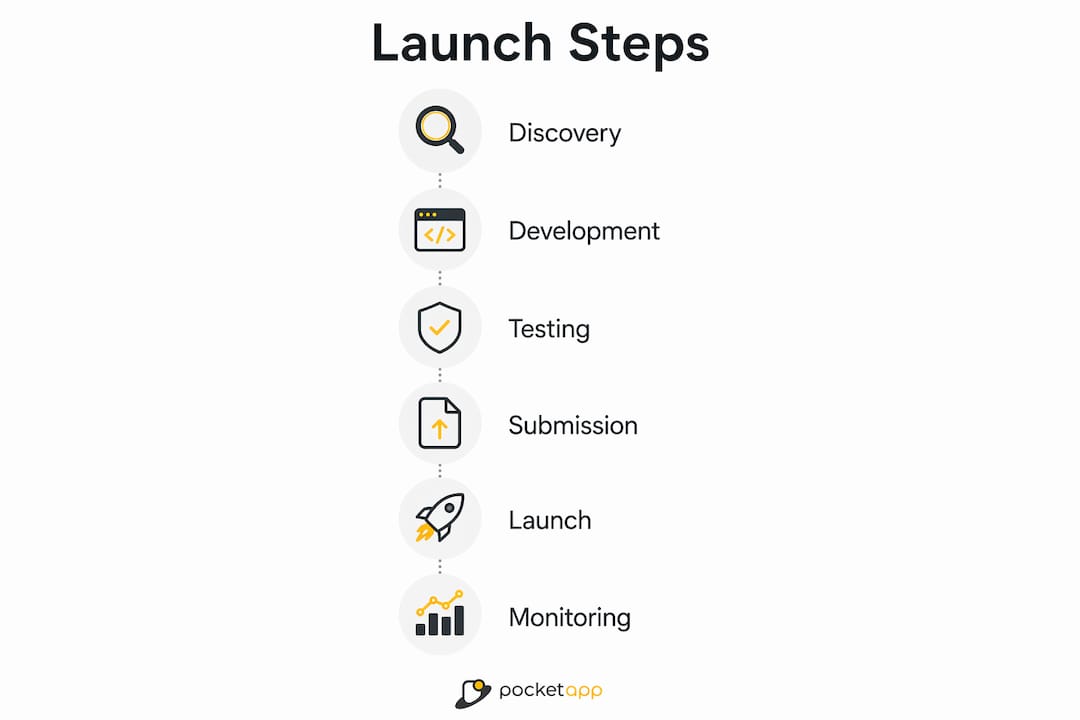
A successful retail app launch follows a clear sequence. Skipping stages or running them in parallel without coordination is the most common cause of delayed or underperforming releases.
-
Discovery and strategy. Define user personas, map customer journeys, and agree on the feature set for your minimum viable product (MVP). A step-by-step development guide for business founders outlines how to structure this phase effectively.
-
UI/UX design. Build wireframes and interactive prototypes before development starts. Poor user experience in retail apps is the leading cause of early uninstalls, so validate designs with real users before committing to build.
-
Agile development sprints. Break development into two-week sprints with defined deliverables. A focused MVP typically takes 4–5 months to build. Building all features upfront causes delays and bloated releases that are harder to test and harder to market.
-
Quality assurance and performance testing. Run functional, regression, and performance tests. For retail apps, load testing under peak conditions is non-negotiable. Testing with mocked data hides the checkout bottlenecks that appear when real inventory calls run concurrently at scale.
-
Beta release. A controlled beta phase with selected users validates onboarding flows and surfaces edge cases before the public release. Use TestFlight for iOS and Google Play's internal testing track for Android.
-
App Store submission. Submit your build with fully optimised metadata, screenshots, and a preview video. Allow at least two weeks before your target launch date.
-
Launch week execution. Deploy a channel stacking approach: coordinate email, SMS, social media, influencer content, and PR within a compressed window. Coordinating multiple channels simultaneously creates a compounding amplification effect on conversion that isolated efforts cannot replicate.
The comparison below shows the difference between a coordinated launch and an uncoordinated one.
| Factor | Coordinated Launch | Uncoordinated Launch |
|---|---|---|
| Channel timing | All channels activate within 48–72 hours | Channels go live at different times over weeks |
| Analytics accuracy | Clean cohort data from day one | Mixed cohorts, unreliable attribution |
| Review velocity | Early reviews accumulate quickly | Reviews trickle in slowly |
| Momentum | Compounding effect across channels | Flat or declining install curve |

Pro Tip: Run a closed beta with 50–100 real customers two to three weeks before launch. Their feedback on onboarding and checkout flows is worth more than any internal review.
How can retail businesses promote their app effectively?
A retail app marketing plan must start weeks before the app goes live. Waiting until launch day to begin marketing is the single most common mistake retail businesses make.
Pre-launch marketing actions:
- Build a waitlist via your website and email list. Offer an exclusive discount or early-access reward to incentivise sign-ups.
- Seed the app with influencers and brand advocates two to three weeks before launch so their content goes live on day one.
- Build a content library of 40–60 user-generated content pieces before launch. Content production cannot start effectively at launch week. This library fuels organic social posts, paid ads, and email campaigns simultaneously.
- Optimise your App Store listing with keyword-rich titles, benefit-led descriptions, and high-quality screenshots. App Store Optimisation directly affects how many users discover your app through search, independent of paid spend.
During and after launch:
- Run paid acquisition campaigns on Meta and Google targeting your existing customer database as a seed audience.
- Use segmented email flows to convert your most loyal customers first. They are the most likely to leave early reviews.
- Generating 5–10 authentic positive reviews within 30 days improves install rates by 40% in the following months. Reviews signal quality to both prospective users and app store algorithms.
- Set up push notification sequences for users who install but do not complete a purchase within 48 hours. Activation, not just installation, is the metric that matters.
Pro Tip: Segment your launch email list by purchase history. Customers who bought in the last 90 days convert at a significantly higher rate than lapsed customers. Send to your highest-value segment first to build early momentum.
Pairing your app marketing with broader retail digital marketing strategies amplifies reach beyond your existing customer base.
What are the common challenges when launching a retail app?
Most retail app launches encounter the same set of problems. Knowing them in advance is the difference between a minor setback and a failed release.
Timing and deadlines. Retail businesses often target peak trading periods such as Christmas or Black Friday. App submission must be complete by late October to clear App Store review before peak season traffic arrives. Missing this window means losing the highest-value period entirely. Backward planning from peak retail dates is the only reliable way to manage these hard deadlines.
Performance under load. Retail apps face sudden traffic spikes during promotions. Performance testing must use realistic inventory and checkout scenarios, not simplified mocked data. Dedicated QA engineers with experience in retail workflows are required for this, not generic testers.
The 48-hour launch window. Avoid feature changes or updates during the critical 48-hour launch window. Iterating during launch disrupts user cohorts and produces unreliable analytics. Lock the build and monitor. Fix only critical bugs.
Review generation. Authentic reviews do not appear automatically. Build a structured ask into your post-install email sequence. Prompt satisfied customers at the right moment, typically after a completed purchase, not immediately after install.
Scaling support. Launch week generates a disproportionate volume of support queries. Brief your customer service team on the app's features and common issues before go-live. Slow or absent support responses during launch week damage your early review score.
Pro Tip: Work backward from your target launch date and set a hard internal deadline for build lock four weeks earlier. This gives you time for beta testing, App Store submission, and marketing preparation without compressing any single phase.
The retail app deployment process covers the practical execution steps in detail for teams managing launch logistics.
Key takeaways
A successful retail app launch requires backward planning from peak trading dates, a locked build during the launch window, and coordinated multi-channel marketing that begins weeks before go-live.
| Point | Details |
|---|---|
| Launch is a phase, not a day | Plan for a 4–8 week launch phase focused on data validation and activation, not just install counts. |
| MVP first, features later | A focused MVP takes 4–5 months to build. Scope creep delays launches and dilutes marketing focus. |
| Pre-launch content is non-negotiable | Build 40–60 pieces of user-generated content before launch week to fuel all marketing channels simultaneously. |
| Lock the build at launch | Avoid any updates during the 48-hour launch window to protect cohort data and maintain momentum. |
| Reviews drive discoverability | Securing 5–10 authentic reviews within 30 days lifts install rates by 40% in the months that follow. |
The part of app launches most retailers get wrong
I have seen retailers invest heavily in development and then treat the launch itself as an afterthought. The app goes live, a single email goes out, and everyone waits for downloads to arrive. They rarely do.
The launch phase is a 4–8 week campaign, not a single event. The goal in those weeks is not to hit a download number. It is to generate enough data to know whether your onboarding works, whether your ASO keywords are attracting the right users, and whether your activation rate is above 30% within 72 hours. Those signals tell you what to fix. Without them, you are iterating blind.
The retailers who get this right treat their app launch like a product launch and a marketing campaign running simultaneously. They have their content ready, their influencers briefed, their email sequences live, and their paid campaigns loaded before the app goes public. Timing is everything in retail, and the same principle applies to app launches. Miss your peak season window and you wait another year.
My honest advice: do not launch in isolation. Coordinate your development partner, your marketing team, and your operations team around a single launch calendar. The product launch process benefits enormously from that kind of cross-functional alignment. The retailers who treat it as a shared project, rather than an IT project, consistently outperform those who do not.
— Paul
How Pocketapp supports retail app launches
Pocketapp has delivered over 300 mobile app projects across retail, healthcare, and consumer engagement, including work for brands such as Crocus and WWF. The team covers every stage of the launch process, from discovery and app design through to development, quality assurance, and App Store submission.

For retail businesses planning a mobile launch, Pocketapp provides retail-focused mobile app development with built-in launch planning, ASO strategy, and performance testing tailored to peak trading periods. Whether you are building your first app or relaunching an existing one, the team brings the technical depth and retail sector knowledge to get your product to market on time and performing from day one. Get in touch to discuss your project.
FAQ
How long does a retail app launch take to plan?
A realistic retail app launch plan spans 6–9 months from initial discovery to public release, including 4–5 months of MVP development, a beta phase, and a 4–8 week launch campaign.
What is the most important metric during a retail app launch?
Activation rate within 72 hours of install is the most telling early metric. An activation rate above 30% indicates that onboarding and core features are working as intended.
When should i submit my retail app to the app store?
Submit at least two weeks before your target launch date. For peak retail periods such as Christmas, submission must be complete by late October to clear the review process before high-traffic trading begins.
What is channel stacking in an app launch context?
Channel stacking means coordinating email, SMS, social media, influencer content, and PR within a compressed 48–72 hour window. Running all channels simultaneously creates a compounding effect on conversions that no single channel can achieve alone.
How do i get early reviews for my retail app?
Build a structured review request into your post-purchase email sequence. Prompting satisfied customers after a completed transaction, rather than immediately after install, generates authentic reviews that improve discoverability and install rates.