
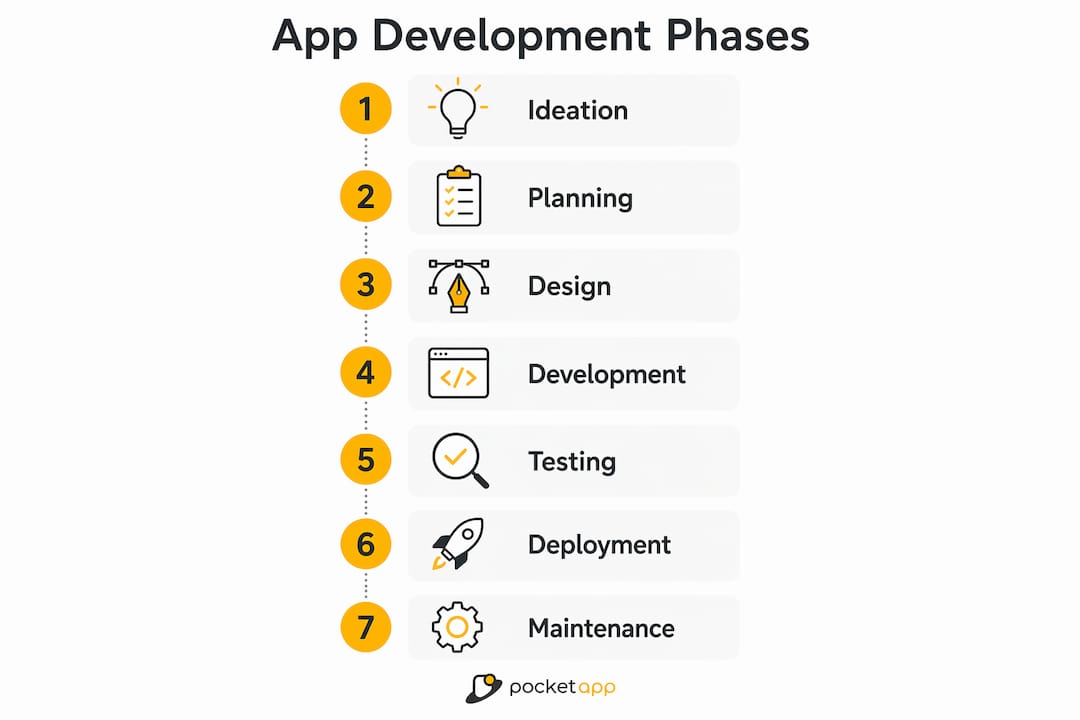
Building a successful app means following a clear sequence of phases, each with defined goals and deliverables. The app development lifecycle typically covers six core stages: ideation, planning, design, development, testing, and deployment/maintenance. Skip or rush any one of them, and you risk budget overruns, missed deadlines, or an app that simply does not work for its users.
Here is a quick summary of what each phase achieves:
- Ideation and discovery: Validate the concept, understand user needs, and assess feasibility.
- Planning and strategy: Define scope, resources, timelines, and the development methodology.
- Design: Create wireframes, prototypes, and technical architecture.
- Development and coding: Build features, integrate systems, and manage version control.
- Quality assurance and testing: Identify and fix defects before release.
- Deployment and maintenance: Launch the app, monitor performance, and keep it updated.
These phases are sequential by design. Each one feeds directly into the next, so the outputs from planning shape the design, and the design drives what gets built. Clear documentation and consistent stakeholder communication throughout every stage are what separate projects that deliver on time from those that stall. Frameworks like Agile and Waterfall give teams a structured way to manage this sequence, and choosing the right one early has a measurable effect on how smoothly the project runs.
Phase 1: Where does a good app idea actually come from?

Every app begins with a question: does this idea solve a real problem for real people? The ideation and discovery phase is where you find out. It combines creative thinking with structured research, so you are not just generating ideas but testing whether they hold up against market realities.
The core activities here are brainstorming sessions, competitive analysis, and feasibility studies. Brainstorming opens up the possibility space; competitive analysis narrows it by showing what already exists and where the gaps are. A feasibility study then asks the harder questions: Can this be built with available technology? Does the budget make sense? Is there a market large enough to justify the investment?
User research sits at the heart of this phase. Building user personas, conducting interviews, and mapping out pain points gives the team a concrete picture of who the app is for and what they actually need. Without this, you are designing for assumptions rather than people.
Typical deliverables from ideation and discovery include:
- A clear idea or problem statement
- User personas based on research
- A competitive analysis report
- A preliminary feasibility assessment
- Initial stakeholder alignment notes
Stakeholder alignment at this stage is often underestimated. Getting everyone in the room early, including business owners, product leads, and technical advisors, prevents the costly disagreements that surface later when the build is already underway.
Phase 2: How do you plan an app project properly?
Planning is where a good idea becomes a workable project. Requirement gathering and analysis are the foundation of this phase, aligning stakeholder expectations and defining a clear project scope before a single line of code is written.
The first decision is methodology. Agile works well for projects where requirements are likely to evolve, breaking work into short sprints with regular reviews. Waterfall suits projects with fixed, well-understood requirements where each phase must be completed before the next begins. Rapid Application Development (RAD) sits between the two, prioritising quick prototypes and user feedback over exhaustive upfront documentation. The right choice depends on your team's size, the client's appetite for iteration, and how well-defined the requirements are at the outset.
Resource planning follows methodology selection. This means identifying who is on the team, what tools they need, and how the budget maps to each phase. Risk assessment at this point, documenting what could go wrong and how you would respond, saves significant time later. Milestone setting gives the whole team a shared sense of progress and accountability.
Platform choice and technical stack decisions also belong here. Whether you are building for iOS, Android, or both via cross-platform development affects everything from design constraints to testing requirements and ongoing maintenance costs.
Key outputs from the planning phase:
- A detailed project plan with milestones and timelines
- A requirements specification document
- A risk matrix
- A resource and budget allocation plan
- A chosen development methodology
Phase 3: What does the design phase actually involve?
Design is where the app's concept takes visible shape. It covers two parallel tracks: user experience (UX) and user interface (UI) design on one side, and technical architecture on the other. Both must be resolved before development begins.
The UX process starts with wireframing, which produces low-fidelity sketches of each screen and user flow. These are deliberately rough because their purpose is to test structure, not aesthetics. Once the structure is agreed, the team moves to higher-fidelity mockups and interactive prototypes. Prototyping and early UX feedback allow iterative improvement, saving time and avoiding costly rework later in the build.
Pro Tip: Share prototypes with real users before signing off on the design. Even a short round of usability testing at this stage regularly surfaces navigation issues that would be expensive to fix after development has started.
On the technical side, this phase produces the system architecture, data models, and API specifications. These documents define how the app's components communicate, where data is stored, and how the system will scale. Getting this right early prevents architectural debt, which is the kind of technical problem that slows every subsequent phase.
| Design deliverable | Purpose |
|---|---|
| Wireframes | Map screen layouts and user flows |
| Interactive prototype | Test usability before build |
| UI mockups and design specs | Define visual style and component behaviour |
| Technical architecture document | Specify system structure and data flows |
| API specifications | Define how front end and back end communicate |
Design deliverables from this phase:
- Wireframes for all key screens
- An interactive prototype
- Finalised UI mockups and a design system
- Technical architecture and data model documentation
- API and integration specifications
The design phase is also the right moment to get formal sign-off from stakeholders. Approving the prototype before development starts means everyone is aligned on what is being built, which reduces the risk of late-stage change requests that derail timelines.
Phase 4: How does the development and coding phase work?
Development is where the plans and designs become a functioning application. Developers write the code, connect the front end to the back end, integrate third-party APIs, and configure the infrastructure that will run the app. It is the longest phase in most projects, and the one where collaboration matters most.

Agile methodologies promote quality and efficiency during this phase by organising work into sprints, typically one to two weeks long. At the end of each sprint, the team reviews what has been built, tests it against requirements, and adjusts priorities for the next sprint. This keeps the project responsive to feedback without losing momentum.
Version control using tools like Git is non-negotiable. It allows multiple developers to work on the same codebase simultaneously without overwriting each other's changes, and it provides a full history of every modification. Continuous integration (CI) pipelines automate the process of merging and testing code changes, catching integration errors early rather than at the end of the build.
Development tasks during this phase include:
- Front-end coding for all screens and user interactions
- Back-end logic, database setup, and server configuration
- API development and third-party service integration
- Environment setup for development, staging, and production
- Code reviews and documentation
Pocketapp's development teams typically include a project manager, a lead developer, front-end and back-end engineers, and a QA specialist embedded from the start. Having QA involved during development, rather than only at the end, means defects are caught earlier and fixed at a fraction of the cost. For a closer look at development phase best practices, the approach Pocketapp takes across its 300-plus project portfolio reflects this integrated model.
Phase 5: What does quality assurance and testing cover?
Testing is not a single event at the end of the build. It is a continuous process that runs in parallel with development and intensifies before release. Comprehensive testing covers unit, integration, system, and user acceptance testing, as well as performance and security checks, all before the app reaches users.
Unit testing checks individual functions or components in isolation. Integration testing verifies that those components work correctly together. System testing evaluates the complete application against the original requirements. User acceptance testing (UAT) puts the app in front of real users or client representatives to confirm it behaves as expected in realistic conditions.
Performance testing is particularly important for mobile apps, where network conditions and device capabilities vary widely. An app that loads quickly on a high-end device in a city centre may perform poorly on an older handset with a weaker signal. Security testing, which checks for vulnerabilities like insecure data storage or weak authentication, is increasingly critical given the UK's National Cyber Security Centre guidance on application security standards.
Key testing activities and success criteria:
- Unit tests pass for all individual components
- Integration tests confirm correct data flow between systems
- System tests validate full functionality against requirements
- UAT sign-off from client or representative users
- Performance benchmarks met across target devices and network conditions
- Security vulnerabilities identified and resolved
- Defect log reviewed and all critical issues closed
Automated testing tools, such as Nightwatch.js for end-to-end browser testing, reduce the manual effort required for regression testing and speed up the feedback loop between development and QA. The goal is a defect log that reaches zero critical issues before the deployment decision is made.
Phase 6: What happens during deployment and after launch?
Deployment is the point at which the app moves from a controlled environment to the hands of real users. How you manage this transition has a direct bearing on user experience and the team's ability to respond to problems quickly.
Staged rollouts are the most common approach for consumer-facing apps. Rather than releasing to everyone at once, you release to a small percentage of users first, monitor for errors, and expand gradually. This limits the blast radius of any issues that slipped through testing. For apps distributed through the Apple App Store or Google Play, the review process adds a lead time that needs to be factored into the project schedule. Enterprise apps may be deployed via mobile device management (MDM) platforms or private hosting environments, bypassing public app stores entirely.
Ongoing maintenance and optimisation are what keep an app relevant after launch. This includes fixing bugs reported by users, releasing feature updates, and adapting the app as the underlying operating systems evolve. iOS and Android both release major updates annually, and apps that are not maintained to stay compatible quickly become unusable. For teams managing this long-term, keeping your app performing well requires a structured maintenance plan, not just reactive fixes.
Post-launch monitoring relies on analytics tools to track user behaviour, crash rates, and performance metrics. This data feeds directly back into the product roadmap, informing which features to build next and which parts of the app need attention.
Deployment steps and maintenance best practices:
- Submit to app stores or configure hosting environments
- Run a staged or beta rollout before full release
- Monitor crash reports and performance metrics from day one
- Establish a regular release cadence for updates and patches
- Collect and triage user feedback through reviews and in-app channels
- Plan for OS compatibility updates at least annually
- Review analytics quarterly to inform the product roadmap
For major updates, the maintenance phase can effectively restart the lifecycle. A significant new feature set may require its own discovery, planning, and design work before development begins, cycling back through the same structured phases. Understanding app lifecycle management as a continuous loop, rather than a one-time project, is what distinguishes teams that build lasting products from those that ship once and struggle to keep up.
Choosing the right cloud service provider for your hosting environment is a decision that affects both deployment speed and long-term maintenance costs. Enterprise teams in particular should evaluate providers against their specific data residency, compliance, and scalability requirements before committing.
Common challenges in app development and how to handle them
Even well-planned projects run into problems. The most common ones are not technical failures; they are process failures, and most of them are predictable.
Scope creep is the single biggest threat to app projects. It happens when new features or changes are added informally, without going through a formal review process. The Association for Project Management identifies the "moving target" problem, where requirements shift continuously, as a leading cause of stalled projects. Each informal change looks small in isolation, but collectively they extend timelines, inflate budgets, and reduce the quality of what gets shipped.
Feature bloat compounds the problem. Adding features that were not in the original specification increases the complexity of the codebase, introduces more potential defects, and raises long-term maintenance costs. An app with too many features is often harder to use than one with fewer, well-executed ones. The discipline of saying no to a feature request, or deferring it to a later release, is one of the most valuable skills a product manager can develop.
Pro Tip: Set up a formal change request process before development starts. Any new requirement or scope change should go through a written review that assesses its impact on timeline, budget, and existing features. This single step prevents most of the informal chaos that derails projects.
For teams managing these challenges day to day, a structured approach to app project management makes a measurable difference to outcomes.
Common pitfalls and how to address them:
- Scope creep: Implement a formal change request process with impact assessment at every stage.
- Vague requirements: Invest time in detailed documentation during planning; ambiguity costs more to fix later.
- Communication gaps: Schedule regular stakeholder updates tied to sprint reviews or milestone completions.
- Underestimating testing: Allocate dedicated QA time in the project plan; do not treat it as an afterthought.
- Ignoring post-launch: Budget for maintenance from the outset; apps that are not maintained lose users quickly.
- Platform indecision: Decide on iOS, Android, or cross-platform during planning, not mid-development.
Ready to take your app from concept to launch? Pocketapp has delivered over 300 projects for clients including WWF, Dechra, and Crocus, covering every phase from discovery through to post-launch maintenance. Whether you are starting with an idea or picking up a project that needs expert guidance, our team brings the technical depth and project experience to get it right.

Talk to Pocketapp about your next app project and find out how we approach each phase to deliver apps that perform.
Key takeaways
Following a structured app development lifecycle, from ideation through to ongoing maintenance, is the most reliable way to deliver a quality app on time and within budget.
| Point | Details |
|---|---|
| Sequence matters | Each phase feeds the next; skipping or rushing one creates problems that compound downstream. |
| Plan before you build | Detailed requirements and a chosen methodology during planning prevent scope creep and budget overruns. |
| Design before coding | Wireframes and prototypes validated with users save costly rework once development has started. |
| Testing is continuous | QA runs throughout development, not just at the end; catching defects early reduces fix costs significantly. |
| Maintenance is ongoing | Post-launch updates, monitoring, and OS compatibility work are what keep an app relevant and usable long-term. |
FAQ
What are the main phases of app development?
The core app development stages are ideation, planning, design, development, testing, and deployment/maintenance. Each phase has specific deliverables that feed into the next.
What are the seven stages of app development?
Some frameworks split the lifecycle into seven stages by separating requirements analysis from initial planning and treating user feedback and iteration as a distinct final stage. The core sequence remains the same: conceptualisation, requirements analysis, design, development, testing, deployment, and maintenance.
What is the SDLC and how does it relate to app development?
The Software Development Life Cycle (SDLC) is the industry-standard framework that defines the structured phases teams follow to plan, build, and maintain software. App development phases map directly onto the SDLC, with methodologies like Agile and Waterfall providing different ways to move through those phases depending on project needs.
How long does each app development phase take?
Timelines vary considerably by project complexity, team size, and methodology. Early phases such as discovery and planning often take a few weeks, design varies by project scope, development is generally the longest phase, and testing through deployment also requires significant time. Maintenance is ongoing with no fixed end point.
Why does the maintenance phase sometimes restart the lifecycle?
Major updates, such as a significant feature overhaul or a platform migration, require their own discovery, planning, and design work before development begins. Maintenance and optimisation are an ongoing phase that can trigger a full lifecycle restart when the scope of change is large enough to warrant it.