
TL;DR:
- App lifecycle management (ALM) oversees a software application's full journey from initial concept through deployment and retirement, encompassing governance, compliance, and ongoing maintenance. It differs from SDLC by focusing on business value, security, and proper decommissioning, especially critical in mobile environments with siloed teams and evolving risks. Effective ALM relies on visibility, structured update strategies, legacy planning, and shared governance to reduce fragmentation, configuration drift, and security vulnerabilities.
App lifecycle management (ALM) is the end-to-end framework that governs a software application from initial business concept through development, deployment, maintenance, and final retirement. It is broader than the software development lifecycle (SDLC), which focuses solely on building software. ALM wraps governance, compliance, people, and processes around the entire existence of an application. For product managers and IT professionals, understanding app lifecycle management is the difference between shipping software reactively and running it as a managed business asset. Platforms like Microsoft Intune, Salesforce, and Google Play each address distinct phases of this lifecycle, which is why a unified framework matters.
What is app lifecycle management and why does it matter?
ALM is the end-to-end process managing software from initial business concept through development, deployment, maintenance, and retirement, covering a wider scope than SDLC alone. Where SDLC describes how code is written and tested, ALM asks a harder question: does this application still serve the business, and is it being governed correctly at every stage of its life?

The distinction matters because most application failures are not development failures. They are governance failures. An app ships on time, then drifts in configuration across deployment locations, accumulates unpatched versions, and eventually becomes a security liability nobody owns. ALM prevents that by assigning accountability to every phase, not just the build.
For mobile applications specifically, the stakes are higher. Users interact with apps daily, update expectations are immediate, and corporate data often sits inside a container on a personal device. Without a lifecycle framework, product and IT teams operate in silos, each managing their slice without visibility into the whole.
What are the main phases of the app lifecycle?
ALM stages typically include business analysis, design, development, testing, deployment, operations and maintenance, and decommissioning. These are not sequential steps you complete and forget. They form a continuous cycle with feedback loops running between them.
| Phase | Core activity | Key output |
|---|---|---|
| Business analysis | Define requirements, validate business case | Scope document, stakeholder sign-off |
| Design | UX/UI architecture, technical design | Wireframes, system design |
| Development | Build and integrate features | Tested codebase |
| Testing | QA, performance, security testing | Release candidate |
| Deployment | Release to production environment | Live application |
| Operations and maintenance | Monitor, patch, update | Stable, current app |
| Decommissioning | Retire or replace the application | Migration plan, data archival |
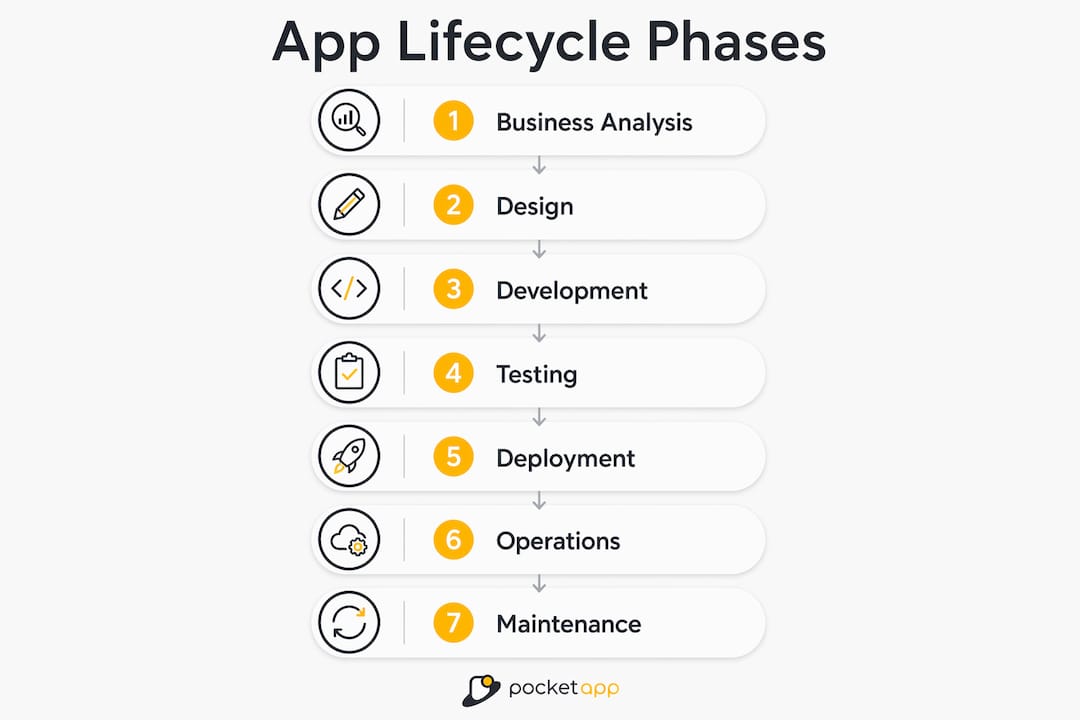
The feedback loops are where ALM earns its value. Monitoring data from operations feeds back into the design phase for the next release. User behaviour in production informs the business analysis for the following iteration. This is why ALM is often described as a cycle rather than a pipeline.
One distinction worth making explicit: SDLC sits inside ALM. The development and testing phases of ALM are where SDLC lives. ALM adds the business analysis at the front and the governance, compliance, and decommissioning at the back. Teams that treat ALM and SDLC as synonyms typically have strong build processes and weak retirement strategies, which is how legacy applications accumulate.
How does ALM differ from SDLC and mobile app management?
The three concepts are related but address different problems. SDLC is a methodology for building software correctly. ALM is a framework for managing software throughout its entire life. Mobile Application Management (MAM) is a security and policy layer applied to apps running on mobile devices, particularly in bring-your-own-device (BYOD) environments.
MAM enforces policies like remote wipes and encryption within app containers via embedded SDKs, running locally in the app process. This means corporate data can be protected on a personal device without the organisation needing to control the device itself. MAM sits within the operations phase of ALM, not across the whole lifecycle.
The table below clarifies the scope of each concept:
| Concept | Scope | Primary concern |
|---|---|---|
| SDLC | Build phase only | Code quality and delivery |
| ALM | Full application life | Governance, value, retirement |
| MAM | Device-level app security | Data protection on mobile devices |
Platforms like Microsoft Intune enable app protection policies and selective wipes to protect corporate data on personal devices, without requiring full device enrolment. This is a practical example of MAM operating within an ALM framework. The ALM governance layer decides which apps are permitted and what policies apply. Intune enforces those policies at the device level.
Pro Tip: If your organisation uses BYOD, map your MAM policies to the governance phase of your ALM framework before deployment. Retrofitting security policies after launch is significantly more disruptive than building them into the lifecycle from the start.
ALM also covers governance and compliance throughout the lifecycle, improving quality and reducing operational stress. This is the element most teams underestimate. Governance means knowing which version of an application is running where, who approved the last change, and what the retirement plan looks like. Without it, configuration drift becomes inevitable.
What are best practices for managing the mobile app lifecycle?
Effective mobile app lifecycle management rests on four disciplines: visibility, update management, security integration, and legacy planning.
Visibility into app versions is the foundation. Visibility into app versions is more effective than immediate lockdowns for maintaining mobile security. Knowing exactly which version of an application is running across your organisation tells you where vulnerabilities exist, which devices need updates, and which deployments have drifted from the approved configuration. Without this inventory, security responses are reactive rather than planned.
Update management requires a deliberate strategy. Android supports two in-app update flows: flexible updates download in background with a snackbar prompt, while immediate updates block app usage until installed. Flexible updates suit the vast majority of releases, where continuity matters more than urgency. Immediate updates are reserved for critical security patches where the risk of running an old version outweighs the disruption of forcing an install. Choosing the wrong flow for the wrong situation creates unnecessary friction with users.
Alongside update type, polling for updates should happen only during cold starts or specific resume events to save battery and network resources. Checking for updates on every screen transition is a common mistake that degrades performance without improving update adoption. For guidance on timing and frequency, Pocketapp's resource on app update frequency covers this in practical detail.
Security integration means treating the application itself as a secured container. Mobile app security works best when the application separates personal from corporate data, reducing user friction while maintaining policy compliance. Embedding security at the SDK level, as Microsoft Intune's SDK approach demonstrates, means protection travels with the app rather than depending on device configuration.
Legacy app planning is the discipline most organisations defer until it becomes a crisis. Legacy app limitations are common hurdles for ALM and MAM implementations, requiring tailored strategies. An application built five years ago may not support modern security SDKs. If that app handles sensitive data, the organisation faces a choice between a costly rebuild, a hybrid management approach, or accepting a security gap. Planning for this during the design phase, rather than discovering it at the operations phase, is the mark of mature lifecycle management.
Pro Tip: Build a simple app inventory register that tracks version, deployment location, last security review, and planned retirement date. This single document resolves most governance gaps and gives both product and IT teams a shared source of truth.
What challenges do organisations face with app lifecycle management?
The most common ALM challenges are fragmentation, configuration drift, legacy app support, and the emerging complexity of AI-driven applications.
Fragmentation occurs when different teams manage different phases of the lifecycle without a shared framework. Development ships a feature. IT deploys it. Security reviews it six months later. Nobody owns the full picture. The result is an application that works technically but drifts from its original governance baseline.
Configuration drift is the silent risk. Effective ALM covers governance and compliance throughout the lifecycle, improving quality and reducing operational stress. When the same application runs in slightly different configurations across ten deployment locations, diagnosing a production issue becomes exponentially harder. Governance frameworks that enforce version consistency and change approval prevent this from accumulating.
Legacy applications present a structural challenge. Legacy app limitations require hybrid management approaches that many organisations fail to plan until deployment. The honest answer is that some legacy applications cannot be brought into a modern ALM framework without significant rework. The practical response is to document those limitations explicitly, apply compensating controls, and set a realistic retirement timeline.
AI-adaptive applications introduce a newer challenge. AI agents and adaptive applications require continuous automated oversight post-deployment, differing from static apps. A traditional app behaves the same way after deployment as it did during testing. An AI-driven app may behave differently as its models update or its training data shifts. This means the operations phase of ALM must include ongoing behavioural monitoring, not just performance metrics.
"The organisations that manage their app portfolios most effectively are the ones that treat decommissioning as seriously as deployment. Every application you retire cleanly is a security risk you have eliminated."
Periodic audits, cross-team governance reviews, and clear ownership at each lifecycle phase are the practical mitigations. The enterprise app components that matter most in BYOD environments are those that embed governance into the application architecture from day one.
Key takeaways
App lifecycle management succeeds when governance, visibility, and security are built into every phase, not added after deployment.
| Point | Details |
|---|---|
| ALM is broader than SDLC | ALM covers governance, compliance, and retirement; SDLC covers only the build phase. |
| Visibility drives security | Maintaining an inventory of app versions across the organisation is more effective than reactive lockdowns. |
| Update strategy is a design decision | Choosing between flexible and immediate update flows should be decided at design time, not at release. |
| Legacy apps need a plan | Applications that cannot support modern security SDKs require documented hybrid approaches and retirement timelines. |
| MAM sits within ALM | Mobile Application Management handles device-level security; ALM governs the full application lifecycle. |
Why governance is the part of ALM most teams get wrong
Having worked across mobile app projects for over a decade, the pattern I see most consistently is this: teams invest heavily in development and almost nothing in governance. The build is meticulous. The retirement plan is a blank document.
The consequence is not dramatic. It is slow. Applications accumulate. Versions diverge. Security reviews find gaps that nobody owns. The product team thinks IT manages it. IT thinks the product team owns it. Neither is wrong, which is exactly the problem.
What I have found actually works is treating the decommissioning phase with the same rigour as the launch. That means setting a retirement date at the point of deployment, not when the app becomes a problem. It means building the app inventory register before you need it, not after a security incident forces the issue.
The other shift worth making is in how teams think about MAM and ALM together. MAM is not a substitute for lifecycle governance. It is one tool within it. Organisations that deploy Intune or a comparable platform and consider their ALM obligations met have solved the device security problem while leaving the governance problem entirely unaddressed.
The mobile app projects that age well are the ones where product, development, and IT share a single lifecycle document and review it together at each phase transition. That collaboration is not a process overhead. It is the mechanism that prevents the expensive, urgent fixes that consume far more time than the governance would have.
— Paul
How Pocketapp supports your app lifecycle from build to beyond

Pocketapp designs, builds, and supports mobile applications across the full lifecycle, from initial discovery through to long-term maintenance. With over 300 projects delivered for organisations including WWF, Dechra, and Crocus, the team brings both technical depth and strategic understanding to every engagement. Whether you need a new application built with governance baked in from the start, or an existing app brought into a structured lifecycle framework, Pocketapp offers the expertise to do it properly. Explore Pocketapp's mobile app development services to understand how a structured approach to lifecycle management can reduce operational risk and extend the value of your mobile investment.
FAQ
What is app lifecycle management in simple terms?
App lifecycle management is the process of overseeing a software application from its initial concept through development, deployment, maintenance, and eventual retirement. It ensures the application continues to serve business goals and remains secure and governable throughout its entire life.
How many phases does the app lifecycle have?
ALM typically includes seven phases: business analysis, design, development, testing, deployment, operations and maintenance, and decommissioning. Each phase feeds back into the others, making ALM a continuous cycle rather than a linear process.
What is the difference between ALM and SDLC?
SDLC covers only the build phase of a software project, focusing on how code is designed, written, and tested. ALM is broader, encompassing governance, compliance, business alignment, and retirement planning across the application's entire life.
Why is mobile app management different from full ALM?
Mobile Application Management (MAM) secures corporate data at the application layer on mobile devices, particularly in BYOD environments, using tools like the Microsoft Intune SDK. It addresses one phase of the lifecycle. ALM governs all phases, from concept to decommissioning.
What is the biggest risk of ignoring app lifecycle management?
The primary risk is configuration drift, where the same application runs in diverging states across deployment locations, creating security gaps and operational instability. Governance and traceability across the lifecycle are the direct mitigations for this risk.