
Mobile A/B testing means splitting your users into groups, showing each group a different version of a feature, and measuring which one improves a chosen metric like conversion or retention, as UK government guidance on comparative testing outlines. For production apps, favour server-side experiments controlled by feature flags rather than client-side variants baked into a build. Before applying changes to live traffic, pick one hypothesis, confirm your analytics events fire correctly, and only then open the test to real users.
TL;DR:
- Mobile A/B testing is most effective when used for high-impact areas like onboarding, checkout, push notifications, recommendations, and paywall placement, where errors can significantly affect metrics.
- Server-side decisioning and feature flags are essential for reliable mobile experimentation, allowing quick rollout, easy reversion, and deeper tests without app store delays.
- Proper test planning involves hypothesis formulation, metric selection, thorough event validation, conservative launch, and gradual rollout, with an emphasis on keeping results trustworthy through effortful sample size and timing considerations.
- Choosing the right experimentation platform requires native SDK quality, offline caching, deterministic assignment, and seamless analytics integration, not just feature set or popularity.
- Starting with simple, low-stakes tests—such as CTA placement or push send times—helps teams learn workflows and build a robust experimental infrastructure before tackling complex features.
Table of Contents
- What is mobile A/B testing and when should you use it?
- How does server-side mobile A/B testing actually work?
- How do you plan and run a mobile A/B test step by step?
- What sample size and statistical rules should you follow?
- What should you require from an A/B testing tool or platform?
- Which starter experiments should you run first?
- How Pocketapp approaches mobile experimentation
- Why most teams get mobile experimentation backwards
- Get help building your experimentation infrastructure
- Sources
- FAQ
What is mobile A/B testing and when should you use it?
Mobile A/B testing is most effective in specific situations rather than being used everywhere simultaneously. Prioritize running it where the cost of error is significant and traffic volume allows reaching conclusions efficiently.
The strongest use cases include:
- Onboarding flows, where a single extra screen can cost you a quarter of new sign-ups
- Checkout and payment steps, where friction directly costs revenue
- Push notification timing and copy, where send windows change open rates dramatically
- Recommendation algorithms, where small ranking tweaks shift engagement across an entire session
- Pricing and paywall placement, where the wrong moment kills conversion before value is proven
Mobile experiments differ from web experiments in ways that catch teams out. Web can ship a new variant instantly; mobile apps live behind app store review, so a client-side-only test is stuck with whatever code shipped weeks ago. Users also go offline mid-session, so variant assignment has to persist locally, not just live on a server call. And you are testing across fragmented SDK versions and OS releases, not one browser engine.
Decide early whether you need a quick UI test (button copy, layout order, colour) or a deep feature experiment (a new recommendation model, a restructured checkout). Quick UI tests can often run client-side with a lightweight remote config tool. Deep feature experiments, especially anything touching backend logic or business rules, need server-side decisioning from the start. Getting this distinction wrong is the single most common reason mobile experimentation programmes stall after the first few tests. For more on where experimentation fits inside a broader retention plan, see this guide on improving app UX for retention.
How does server-side mobile A/B testing actually work?
Server-side decisioning is the backbone of reliable mobile experimentation. The server, not the app binary, decides which variant a user sees, which avoids the flicker problem where a client briefly renders the wrong version before switching, and it supports far deeper experiments than a UI tweak, according to LaunchDarkly's mobile testing guidance. If a variant misbehaves, you flip it off from a dashboard. No app store resubmission, no waiting on Apple's review queue.
Your SDK still carries real responsibilities even though the server makes the call. It needs to:
- Fetch and cache variant assignments so users see a consistent experience offline
- Report exposure and outcome events back to your analytics pipeline reliably
- Handle assignment keys deterministically, using a stable user ID or device ID so the same person always lands in the same bucket across sessions, a requirement LaunchDarkly flags as essential for mobile reliability
- Degrade gracefully to a sensible default when the network is unavailable
Coverage across platforms matters more than most teams expect going in. iOS and Android each need native SDK integration with attention to init latency; React Native and Flutter need a bridging layer that does not introduce lag on cold start. An SDK that significantly increases your app's launch time can negatively impact crash and retention metrics before affecting experiment results.
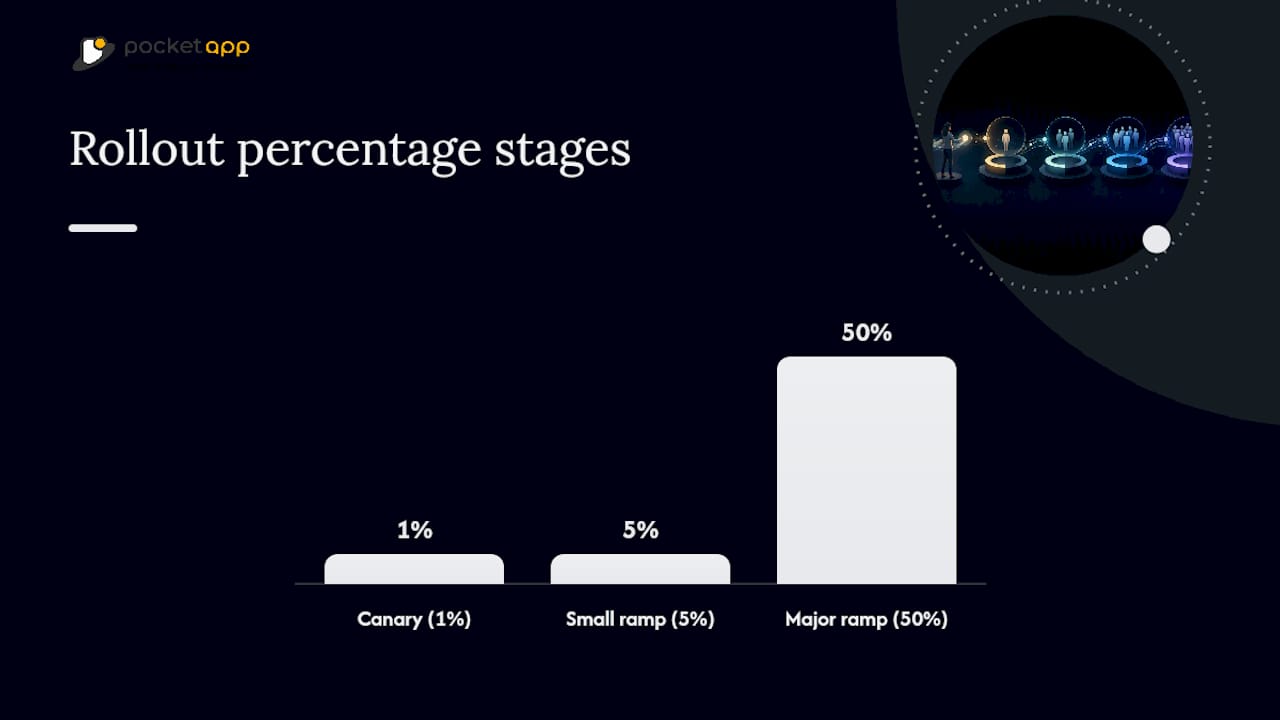
Feature flags and percentage rollouts are the actual rollout mechanism underneath all of this. Rather than shipping a binary "on or off" release, you ramp a new experience from 1% to 5% to 50% of users, watching guardrail metrics at each step, and this decouples your experimentation cadence entirely from your app store release cadence, as Optimizely's work on feature management and experimentation points out. A test that would normally require a two-week release cycle can start this afternoon.
Pro Tip: Build your rollback plan before you build your rollout plan. If you cannot answer "how do we get everyone back to the control variant in under five minutes if crash rate spikes," you are not ready to expose real traffic yet.
How do you plan and run a mobile A/B test step by step?
A workable mobile A/B test follows the same sequence every time. Skipping a step here is where most failed tests actually fail, long before anyone looks at a p-value.
- Write the hypothesis first. State the change, the expected direction of effect, and the primary metric it should move. "Removing the optional profile photo step increases day-1 activation" is testable; "improve onboarding" is not.
- Choose one primary metric and two or three guardrails. Your primary metric might be checkout conversion; your guardrails should include crash rate, app store rating triggers, and a retention metric that would catch a change that wins short-term and loses long-term.
- Instrument and validate events before opening traffic. Fire the events in a staging build, confirm they land in your analytics tool with correct properties, and check them against a dashboard you trust. Pairing this with direct qualitative user testing at this stage helps you understand why a change might move a number, not just whether it did, a combination UserTesting's research on mobile experimentation recommends.
- Configure segmentation and traffic split through your feature flag tool. Decide who is eligible (new users only? a specific platform? a specific region?) and what percentage each arm receives.
- Launch at a conservative percentage and monitor safety signals first. Watch crash rate and error logs for the first 24 to 48 hours before you trust any conversion number.
- Let the test run to its planned duration, then evaluate statistical significance alongside practical significance: does the win justify the engineering cost of keeping two code paths alive?
- Roll out the winner via your feature flag, ramping gradually rather than flipping to 100% instantly, and keep the rollback switch live for at least a week after full rollout.
- Document the result and the reasoning, win or lose, so the next team does not re-run a test you already have an answer for.
Pro Tip: Treat a "no difference" result as a real finding, not a failure. Knowing that a redesign made no measurable difference frees your roadmap for the next hypothesis instead of leaving that question open forever.
Mobile experimentation requires developer involvement at nearly every stage because variants are typically coded and assignment logic runs server-side., a point the Adjust team makes about mobile testing specifically. Budget for that engineering involvement upfront rather than discovering it mid-test.
What sample size and statistical rules should you follow?
Pick your primary KPI before you look at any data, and keep it singular. Conversion rate, day-7 retention, or crash-free session rate each make a fine primary metric; trying to optimise for all three at once just means you will find a story to justify whatever the data shows.
Calculating minimum detectable effect (MDE) matters more for mobile than most teams realise, because mobile conversion events are often rarer than web ones. Calculate required sample size before starting tests to estimate the necessary duration.
A few operational rules keep results trustworthy:
- Run tests long enough to cover multiple business cycles to smooth out weekday and weekend behaviour differences, a duration guideline Kameleoon's research on mobile app testing recommends
- Avoid checking results too frequently or stopping early even if outcomes appear positive, as this increases false-positive risk.
- Avoid running multiple overlapping tests on the same user segment without accounting for interaction effects between them
- Watch for platform splits, since an iOS-only effect hiding inside a combined result can mislead you about what actually worked
Insufficient sample size and premature stopping are the two most common practitioner mistakes in mobile experimentation, and both are avoidable with a plan set before launch rather than a decision made mid-test, Adjust's guidance on mobile A/B testing notes. Preliminary significance observed early in testing often diminishes with further data collection.
What should you require from an A/B testing tool or platform?
Choosing an experimentation platform is really a checklist exercise against your existing stack, not a popularity contest. Start from technical fit, not feature marketing.
Require these from any tool you evaluate:
- Native SDK quality on iOS, Android, and whichever cross-platform framework you use, with documented init latency and binary size impact
- Offline handling that caches assignments locally and behaves predictably when connectivity drops
- Deterministic assignment keyed to a stable user or device identifier, so the same person always lands in the same variant
- Flexible targeting keys covering user attributes, platform, app version, and custom segments
- Analytics and data warehouse integration, so experiment results land next to the rest of your product data rather than in an isolated dashboard
- CI/CD and security compatibility, particularly if flags gate features touching regulated data
Practitioner tool evaluations consistently flag SDK quality (init latency, footprint, offline behaviour) and analytics integration as the two criteria that separate tools that work in production from ones that look good in a demo, UXCam's review of mobile testing tools found. Firebase's approach, for instance, pairs Remote Config with Cloud Messaging so UI and notification experiments share one gradual rollout and monitoring layer, Google's own documentation explains, which is a useful reference point for what "integrated" should mean in practice.
Do not overlook the operational side either: pricing model (per monthly active user versus per seat), support responsiveness, and SLA terms all shape whether the tool survives contact with a real incident at 2am.
Which starter experiments should you run first?
Start with tests that are cheap to build and easy to read, so your team learns the workflow before tackling anything architecturally complex.
- Guest checkout versus required sign-up at onboarding, measuring day-1 activation and week-1 retention against each other
- Primary CTA text and placement on your highest-traffic screen, a low-risk test that teaches your team the full flag-to-analysis pipeline
- Push notification send windows and message variants, comparing morning versus evening sends and directive versus curiosity-led copy
- Small ranking tweaks behind a feature flag in search or recommendations, exposed to a small percentage first to catch any regression before it reaches everyone
Each of these maps to a genuinely common UX optimisation lever, and none requires a new backend service to test. Get one of these live end-to-end before attempting anything that touches checkout logic or pricing.
How Pocketapp approaches mobile experimentation
Across more than 300 delivered projects for various brands, a mobile app development company has built experimentation thinking into discovery from day one rather than bolting it on after launch. Strategic discovery workshops identify the hypotheses worth testing before a line of code gets written, and every build includes the analytics instrumentation needed to validate events long before real traffic touches a feature flag.
Agile build cycles mean experiment infrastructure, SDK integration, and telemetry validation happen alongside core development, not as an afterthought once a feature ships. That approach reflects why clients keep returning: robust, user-focused apps delivered within tight deadlines, with the measurement layer already built to answer the next product question.
Why most teams get mobile experimentation backwards
Most advice on A/B testing still treats mobile like a slightly slower version of web testing, and that assumption causes more failed programmes than bad statistics ever do. Web culture trained product teams to expect instant iteration: change a variant, redeploy, watch the number move. Mobile does not work that way, and pretending otherwise is why so many teams give up on experimentation after two or three frustrating cycles stuck behind app store review.
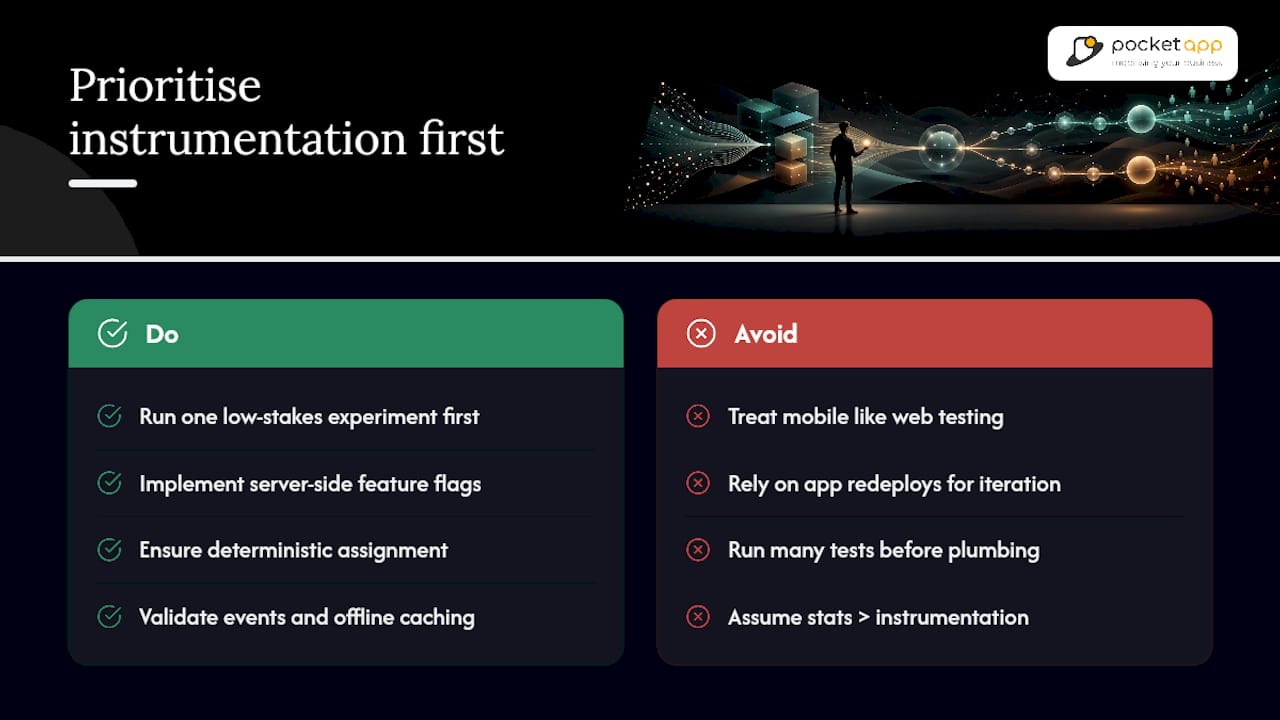
The conventional advice to "just run more A/B tests" also skips the actual bottleneck, which is rarely statistical rigour. It is instrumentation. A team can understand sample size maths perfectly and still produce useless results because nobody validated that the conversion event fires correctly before opening traffic to a test.
What should the reader prioritise first? Get server-side decisioning and feature flags working reliably on one low-stakes experiment before chasing anything ambitious. That unglamorous plumbing, deterministic assignment, offline caching, clean event validation, is what separates teams running a genuine experimentation programme from teams that ran one interesting test eighteen months ago and never repeated it.
— Paul
Get help building your experimentation infrastructure
If your team is weighing up whether to build server-side decisioning and feature flag infrastructure in-house or bring in specialist support, some providers offer a direct route to production-ready experimentation without the months of trial and error that usually come with a first attempt. Unlike assembling a patchwork of vendor SDKs and hoping they integrate cleanly, Pocketapp builds the instrumentation, analytics pipeline, and SDK integration as part of the app itself, so telemetry validation and experiment readiness are baked in from the first sprint rather than retrofitted later.

Pocketapp's mobile app development service covers the discovery workshops, backend architecture, and cross-platform build work needed to support server-side experimentation properly across iOS, Android, and hybrid frameworks. If you are planning a new app build or need to retrofit experimentation into an existing one, get in touch for a consultation and find out what a properly instrumented rollout could look like for your product.
Sources
- A/B testing and comparative studies guidance
- Mobile app A/B testing — LaunchDarkly blog
- A/B testing for mobile apps — Adjust blog
FAQ
What are the best A/B testing platforms for mobile apps?
The strongest platforms combine native SDK quality with offline handling, deterministic assignment, and analytics integration rather than any single standout feature. Evaluate against your existing stack first, since the "best" tool depends heavily on which analytics and data warehouse systems you already run.
Does Netflix use A/B testing?
Streaming and consumer apps at that scale run continuous experimentation on everything from thumbnail artwork to recommendation ranking, treating it as a permanent part of product development rather than an occasional project. The same server-side, feature-flag-driven approach covered in this guide underpins that kind of large-scale testing programme.
What are some good mobile apps for testing experiments?
Rather than naming specific consumer apps, look at the categories that suit experimentation best: apps with high daily traffic, a clear conversion or retention metric, and existing analytics instrumentation. Onboarding-heavy apps and anything with a checkout flow tend to generate results fastest.
Should I turn on A/B testing on Facebook for my app?
Facebook's own advertising and app testing tools work well for marketing-level experiments, such as ad creative or install campaign variants, but they are not a substitute for server-side product experimentation inside your own app. Use them for acquisition testing and keep in-app feature experiments on a dedicated feature flag and analytics setup you control directly.
How long should a mobile A/B test run?
Run tests for at least two full business cycles to account for weekday and weekend behaviour differences, and never stop early just because early results look promising. Confirm the sample size needed for your minimum detectable effect before launch so you know the realistic timeline going in.