
TL;DR:
- App usability testing reveals why users abandon or struggle with app flows.
- Combining qualitative and quantitative metrics helps identify and fix user experience issues.
- Continuous testing and real-world conditions improve mobile app design and user satisfaction.
Your analytics dashboard shows a 60% drop-off rate at checkout. You know users are leaving, but you have no idea why. This is the fundamental gap that traps product teams: data tells you what is happening, but it cannot tell you why. Bug trackers catch crashes, A/B tests compare variants, and funnel reports highlight abandonment, but none of these reveal the moment a user squinted at a label, tapped the wrong button three times, or simply gave up because the flow felt wrong. App usability testing fills that gap by putting real people in front of your app and watching what actually happens.
Table of Contents
- What is app usability testing?
- Core methods and formats: How app usability testing works
- What does app usability testing measure? Key metrics and KPIs
- Usability testing, UAT, and benchmarking: Clear distinctions and standards
- Best practices for realistic mobile usability testing
- Why great usability testing requires courage—and what most teams get wrong
- Enhance your mobile app with expert usability testing and design
- Frequently asked questions
Key Takeaways
| Point | Details |
|---|---|
| Usability testing defined | It means observing real users as they complete app tasks to spot friction and confusion. |
| Methods and formats | Choose moderated for deep insight, unmoderated for scale—using realistic devices and tasks. |
| Critical KPIs | Track success rates, time on task, and tap errors to get actionable feedback for app improvement. |
| Benchmarking standards | Tools like SUS help you compare user experience across releases or against competitors. |
| Real-world simulation | Effective tests mimic user context and avoid helping, surfacing genuine problems that analytics miss. |
What is app usability testing?
App usability testing is structured observation of real users performing realistic tasks within your application. It is not about asking users whether they like the design or collecting star ratings after a release. It is about watching someone try to complete a booking, a registration, or a product search, and noting every hesitation, wrong tap, and moment of confusion along the way.
The core objectives are straightforward but powerful:
- Reveal confusing UI patterns that users encounter but rarely report
- Identify unclear flows where intended pathways differ from actual behaviour
- Expose missed actions or errors that cause task failure
- Target navigation decisions that slow users down or send them in circles
- Pinpoint the precise moments where users lose confidence or quit
As usability testing research confirms, the practice is about observing real users as they attempt typical tasks, to find friction, confusion, or errors. This is a fundamentally different discipline from quality assurance testing, which checks for technical correctness, or from analytics, which records aggregate patterns without context.
"The design intent and the actual user experience are frequently two entirely different things. Usability testing is how you find out which one is real."
Understanding the importance of user feedback is where most product teams begin to shift their thinking. Feedback gathered through usability testing is not anecdotal; it is observed behaviour, which is far more reliable than asking users to self-report their experience after the fact.
Core methods and formats: How app usability testing works
Knowing what usability testing is leads naturally to the question of how it works in practice. There are several formats, and choosing the right one depends on your timeline, the questions you need answered, and the resources your team can commit.
Moderated testing places a facilitator alongside the participant, either in person or over a video call. The facilitator guides the session, asks follow-up questions, and can probe unexpected behaviour in real time. This format is invaluable when you need to understand not just what a user does but why they did it. The trade-off is time: sessions take longer to recruit for, run, and analyse.
Unmoderated testing asks participants to complete tasks independently, recording their screen and audio for later review. Teams can run these studies at scale and at speed, which makes them practical when you need broad signal quickly. The limitation is that you cannot probe in the moment, so nuanced confusion may go unexplained.
| Format | Best for | Key advantage | Key limitation |
|---|---|---|---|
| Moderated in-person | Deep behavioural insight | Rich qualitative data, live probing | Time-intensive, small sample |
| Moderated remote | Distributed teams, faster recruitment | Real-time insight at lower cost | Technical setup required |
| Unmoderated remote | Scale, speed, early-stage research | High volume, quick turnaround | No live probing capability |
| Unmoderated in-person | Controlled environment testing | Realistic conditions, no facilitator bias | Requires lab or controlled space |
Research into usability testing formats confirms that moderated and unmoderated methods each have unique strengths, and finding the right fit depends on probing needs. For most mobile teams, a mixed approach works best: unmoderated tests to catch the obvious issues early, followed by moderated sessions to investigate complex or unexpected findings.
For iterative mobile app design, running short usability tests at each design iteration rather than a single large study at the end produces far better outcomes. It keeps feedback close to decisions rather than arriving too late to influence them.
Pro Tip: During moderated sessions, resist the urge to explain or assist when a user struggles. The moment you intervene, you lose the data. Silence is uncomfortable but essential. What you learn from watching someone genuinely confused is worth far more than a smooth session that produces no insight.
Mobile testing also demands attention to context. Users interact with apps on the bus, in bright sunlight, with one hand, or on slow networks. Replicating these real-world conditions during testing reveals friction that a perfectly lit, fully connected lab session will never surface.

What does app usability testing measure? Key metrics and KPIs
With formats understood, the next practical question is what to measure. Usability testing generates both qualitative and quantitative data, and the strongest programmes use both deliberately.
Key quantitative metrics include:
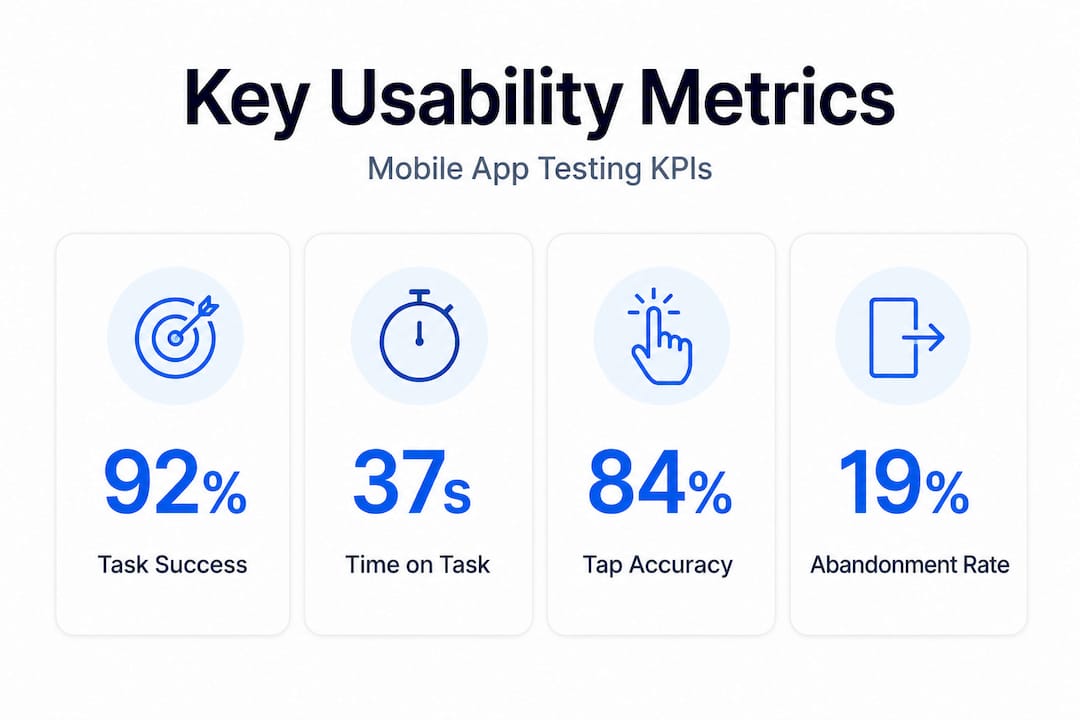
- Task completion rate: The percentage of users who successfully finish a defined task. This is the clearest signal of whether a flow works.
- Time on task: How long it takes users to complete each task. Longer is not always worse, but significant variation between users often signals confusion.
- Tap accuracy: How frequently users tap the correct element on the first attempt. High error rates on a specific control indicate a design problem, not a user problem.
- Abandonment rate: The point at which users give up. Knowing where abandonment occurs is far more actionable than knowing it happens.
- Number of screens visited: When users visit more screens than a task should require, it signals a navigation or signposting failure.
As outlined in mobile usability testing research, task success rate, time on task, tap accuracy, and abandonment rate are the crucial metrics for mobile usability tests. These figures give you a repeatable baseline you can track across design iterations.
Qualitative data, the verbal commentary, facial reactions, and spontaneous statements users make during sessions, tells you why those numbers are what they are. A high abandonment rate at the payment screen means something very different if users are confused about security versus frustrated by the number of form fields. Only qualitative observation can make that distinction.
Understanding how to improve app UX depends on treating these two data types as complementary rather than choosing one over the other. Quantitative data identifies where problems exist; qualitative data explains what to do about them. Strategies for mastering app feedback reinforce this dual approach across design cycles.
Usability testing, UAT, and benchmarking: Clear distinctions and standards
A source of persistent confusion in many product teams is the relationship between usability testing and User Acceptance Testing (UAT). They sound similar and often take place at similar points in a project, but they serve entirely different purposes.
UAT is a validation exercise. Business stakeholders confirm that the application meets the agreed requirements and behaves as specified. A user clicks a button, the right screen appears, the correct data is saved. UAT is pass or fail against a defined checklist. As research confirms, usability testing differs from UAT fundamentally: one focuses on user-friendliness, the other on requirement validation. A product can pass UAT completely and still be genuinely difficult to use.
This distinction matters enormously for mobile teams. Shipping an app that technically meets all requirements but confuses users in the first thirty seconds is a costly mistake. UAT does not catch that. Usability testing does.
Benchmarking adds another layer of rigour. Rather than treating each test as an isolated event, benchmarking tracks usability performance over time, comparing scores across design iterations or against industry standards. The System Usability Scale (SUS) is one of the most widely used tools for this purpose. It is a ten-item questionnaire that produces a score from zero to one hundred, where a score above 68 is considered above average. Standardised tools like SUS allow benchmarking across products and design iterations, giving teams an objective, comparable measure of progress.
For teams working on accessible mobile app design, standardised benchmarking is particularly valuable because it creates accountability around usability for diverse user groups, not just the majority experience.
Best practices for realistic mobile usability testing
Understanding formats and metrics is necessary, but usability testing only delivers value when it is executed thoughtfully. Here are the practices that consistently separate productive testing from wasted effort.
-
Test on real devices in realistic environments. Emulators and browser previews do not replicate the physical experience of tapping a small target on a glass screen. As mobile UX research demonstrates, real device testing combined with authentic tasks and diverse conditions is essential for uncovering mobile-specific UX problems. Thermal throttling, screen brightness variation, and touch sensitivity differences between devices all affect user experience.
-
Write tasks that mirror actual usage scenarios. Avoid instructional language that leads users. "Log in and find your order history" is a realistic task. "Click the account icon in the top right corner" is not a task; it is a tutorial. Tasks should describe a goal, not a method.
-
Test key flows under common failure conditions. What happens when a user enters the wrong password? What does your app look like on a slow 3G connection? Failure states are often designed last and tested least, yet they are the moments that most affect user trust.
-
Recruit diverse, representative users. Testing only with colleagues or people who match your ideal customer profile will systematically miss accessibility barriers, age-related challenges, and the wide variation in digital confidence that exists in real user populations.
-
Iterate your test design. After the first round of sessions, review your tasks and scripts. If a task was misunderstood by multiple participants, the task itself may be the problem, not the app. Refining your methodology between rounds sharpens the quality of subsequent findings.
-
Prioritise user flow in app design when selecting which tasks to test. Core flows with high traffic and high business value should be tested first. Peripheral features can wait.
Pro Tip: Record every session, even unmoderated ones, and review recordings as a cross-functional team. Watching a real user struggle with a flow you designed is one of the fastest ways to build shared team commitment to fixing it. Design decisions that survive committee debate often collapse after thirty seconds of watching a user fail.
Good app design tips consistently align with usability testing findings precisely because the best design decisions are grounded in observed behaviour rather than assumption.
Why great usability testing requires courage—and what most teams get wrong
After years of working across hundreds of mobile projects, one pattern emerges reliably: teams that get the most from usability testing are the ones willing to be genuinely surprised by the results.
The most common failure mode is not poor methodology. It is using testing as a confirmation exercise rather than a discovery one. Teams run a study hoping to validate a design they have already committed to, then unconsciously filter the findings to support that conclusion. When a participant struggles, it gets attributed to individual unfamiliarity. When three participants struggle with the same element, it is described as "something to monitor." This is not usability testing. It is expensive reassurance.
The second most common mistake is testing in conditions that do not reflect reality. An app that works beautifully on a new flagship device, used by a designer who knows exactly what it is supposed to do, in a quiet room with a strong Wi-Fi connection, will always perform well. That is not useful information. The value of testing comes from the discomfort of watching someone who does not share your mental model try to navigate what you built.
A third pitfall involves timing. Many teams treat usability testing as a pre-launch checkbox rather than a continuous practice. The teams that derive real competitive advantage from testing do so throughout development, treating crafting engaging user experience as an iterative discipline rather than a one-time event. Finding a critical navigation failure in week three of a project costs a few hours of redesign. Finding it after launch costs users, ratings, and revenue.
Facing negative findings early is less costly in every dimension. The courage required is not the courage to test. It is the courage to act honestly on what the testing reveals.
Enhance your mobile app with expert usability testing and design
If this guide has made one thing clear, it is that effective usability testing requires the right processes, the right metrics, and the willingness to act on difficult findings. For product managers and designers who want to move quickly without compromising quality, working with an experienced partner accelerates every stage of this process.

At Pocket App, our mobile app development expertise spans over 300 projects across retail, healthcare, charity, and consumer engagement. We bring structured usability testing into every stage of the design and build process, not as an afterthought but as a core discipline. Our team of UX and UI specialists combines observational testing, benchmarking, and iterative design to produce apps that users genuinely find easy and satisfying to use. If you want to build an app that performs as well for users as it does in your analytics, explore our professional app design services and let us show you what evidence-led design looks like in practice.
Frequently asked questions
Is usability testing essential for every mobile app project?
Yes; without it, critical user experience flaws often go undetected until launch, risking user frustration and lower retention. As analytics alone rarely reveal why users struggle, usability testing exposes the hidden issues that data cannot.
What's the difference between usability testing and user acceptance testing (UAT)?
UAT checks whether business requirements are met, but usability testing reveals whether real users can achieve their goals easily and comfortably. These are distinct purposes in product validation and should not be treated as interchangeable.
How many users do I need for effective app usability testing?
Testing with 5 to 8 diverse users often surfaces most major usability issues, though the complexity of your app and the breadth of your user base may mean additional rounds with different participant profiles are worthwhile.
Which usability metrics are most important for mobile apps?
Success rate, time on task, tap accuracy, and abandonment rate best reveal usability obstacles in mobile environments. Research confirms that key performance indicators for mobile usability include success rates and error frequencies as the most actionable signals.
Can I do mobile usability testing remotely?
Yes; remote tests are common and cost-effective, though moderated studies offer deeper insight when you need live probing. Moderated and remote studies both play a valid role depending on what questions your team needs answered.