
TL;DR:
- Getting your retail app into customers' hands involves complex steps like code signing, documentation, and store approvals that can delay launches. Proper preparation, staged rollouts, and post-launch monitoring are essential to ensure a smooth deployment process and maintain customer trust. Common pitfalls include missing privacy policies and rushing deployment, which can cause significant setbacks and app rejection.
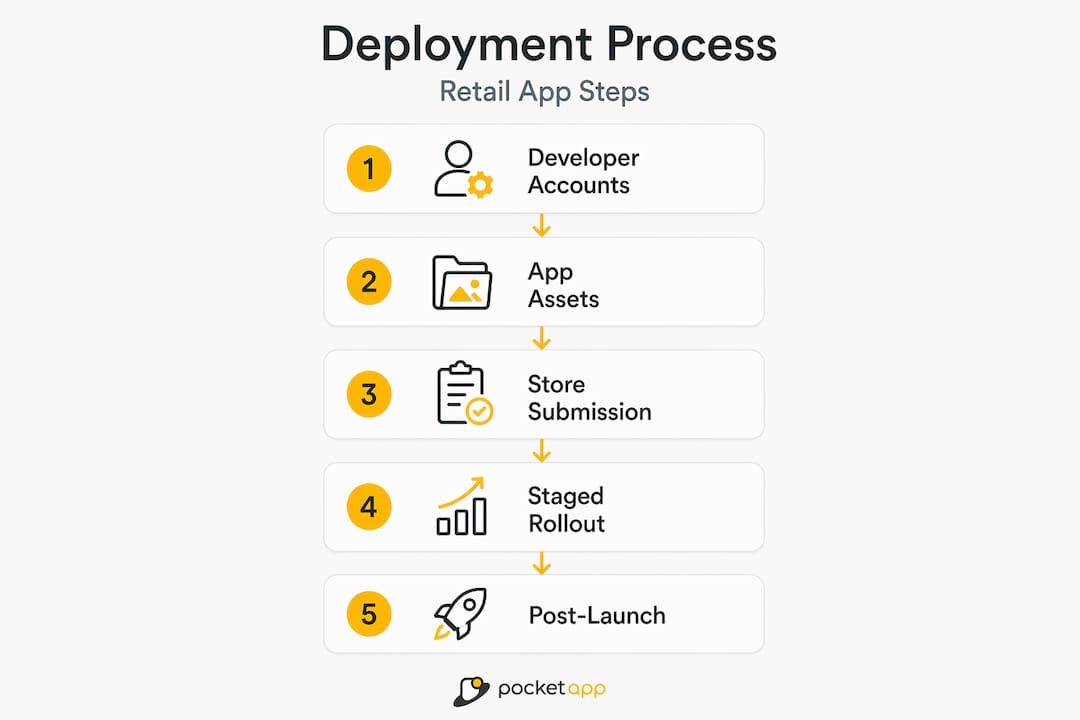
Getting your retail app into customers' hands sounds straightforward until you realise the retail app deployment process involves code signing, platform-specific reviews, compliance documentation, and staged rollouts, all before a single user taps "download." Unlike publishing a website, mobile app deployment means producing signed binaries, submitting to store gatekeepers, and waiting for approval timelines that can stretch from 24 hours to over a week. This guide walks you through every critical stage, from pre-deployment preparation to post-launch verification, so you avoid the pitfalls that delay retail launches and damage customer trust.
Table of Contents
- Key takeaways
- The retail app deployment process: getting prepared
- Submitting your app to iOS and Android stores
- Staged rollouts and update deployment
- Post-deployment verification and optimisation
- My honest take on what actually trips retailers up
- How Pocketapp can help with your retail app launch
- FAQ
Key takeaways
| Point | Details |
|---|---|
| Preparation prevents costly delays | Set up developer accounts, privacy policies, and metadata assets well before submission day. |
| Platform review timelines vary | Apple reviews average 24 to 72 hours; Google Play typically takes 1 to 7 days. |
| Staged rollouts reduce launch risk | Release to a small percentage of users first, then expand after monitoring crash rates. |
| Post-deployment monitoring matters | Track app health metrics and respond to user reviews to sustain engagement after launch. |
| Privacy policy readiness is non-negotiable | A broken or missing privacy policy URL will cause Apple to reject your submission outright. |
The retail app deployment process: getting prepared
In software engineering, the formal term for this entire activity is application release management, though most developers and retailers simply call it deployment. Whatever you call it, the preparation stage is where most retail app launches either succeed or quietly fall apart before they begin.
You need two active developer accounts before anything else: an Apple Developer account (£99 per year) and a Google Play Console account (a one-time £25 fee). These are not optional extras. Without them, there is no submission, no review, no app in the store.
Beyond accounts, gather everything in the table below before writing a single line of store listing copy.
| Asset | Platform | Notes |
|---|---|---|
| Signed .ipa binary | iOS | Produced via Xcode with a valid distribution certificate |
| Signed .aab bundle | Android | Generated with a release keystore; never lose this file |
| Privacy policy URL | Both | Must be publicly accessible over HTTPS |
| App screenshots | Both | Correct dimensions per device size; mandatory for listing approval |
| App description copy | Both | Up to 4,000 characters on Google Play; 4,000 on App Store |
| Age rating information | Both | Completed via in-platform questionnaire |
One asset retailers consistently underestimate is the privacy policy. Apple requires the URL to be reachable over HTTPS, not hidden behind a login or blocked by geofencing. A missing or broken link triggers metadata rejection and adds days to your timeline.
Pro Tip: Host your privacy policy on your own domain with a noindex tag if you want to keep it out of search results before launch. It remains publicly accessible for Apple's review crawler while staying invisible to Google.
You also need to decide on your app's wrapper technology and build configuration before submission. If your retail app needs to function when the shop floor has no internet connection, offline-capable deployment should be built in from the start, not added as an afterthought. Offline mode affects how your app is structured, tested, and ultimately how it behaves during an update rollout.
Submitting your app to iOS and Android stores
With your assets prepared, the actual submission process follows a clear sequence. The key is understanding that app store deployment differs fundamentally from web deployment: you are not pushing files to a server. You are requesting permission from a gatekeeper.
Here is how the process unfolds for both major platforms:
-
Upload your binary. For iOS, use Xcode or Transporter to upload your signed .ipa to App Store Connect. For Android, upload your signed .aab via the Google Play Console under "Production" or your chosen track.
-
Complete the store listing. Write your app title, short description, full description, and select the correct category. Retail apps typically fall under "Shopping" or "Business." Screenshots for every required device size are mandatory.
-
Fill in compliance forms. Apple requires you to declare encryption usage and confirm your app complies with export laws. Google Play requires you to complete the Data Safety form, disclosing exactly what user data your app collects and why.
-
Set your privacy policy URL. Paste in your live, HTTPS-accessible policy link. Double-check it resolves correctly before submitting. This single step causes more rejected submissions than almost any other.
-
Submit for review. On Apple, production review averages 24 to 72 hours, though the full production timeline including account setup runs closer to 7 to 10 days. On Google Play, review takes 1 to 7 days, and Google recommends at least 14 days of closed testing before pushing to production.
-
Respond to review feedback. If either platform rejects your build, you will receive a reason. Common causes include missing privacy links, incorrect version codes, and screenshots that do not match the actual app functionality. Address the issue and resubmit.
Pro Tip: Before submitting to production on Android, run a closed test with real users for at least two weeks. This catches crashes that internal testing misses and signals to Google Play's algorithm that your app is stable, which can positively influence review priority.
If you are working with your own development team or an agency, automated mobile CI/CD pipelines can handle the build, signing, and distribution steps programmatically, reducing human error considerably.
Staged rollouts and update deployment
Pushing a new retail app, or a significant update, to 100% of your users on day one is rarely the wisest approach. A single undiscovered bug affecting checkout or loyalty point redemption can generate a wave of one-star reviews before you have time to diagnose the problem.

The better approach is progressive delivery. This means releasing to a small subset of users first, watching the data, and expanding gradually.
| Rollout strategy | Initial exposure | Best for | Key risk |
|---|---|---|---|
| Phased Google Play release | 1% to 5% | Major updates with significant code changes | Slower reach; requires active monitoring |
| Full production release | 100% immediately | Minor bug fixes and content-only updates | No containment if critical issues appear |
| TestFlight (iOS) | Invited users only | Pre-release validation before App Store submission | Limited to 10,000 external testers |
| Closed testing track | Defined group | Android beta validation with real shoppers | Requires managing tester opt-ins |
Google Play's staged rollout feature lets you limit initial exposure to as little as 1%, then expand in steps such as 5%, 25%, 50%, and finally 100% over roughly 72 hours, pausing at each stage to review crash rates and user feedback. Enterprise retail platforms like Oracle Xstore take a similar approach, using scheduled deployment waves to roll out store-level updates in controlled phases rather than applying changes across all locations simultaneously.
Pro Tip: Align your major app updates with quieter retail periods. Launching a significant update on Black Friday week or during a peak sale is asking for trouble. Schedule releases during low-traffic windows so your team has time to monitor and respond.
Build rollback capability into your process from the start. Automated rollback and progressive delivery are not luxuries. They are the difference between a minor incident and a front-page customer service failure. On Google Play, you can halt a staged rollout at any percentage and retain the previous version in production while you investigate.
For pre-launch strategies that build confidence before you even reach the rollout stage, the groundwork laid during beta testing directly informs how aggressively you can push the initial release percentage.
Post-deployment verification and optimisation
Going live is not the finish line. The period immediately after launch is when you learn whether your deployment actually delivered on its promise.
Watch these metrics closely in the first 72 hours after any release:
- Crash rate. Both App Store Connect and Google Play Console surface crash reports in near real time. A crash rate above 1% in a new release warrants pausing the rollout and investigating immediately.
- App adoption rate. How many users have updated to the new version? Slow adoption often signals that users are disabling automatic updates, which can be a sign of distrust from a previous poor release.
- User reviews. New reviews spike after a release. A sudden pattern of complaints pointing to the same feature or flow tells you exactly where to focus your bug-fixing efforts.
- Performance metrics. Monitor app start time, screen load speeds, and API response times through your analytics platform. Degraded performance after a release often points to an unoptimised new feature rather than a deeper code issue.
Understanding why user experience directly affects retail outcomes is what separates retailers who treat post-deployment monitoring as routine maintenance from those who see it as a strategic driver.
Scheduling regular updates is also part of an effective deployment strategy. Apps that go months without updates signal neglect to both users and app store algorithms. Knowing how often to update your app and timing those updates around retail cycles gives you a genuine competitive edge.
My honest take on what actually trips retailers up
I have worked on enough retail app launches to spot the patterns that turn a promising deployment into a drawn-out ordeal. The technical steps are learnable. The organisational ones catch people off guard.
The single most underestimated factor is privacy policy readiness. Retailers invest months in app design and development, then hit Apple's review wall on day one because the privacy policy URL was never properly set up or points to an internal page that the App Store crawler cannot reach. That is a week of delay, often during a launch window tied to a marketing campaign.
The second pattern I see is the instinct to rush full deployment. I understand the commercial pressure. You have spent budget, you have a launch date in the marketing calendar, and staged rollouts feel like caution you cannot afford. In my experience, the opposite is true. A 5% initial rollout that catches a checkout crash saves you from a 100% rollout that tanks your store rating overnight.
What I tell every retail client is this: align your deployment schedule with your trading calendar, build your rollback plan before you ever push to production, and treat offline connectivity as a first-class requirement rather than an edge case. The retailers who do this consistently are the ones whose apps become genuine assets rather than expensive liabilities.
— Paul
How Pocketapp can help with your retail app launch

Deploying a retail app well takes more than good code. It takes experience across platforms, an eye for compliance, and the kind of structured process that prevents costly delays. Pocketapp has delivered mobile app development for over 300 projects across retail, charity, and consumer engagement, with a process built around real-world deployment realities. Whether you need end-to-end app development or support at a specific stage of your rollout, the team brings the technical rigour and retail understanding your project needs. Get in touch to discuss your requirements.
FAQ
What does the retail app deployment process involve?
The retail app deployment process covers everything from developer account setup and binary signing through store submission, review, staged rollout, and post-launch monitoring. It differs from web deployment because each release must pass a platform review before reaching users.
How long does Apple App Store review take for a retail app?
Apple's review process averages 24 to 72 hours for most submissions, though the full timeline from account setup to live app is closer to 7 to 10 days. Rejections due to missing metadata, such as a broken privacy policy link, can add further delays.
What is a staged rollout and why does it matter?
A staged rollout releases your app to a small percentage of users initially, expanding incrementally after you confirm stability. Google Play staged rollouts let you start at 1% and expand cautiously, protecting your store rating if a critical bug emerges.
Can a retail app function offline during deployment?
Yes, but only if offline support is built into the app architecture before deployment. Offline-capable deployment modes install all required components locally, whereas cloud-dependent modes fail when connectivity is unavailable, making the deployment approach a direct business continuity decision.
What causes most retail app submission rejections?
The most common causes are missing or inaccessible privacy policy URLs, incorrect version codes, screenshots that do not accurately reflect app functionality, and incomplete data safety declarations on Google Play. Addressing these in the preparation stage eliminates the majority of avoidable rejections.