
Mobile CI/CD automates the mobile build lifecycle: commit, build, test, sign and distribute, with mandatory code signing and app store review sitting on top. The macOS requirement for iOS, real-device testing and store queues make it structurally different from web CI/CD. For most teams, a mobile-specialised platform or a hybrid setup that offloads binary builds and signing gives the best balance of speed and upkeep.
TL;DR:
- Mobile CI/CD requires macOS runners, code signing credentials, real-device testing, and store review queues, increasing complexity compared to web pipelines.
- Proper pipeline stages include explicit pinning of Xcode and Gradle versions, and sharding UI tests across device farms to optimize build times and reliability.
- Offloading build, signing, and distribution tasks to specialised platforms like Bitrise reduces engineering overhead but involves ongoing maintenance.
- Securing signing keys through secret managers and automating certificate expiry tracking prevents costly build failures.
- Improving speed involves aggressive caching, fingerprinting to skip unnecessary recompiles, and parallelizing device tests to shorten release cycles.
Table of Contents
- What is mobile CI/CD, and how does it differ from web CI/CD?
- Which pipeline stages matter for iOS and Android builds?
- Mobile-specialised platforms or generic CI: which should you use?
- How do you build a practical mobile CI/CD pipeline?
- How can you speed up builds and cut CI costs?
- How do you keep signing keys and CI secrets secure?
- How does Pocketapp fold CI/CD into app delivery?
- What actually slows mobile teams down first?
- Get a pipeline audit before you rebuild anything
- Primary sources and further reading
- Sources
- FAQ
What is mobile CI/CD, and how does it differ from web CI/CD?
Mobile CI/CD covers the same core idea as any continuous integration and delivery pipeline. Every commit triggers an automated build, a battery of tests, and eventually a release. What changes is the mechanics.
Web pipelines deploy in seconds to a server you control. Mobile pipelines have to clear extra hurdles before anything reaches a phone:
- iOS builds require a macOS runner with a matching Xcode version, since Apple's toolchain won't compile on Linux or Windows.
- Every release, even a test build, needs valid code signing credentials before it can run on a device.
- Testing has to account for real hardware quirks, not just browser rendering differences.
- Distribution ends with a store review queue (App Store or Google Play), not an instant push.
Bitrise's own guide to mobile CI/CD frames these four constraints, macOS dependency, signing, device testing, and review queues, as the defining difference from web pipelines. Miss any one of them in your planning and your release cadence slips.
Which pipeline stages matter for iOS and Android builds?
A mobile pipeline breaks down into five stages, each with its own mobile-specific detail. Getting the order and configuration right at each stage is what separates a reliable pipeline from one that quietly rots.
- Trigger. Define which branches build automatically (feature branches get unit tests only; release branches trigger full builds) and pin your build variants (debug, staging, release) to specific environment configs.
- Build. iOS needs a macOS executor and a locked Xcode version; Android can build on Linux with Gradle. Pin both toolchains explicitly, since an unannounced Apple point release can silently break an unpinned build.
- Test. Run unit tests first, they're cheap and fast. UI tests are where trade-offs bite: simulators are quick but miss hardware quirks, while real devices catch genuine regressions at the cost of time. Sharding tests across parallel device farm runs keeps this manageable.
- Sign. iOS needs provisioning profiles and certificates managed through Apple's developer portal; Android needs a keystore file and its passwords. Both are the single biggest source of "works on my machine" failures if handled manually.
- Distribute. TestFlight or Firebase App Distribution for iOS betas, internal testing tracks for Play Store, and the public store submission itself once review clears.
Mobile-specialised platforms or generic CI: which should you use?
This is the decision that shapes your entire maintenance burden, and there's no universally right answer. It depends on team size, stack, and appetite for YAML.
Mobile-specialised platforms like Bitrise, Codemagic, and Expo's EAS Workflows exist specifically to remove mobile's rough edges. Bitrise's platform documentation describes managed macOS hosts, prepackaged signing steps, and same-day Xcode updates, all things you'd otherwise maintain yourself. Generic CI platforms like CircleCI or GitHub Actions offer more control and let you consolidate tooling under one vendor, but mobile support demands ongoing upkeep.
That upkeep has a name: the engineering tax. Embrace's overview of mobile CI tools describes this as the recurring cost of custom scripts and signing workarounds that generic CI forces onto mobile teams, cost that mobile-specialised providers convert into a predictable subscription instead.
A hybrid pattern splits the difference nicely:
- Keep linting and unit tests in your existing generic CI, where they're cheap and already integrated with your code review flow.
- Offload the binary build, signing, and store submission to a mobile-specialised provider, where the mobile-specific complexity actually lives.
Teams commonly land here because it avoids paying full mobile tooling costs for jobs that don't need them.
How do you build a practical mobile CI/CD pipeline?
Implementing this well isn't about picking the fanciest tool. It's about sequencing the right checks and locking down the risky parts early.
- Set triggers and branch policies first. Run fast checks (lint, unit tests) on every push; reserve full builds and device tests for pull requests into release branches.
- Secure your signing credentials before anything else. Use provider-managed signing where available, or store certificates and keystores in a secret manager, never in your repository.
- Pin your toolchains. Lock Xcode and Gradle versions explicitly and configure dependency caches so a routine Apple update doesn't break your pipeline overnight, a risk Bitrise's mobile CI/CD guide flags directly.
- Split your test suite by cost. Unit tests run in a quick CI job on every commit; UI tests get sharded across a device farm, since real-device testing catches hardware regressions that simulators simply miss.
- Automate submission metadata. Screenshots, release notes, and version bumps should be scripted, not typed in manually at 11pm before a deadline.
- Track post-release health. Crash rates and adoption curves after a release tell you whether your pipeline is actually shipping quality, not just shipping fast.
Pro Tip: Measure the time between "code merged" and "build available to testers" as one number. It's the single metric that tells you whether your pipeline is actually serving the team or just producing green ticks.
How can you speed up builds and cut CI costs?
Build time is where mobile CI/CD budgets quietly leak away, mostly through unnecessary native recompiles.
- Cache aggressively. Dependency caches for CocoaPods, Swift Package Manager, and Gradle cut minutes off every build that doesn't touch native dependencies.
- Use fingerprinting to skip full rebuilds. Expo's comparison of mobile CI/CD tools explains how fingerprint and repack techniques detect when only JavaScript changed, reusing the existing native binary instead of recompiling from scratch, a significant time saver for React Native and Expo projects specifically.
- Shard UI tests across parallel runners. Splitting a 40-minute test suite across four device farm runners turns it into a 10 minute wait.
- Weigh hardware against concurrency. Faster build machines help every job; more parallel runners help only when your test suite is the bottleneck, not the build itself.
Get the sequencing wrong and you end up paying for concurrency you don't need while the actual build stays slow.
How do you keep signing keys and CI secrets secure?
Signing credentials are the part of mobile CI/CD most likely to cause a genuine incident if mishandled, not just a broken build.
- Never commit signing keys or keystores to a repository, use a secret manager or provider-managed signing instead.
- Apply role-based access control and keep audit logs on who can trigger release builds or view secrets.
- Track certificate and keystore expiry dates on a calendar; expired signing credentials are a common and entirely avoidable cause of failed releases.
- For particularly sensitive signing work, use ephemeral or dedicated self-hosted runners rather than shared build agents.
Automating certificate handling, as Bitrise notes, removes what is consistently the largest source of "it worked yesterday" failures in mobile teams.
How does Pocketapp fold CI/CD into app delivery?
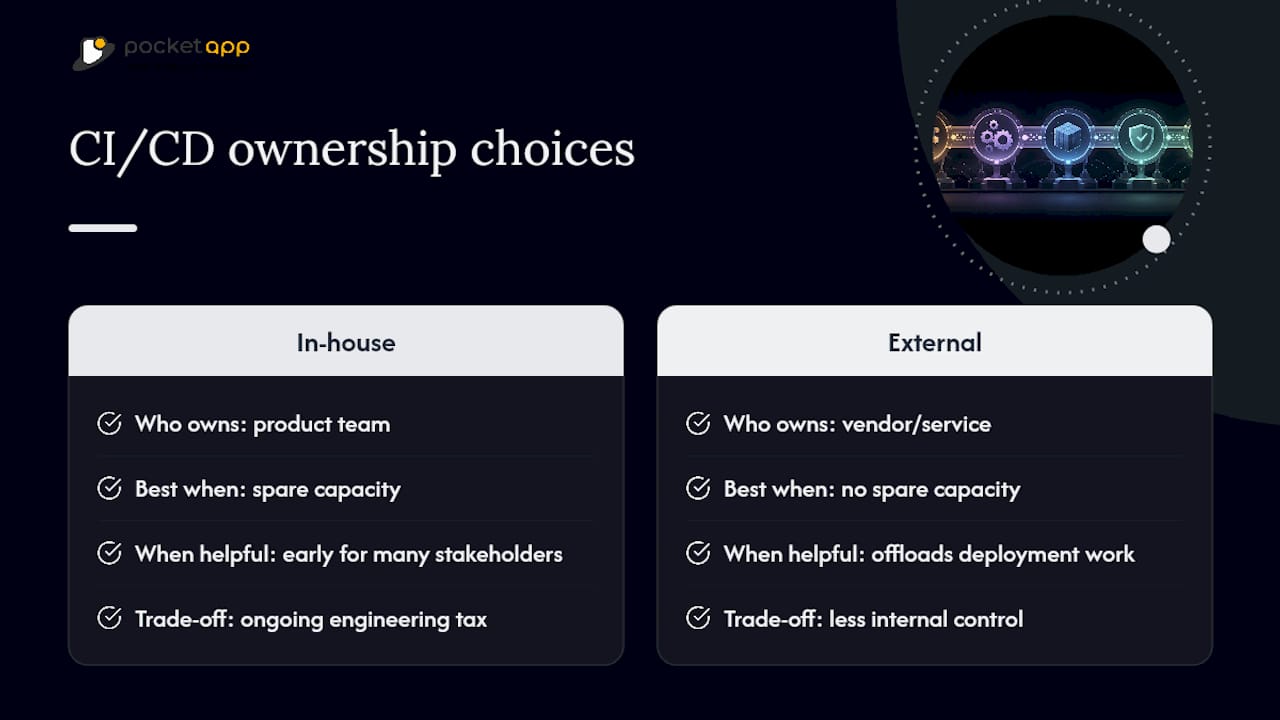
Pocketapp treats CI/CD as infrastructure that gets built alongside the app, not bolted on before launch. Working across various projects has shown a consistent pattern: teams shipping to multiple stakeholders benefit from automated pipelines far earlier than they expect to need them. Whether to build this in-house or bring in outside help usually comes down to whether your team has spare capacity to own the engineering tax long-term, or whether an app deployment process handled externally suits the project better.
What actually slows mobile teams down first?
Most teams over-invest in pipeline sophistication before fixing the basics. Automate signing and get reproducible builds working early. Then measure your end-to-end feedback time and attack whichever single stage eats the most of it, often it's device test sharding, not the build itself. Push preview builds to testers as fast as possible; decision-making speed matters more than pipeline elegance.
— Paul
Get a pipeline audit before you rebuild anything
This service can be an alternative to hiring a full-time DevOps engineer just to fix a broken pipeline. Where a generic consultancy might rebuild your entire toolchain from scratch, a Mobile App Clinic session gives you a focused audit of what's actually slowing your releases down, whether that's an unpinned Xcode version, unsharded UI tests, or signing credentials nobody dares touch.
Engagements typically start with a short technical review, then move into whichever combination of pipeline implementation, documentation, or team handover the project actually needs, following the same Discover, Design, Develop and Deploy process used across every Pocketapp build. For teams evaluating automation tooling more broadly, resources like AmmarAI's guide for developers are worth a look alongside your CI setup. If your builds are the thing standing between your team and a faster release cadence, book a Mobile App Clinic session and get a straight answer on what to fix first.
Primary sources and further reading
- Bitrise's guide to mobile CI/CD, for the core definitions and pipeline stages referenced throughout.
- Expo's comparison of mobile CI/CD tools, covering EAS Workflows and fingerprint-based build optimisation.
- CircleCI's mobile CI/CD requirements, on macOS executors and signing automation.
- Embrace's overview of mobile CI tooling, for the engineering tax comparison between generic and specialised CI.
Provider documentation changes frequently, particularly around signing and store submission requirements, so check the official docs before locking in a pipeline design.
Sources
- What is mobile CI/CD? CI/CD for iOS and Android | Bitrise
- Best CI/CD for mobile apps in 2026: a practical comparison | Expo
- CI/CD requirements for mobile applications | CircleCI (blog)
FAQ
What is Bitrise used for?
Bitrise is a mobile-specialised CI/CD platform that automates building, testing, signing and distributing iOS and Android apps, offering managed macOS hosts and prepackaged mobile workflow steps.
What's the best setup for mobile app development?
There's no single best IDE or platform; most teams pair Xcode or Android Studio for native code with a mobile CI/CD provider (Bitrise, Codemagic, or EAS Workflows) to automate the build and release stages beyond the editor itself.
What does CI/CD actually mean?
CI/CD stands for continuous integration and continuous delivery: automatically building and testing every code change, then automatically preparing (or deploying) it for release. In mobile, delivery stops short of full automatic deployment because store review sits between a build and its release to users.
How do I set up a CI/CD pipeline for an Android project?
Configure a trigger on your main and release branches, build with Gradle on a Linux or macOS runner, run unit and sharded UI tests, sign the APK or AAB using a securely stored keystore, then distribute through Play Store's internal testing track or a service such as Firebase App Distribution.
Should I use a mobile-specialised platform or generic CI?
Mobile-specialised platforms like Bitrise or Codemagic reduce the ongoing maintenance burden of signing and macOS upkeep, while generic CI offers more control at the cost of extra scripting; many teams use a hybrid setup that runs lint and unit tests in generic CI and offloads builds and signing to a specialised provider.