
Deep links send users directly to specific in-app content, cutting the friction between a tap and an action. That single change typically multiplies conversion from clicks to meaningful in-app engagement, and this guide covers exactly how to implement, test, and measure it across Android and iOS.
TL;DR:
- Deep links using verified Android App Links and iOS Universal Links significantly improve user experience by opening the app directly to the intended content and fallback properly if the app isn't installed.
- Implementing deep links requires precise platform setup, including intent filters and asset links files, and thorough testing across multiple browsers and devices, especially in in-app browsers.
- Deferred deep linking preserves campaign context for first-time installs, ensuring users land on the exact screen promoted in ads, but it must store attribution data securely and adhere to privacy regulations.
- A common failure point is content mismatch between web and app, or broken fallback flows, which can cause lost conversions, so early content parity and login state handling are critical.
- Starting deep linking implementation during app development, rather than as an afterthought, maximizes conversion and retention benefits, especially for marketing-driven campaigns.
Table of Contents
- How deep linking works: URIs, intents and routing
- Types of deep links and which to choose
- Implementing deep links on Android: checklist and notes
- Implementing deep links on iOS: universal links and state handling
- Deferred deep linking and attribution: preserving campaign context
- Testing and debugging deep links across channels and devices
- Benefits and measurement: KPIs marketers and product teams should track
- Best practices and pitfalls: an actionable checklist
- Pocket App perspective and how to get started with a development partner
- Handling deep links in complex app architectures
- Ready to build deep linking into your next app?
- Why this deserves more attention than a launch-week checklist
- Sources
- FAQ
How deep linking works: URIs, intents and routing
A deep link is a URI that points to a specific screen inside an app rather than a website homepage. Links come in two flavours: custom schemes (like myapp://product/123) and standard HTTP(S) links that the operating system associates with an installed app. When you tap a link, the operating system checks which installed apps have registered to handle it, then routes accordingly.
On Android, this happens through intents. An ACTION_VIEW intent carries the URI, and the system compares it against every app's registered intent filters, resolving conflicts through specificity and, where verified, App Links priority. On iOS, the equivalent mechanism uses NSUserActivity and Universal Links, handled through continueUserActivity in the app delegate.
Once inside the app, you retrieve the link data through platform-specific calls:
- Android apps read the URI via
getIntent().getData()inside the receiving activity. - iOS apps inspect the
NSUserActivity.webpageURLproperty passed to the app delegate. - Cross-platform apps built with React Native use
Linking.getInitialURL()for cold starts andLinking.addEventListener('url', ...)for links received while running.
Navigation matters as much as retrieval. A poorly handled deep link can strand a user on a screen with no back-stack, so the destination activity or fragment needs a synthetic back-stack that leads somewhere sensible, not a dead end.
Types of deep links and which to choose
To choose the right link type depends on where the click originates and what happens if the app isn't installed.
- Custom URI schemes open fast and need no domain verification, but they fail silently if the app is missing and browsers can't parse them without an installed handler. Fine for internal in-app navigation, risky for public marketing links.
- Android App Links and iOS Universal Links use standard
https://URLs verified against your domain, so they open the app when installed and fall back gracefully to the web when not. These are the right choice for email campaigns, social posts, and paid ad landing pages, because the same link works everywhere. - Deferred deep links solve the install gap: a user without the app taps a link, gets sent to the app store, installs, and lands on the intended screen on first open rather than a generic home screen. Essential for install-driven acquisition campaigns.
- Plain HTTPS links without app-link verification remain the most shareable format for anything destined for search engines, messaging apps, or contexts where you can't guarantee the app is even relevant.
Implementing deep links on Android: checklist and notes
Android deep linking starts in the manifest and finishes with server-side verification. The core building block is the intent filter, which declares what your app can handle.
- Add an intent filter with
action android.intent.action.VIEW, categoryBROWSABLE, and categoryDEFAULTso both browsers and other apps can trigger it. - Define the
scheme,host, andpathPatternattributes precisely; overly broad patterns cause disambiguation dialogues that confuse users. - Host an
assetlinks.jsonfile at/.well-known/assetlinks.jsonon your domain to verify the app-to-website association, which lets Android App Links skip the "open with" chooser entirely once verified. - If you use the Navigation component, build links with
NavDeepLinkBuilderorNavController.createDeepLink()for consistent back-stack behaviour; manuallaunchModesettings likesingleToprequire callinghandleDeepLink()yourself insideonNewIntent(), according to Android's navigation documentation. - Test with
adb shell am start -W -a android.intent.action.VIEW -d "https://yourapp.com/product/123" com.yourapp.packageand confirm resolution through Android Studio's App Links Assistant.
Pro Tip: Android 15's Dynamic App Links let you update URL matching rules server-side without shipping a new build, which is worth building into any campaign that changes landing paths frequently.
Implementing deep links on iOS: universal links and state handling
iOS Universal Links rely on a single hosted file and one entitlement, but both need to be exactly right or the link silently falls back to the browser.
- Host an
apple-app-site-associationfile (no extension) at/.well-known/on your domain, listing the app IDs and paths you want handled. - Add the Associated Domains entitlement in Xcode with the format
applinks:yourdomain.com. - Handle incoming links through
application(_:continue:restorationHandler:), reading the URL fromNSUserActivity.webpageURL. - Store the intended destination in memory if a login screen intervenes, then route to it immediately after authentication rather than dropping users on the app's home screen, a detail Google's own guidance on app deep links flags as a common UX failure point.
- Common failures include a misconfigured AASA file, serving it without valid HTTPS, or forgetting the entitlement entirely, all of which cause silent fallback to Safari.
- Test using a real device (Universal Links don't reliably trigger in Simulator from Notes or Messages) and check the device console logs for
swcderrors, which flag AASA fetch failures.
Deferred deep linking and attribution: preserving campaign context
Deferred deep linking carries campaign context through the install gap. A user clicks an ad, gets redirected to the App Store or Play Store because the app isn't installed, and lands on the exact screen the ad promised the moment they open the app for the first time. This works by preserving referral parameters through the install flow, so the post-install routing logic can apply the original campaign context, as described in Branch's overview of deep linking mechanics.
A few practical constraints shape how you build this:
- Store referral data server-side against a device fingerprint or install token rather than relying solely on client storage, which can be cleared or spoofed.
- Avoid intermediary redirect chains that violate ad platform policies, particularly on paid social, where excessive redirects can trigger click-fraud flags.
- Treat any identifier carried through the install flow as personal data under GDPR if it can be linked to a device or individual, and get consent before persisting it beyond the immediate attribution window.
Testing and debugging deep links across channels and devices
Most deep link failures come down to verification, not code logic.
- Run
adb shell am start -a android.intent.action.VIEW -d "yourlink"to confirm Android resolves the intent to the correct activity. - Use the Play Console's deep links page and Android Studio's App Links Assistant to validate domain verification status before shipping.
- On iOS, check device console logs for AASA fetch errors and use a Universal Links validator to confirm the file is reachable and correctly formatted.
- Test every link inside Instagram, X, and Facebook's in-app browsers specifically, since WebView interception is one of the most common real-world failure modes.
Pro Tip: Build a five-minute manual QA pass into every release: tap the same link from Messages, Gmail, and one social in-app browser. If it behaves differently in each, you've found your bug before your users do.
Benefits and measurement: KPIs marketers and product teams should track
Advertisers running deep-linked ad campaigns in Google Ads see, on average, a 2.8× increase in conversion rates compared with clicks landing on a mobile website. That gap exists because a deep link removes the extra steps of finding the app, opening it, and re-navigating to the intended product or offer.
Retention tells a similar story. Re-engagement campaigns that route users to a specific relevant screen rather than the app's home screen see 2 to 3 times better retention than generic launches. For product teams and marketers, the metrics worth tracking are conversion rate by traffic source, time-to-first-action after open, referral completion rate for deferred links, and cohort retention split by deep-linked versus non-deep-linked sessions, as explained in our guide on how to improve user engagement for lasting growth. Structuring an A/B test is straightforward: route half a campaign's traffic through a verified deep link and half through a generic app store or homepage link, then compare conversion and seven-day retention between cohorts. Our guide to increasing app engagement covers how to pair this measurement with broader retention tactics.
Best practices and pitfalls: an actionable checklist
Most deep linking failures aren't technical, they're structural decisions made early and never revisited.
- Do maintain content parity between the web page and the app screen a link resolves to; Google's own guidance on app deep links warns that mismatched content misleads users and produces inaccurate search snippets.
- Do provide a graceful fallback to mobile web or the relevant app store listing, and preserve the intended destination through any login flow rather than dropping users at a generic home screen.
- Don't rely solely on custom URI schemes for anything public-facing; without HTTPS verification, they break the moment the app isn't installed.
- Watch for social platforms' in-app browsers, which frequently intercept links inside a WebView and prevent the native app from ever opening, a pattern documented in analysis of Android's Dynamic App Links behaviour.
Pocket App perspective and how to get started with a development partner
A leading UK mobile app developer has built and shipped hundreds of mobile projects, including apps for organisations like WWF, Dechra, and Crocus, with deep linking work being a recurring part of that portfolio wherever campaigns and content routing needed to work reliably across platforms.
A discovery phase with a development partner should cover more than screens and features.
- Expect an audit of your existing intent filters, AASA configuration, and any cross-platform framework layer before a single new line of code gets written.
- A proper scope defines fallback behaviour, deferred linking requirements, and attribution needs upfront, not as an afterthought once campaigns are already live.
- For teams building or rebuilding on cross-platform frameworks, native manifest and entitlement work still has to happen alongside the framework's own linking APIs.
Handling deep links in complex app architectures
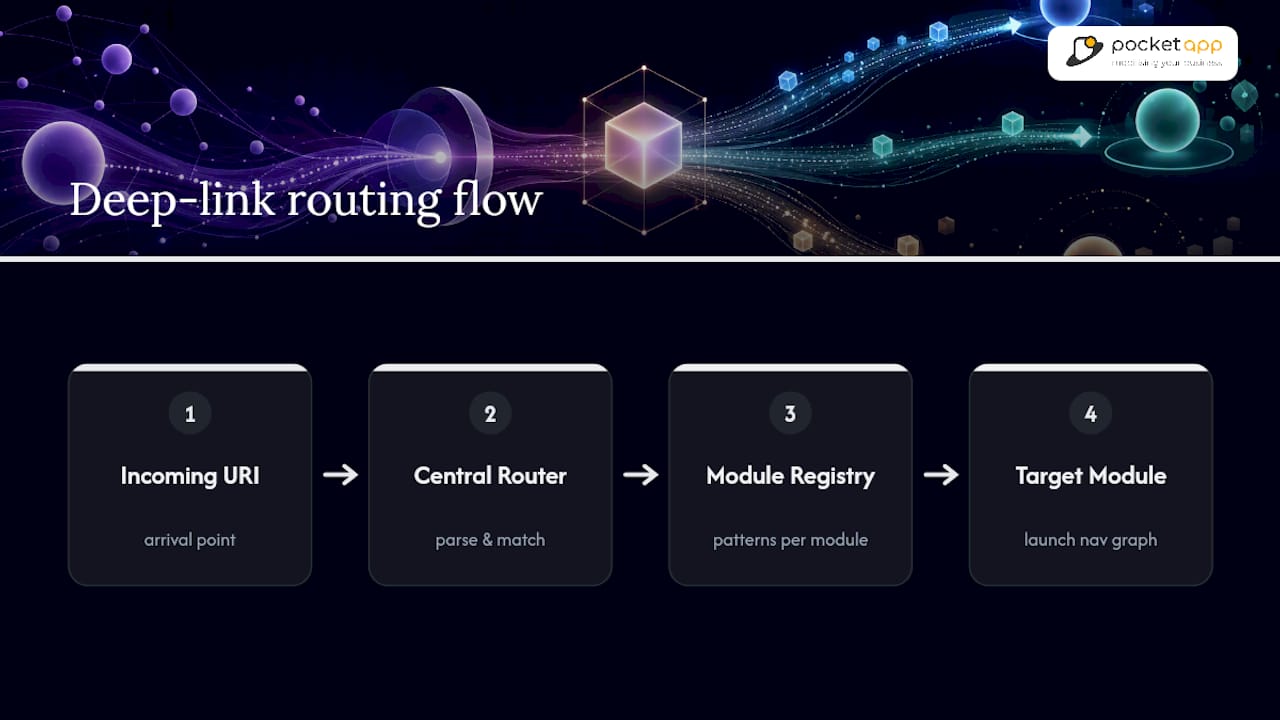
Multi-module apps and apps with several entry points complicate deep linking in ways a simple single-activity app never encounters. When a codebase splits into feature modules, each with its own navigation graph, a deep link arriving at the app's main entry point needs a routing layer that can dispatch to the correct module without every module knowing about every other one. The common pattern is a lightweight central router: a single point that parses the incoming URI, matches it against a registry of module-owned patterns, and hands off navigation to the owning module's own NavController or equivalent.
Cross-platform frameworks add another layer. React Native and Flutter apps still need native manifest entries, intent filters, and entitlements configured exactly as a fully native app would; the framework's Linking API sits on top of that native layer, not instead of it, as React Native's own documentation makes clear. Skipping the native configuration because "the framework handles it" is one of the most common causes of links that work in development but fail in production.

Apps with multiple entry points, such as a companion widget, a share extension, or a separate onboarding flow, each need their own intent filter or Universal Links handling, because the operating system treats each declared entry point independently. Testing every one of these paths individually, rather than assuming one working link means they all work, catches most of the failures before release. If your architecture already spans several modules or frameworks, that's usually the point at which a scoped technical discovery pays for itself, because retrofitting a router after launch costs considerably more than designing one upfront.
Ready to build deep linking into your next app?
Deep linking rewards apps that treat it as infrastructure, not a launch-week checkbox. Pocket App builds this thinking into mobile app development projects from the discovery phase onward, so routing, fallback behaviour, and attribution are designed in rather than patched on after a campaign underperforms. If your team is planning a rebuild, a cross-platform migration, or a first-time app launch that depends on marketing campaigns landing users in the right place, get in touch to scope the work properly.
Why this deserves more attention than a launch-week checklist
Most teams treat deep linking as a technical afterthought, something to wire up once the app is otherwise finished. That's backwards. The routing decisions you make early, how modules hand off navigation, whether fallback behaviour is designed or improvised, determine whether a marketing campaign months later actually converts.
The conventional advice focuses almost entirely on the Android manifest and the iOS entitlement, treating implementation as the finish line. It isn't. The 2.8× conversion lift Google Ads reports only materialises when the landing screen genuinely matches what the ad promised, when login doesn't strand the user, and when the link survives an in-app browser. Skip any one of those and the technical implementation is correct but the business outcome disappears.
If you're prioritising, start with content parity and login state preservation before you touch attribution tooling. Those two failures account for more broken campaigns than any manifest misconfiguration, and they're the ones marketers notice first, usually in a drop-off report, long before anyone traces it back to a routing decision made in week one.
— Paul
Sources
A handful of tools cover nearly every validation need across both platforms.
- Why deep linking is better for business: An overview for developers
- App links — Android Developers
- App deep links: connecting your website and app | Google Search Central Blog
- Linking · React Native
FAQ
What Is Deep Linking in Apps?
Deep linking is a technique that sends users directly to a specific screen or piece of content inside a mobile app, rather than to the app's home screen or a generic web page.
How Do I Get the Deep Link for an App?
You typically get an app's deep link from its developer documentation, its Android App Links or iOS Universal Links configuration, or by inspecting the URI scheme registered in its manifest or entitlements file.
Are Deep Links Safe?
Verified deep links, such as Android App Links backed by an assetlinks.json file or iOS Universal Links backed by an apple-app-site-association file, are safe because the operating system confirms domain ownership before routing. Unverified custom schemes carry more risk of hijacking, since any app can register the same scheme.
How Do I Open a Deep Link From a Website?
Add a standard HTTPS link on your web page pointing to the relevant app path; if the app is installed and the link is verified through App Links or Universal Links, the operating system opens the app automatically, and if not, it falls back to the mobile website.