
TL;DR:
- Continuous user feedback loops significantly improve retention and user satisfaction.
- Effective feedback collection involves structured prioritization and closing the communication loop with users.
- Integrating qualitative and quantitative data leads to better, data-driven app design decisions.
Plenty of product teams invest heavily in visual polish, animation, and on-trend colour palettes, then wonder why retention figures disappoint. The uncomfortable reality is that aesthetics alone rarely move the needle. Apps using feedback loops see 50–75% higher user satisfaction, 20–60% lower churn, and 15–30% higher retention and conversion. For product managers and UX designers, that gap between a beautiful app and a successful one is almost always closed by one thing: a disciplined, continuous approach to user feedback. This article walks you through exactly how to build that approach, from collection right through to measurable results.
Table of Contents
- Why feedback is central to effective app design
- Methods for collecting and prioritising user feedback
- Analysing feedback: Turning raw data into design action
- Practical examples: Feedback in action for higher app retention
- A hard truth: Why most teams still underuse feedback
- Accelerate app success with expert-led design
- Frequently asked questions
Key Takeaways
| Point | Details |
|---|---|
| Continuous feedback drives retention | Apps using active feedback loops achieve significantly higher user satisfaction and engagement. |
| Blend qualitative and quantitative | Gather both direct and behavioural user insights for the most reliable, actionable design improvements. |
| Prioritise and close the loop | Employ frameworks like RICE or MoSCoW to act on feedback and communicate changes back to users. |
| Technology scales insight | Use AI tools and user testing platforms to collect and analyse feedback efficiently as your app grows. |
Why feedback is central to effective app design
Think about the last time your team shipped a feature that felt obvious internally, only to watch users ignore it or complain. It happens constantly, and it almost always traces back to the same root cause: decisions made without sufficient real-world input. User feedback in app development is not a nice-to-have bolt-on. It is the mechanism that keeps your product aligned with actual human behaviour rather than internal assumptions.
The feedback integration process works as a continuous cycle rather than a one-off event. Feedback loops are central to iterative app design, involving continuous cycles of collecting, analysing, prioritising, implementing, and measuring user input to refine UX. Each revolution of that loop tightens the fit between what you build and what users actually need.
"Design is not just what it looks like and feels like. Design is how it works." The same logic applies to feedback: it is not just what users say, it is what their behaviour reveals.
A few misconceptions still hold teams back. The most common is that improving app UX is primarily a visual discipline. In practice, the highest-impact UX changes often come from fixing flows, reducing friction, and clarifying microcopy, none of which require a redesign. Another misconception is that feedback is only relevant pre-launch. In truth, post-launch signals are often richer because they reflect real usage under real conditions.
Here is what high-performing teams do differently:
- They treat every release as a hypothesis to be tested, not a solution to be celebrated.
- They build feedback collection into the product itself, not as an afterthought.
- They share feedback findings with engineering, marketing, and leadership, not just design.
- They measure the outcome of every change they make based on user input.
- They close the loop with users, telling them what changed and why.
The payoff for this discipline is not marginal. Teams that embed feedback into their design process consistently outperform those that rely on intuition, regardless of how talented their designers are.
Methods for collecting and prioritising user feedback
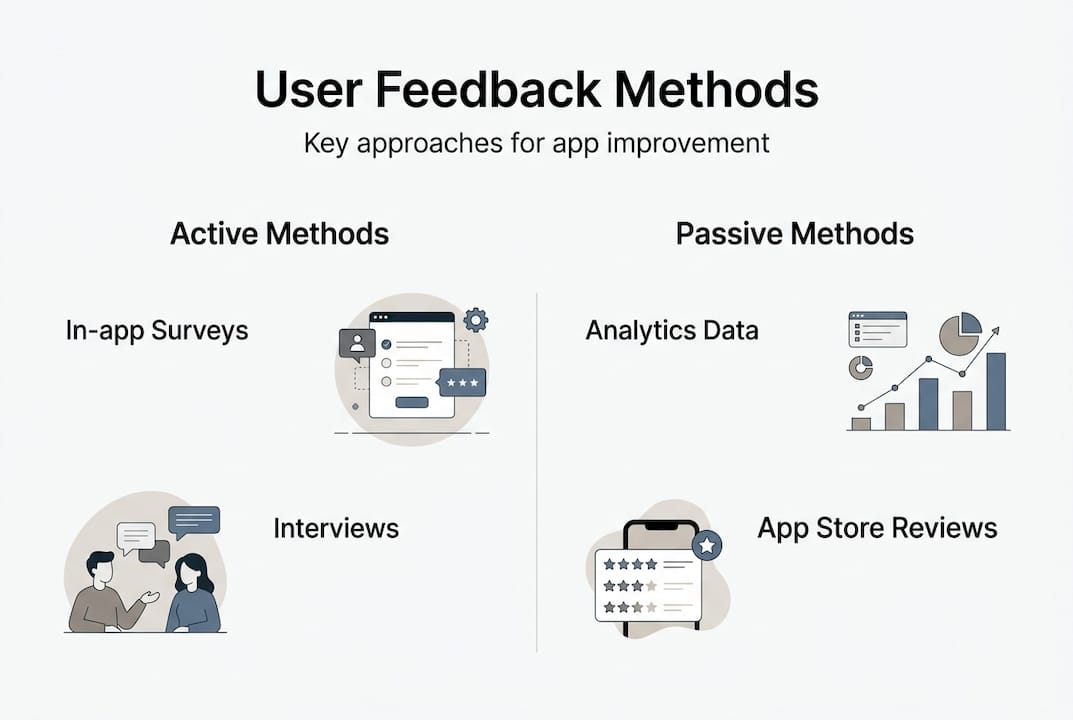
With feedback's value clear, let us explore effective approaches for gathering and sorting through user insights. Feedback broadly falls into two categories: explicit and implicit. Explicit feedback is what users tell you directly, through in-app surveys, app store reviews, support tickets, and interviews. Implicit feedback is what their behaviour tells you, through drop-off rates, session lengths, heatmaps, and feature usage data.
Key methodologies include in-app surveys, usability testing, analytics for implicit feedback, interviews, and app store reviews, with prioritisation using frameworks like RICE, MoSCoW, or impact-effort matrices. Each method has a distinct role.
| Method | What you learn | Best-use scenario |
|---|---|---|
| In-app surveys | Sentiment at a specific moment | Post-task or post-purchase |
| Usability testing | Where users struggle | Pre-launch or post-redesign |
| Analytics and drop-offs | What users actually do | Ongoing monitoring |
| App store reviews | Broad satisfaction themes | Competitive benchmarking |
| User interviews | Deep motivations and context | Discovery and ideation phases |
Once you have collected feedback, the challenge is knowing what to act on first. Not all feedback carries equal weight. A single power user's request may matter less than a repeated friction point flagged by hundreds of casual users. Segment your responses by persona and lifecycle stage. A new user struggling with onboarding deserves different prioritisation than a long-term user requesting an advanced feature.
For leveraging user feedback effectively, use a structured prioritisation model:
- Gather all feedback into a central repository.
- Tag each item by theme, user segment, and frequency.
- Score using RICE (Reach, Impact, Confidence, Effort) or MoSCoW (Must have, Should have, Could have, Won't have).
- Map high-scoring items against your product roadmap.
- Communicate decisions back to users who raised the issues.
That last step is where most teams fall short. Closing the loop builds trust and encourages further feedback, creating a virtuous cycle. Good app design tips consistently emphasise transparency with your user base as a retention driver in its own right.
Pro Tip: When you ship a change based on user feedback, send a brief in-app message or release note saying exactly what changed and why. Users who feel heard are significantly more likely to leave positive reviews and remain loyal.
Analysing feedback: Turning raw data into design action
After collecting and organising feedback, the next challenge is to draw valuable conclusions that lead to actionable design. Raw data, whether it is a spreadsheet of survey responses or a dashboard of analytics, rarely speaks for itself. You need a structured approach to interpretation.

The usability data analysis framework from Nielsen Norman Group outlines four steps: collect relevant data, assess its accuracy, explain the patterns you find, and check how well your conclusions fit the broader context. This sequence prevents the most common analytical error, which is jumping straight from data to solution without interrogating the quality of the evidence.
A practical comparison of your two main data types helps clarify when to use each:
| Feedback type | Strengths | Limitations | Best scenarios | |---|---|---| | Quantitative | Statistically reliable, scalable | Tells you what, not why | Identifying drop-off points | | Qualitative | Rich context, reveals motivations | Time-intensive, harder to scale | Understanding emotional friction |
Teams often fall into the trap of over-relying on one type. Analytics can tell you that 40% of users abandon the checkout screen, but only an interview or session recording will reveal that they are confused by a poorly labelled button. The usability analysis dimensions worth evaluating include authenticity, consistency, repetition, and spontaneity. Repeated, spontaneous complaints carry far more weight than isolated, prompted ones.
Strategies to counter data overload and bias:
- Limit your analysis window. Reviewing three months of feedback at once is manageable; reviewing two years is paralyzing.
- Assign a devil's advocate in feedback reviews to challenge the dominant interpretation.
- Separate feedback collection from analysis sessions to reduce recency bias.
- Use AI-driven feedback analysis tools to cluster large volumes of qualitative responses into themes automatically.
Pro Tip: Schedule a monthly "feedback synthesis" session that brings together your PM, lead designer, and a developer. Reviewing data as a cross-functional group surfaces interpretations that any single discipline would miss, and it builds shared ownership of the resulting decisions.
Practical examples: Feedback in action for higher app retention
Understanding theory is useful, but seeing feedback's results in live projects is the real game changer. Consider a retail app that launched with strong visual design but saw a 35% drop-off during the account creation flow. Post-launch usability testing and in-app survey data revealed that users found the mandatory phone verification step unnecessary and intrusive. The team made it optional. Within six weeks, drop-off fell to 12% and weekly active users rose by 22%.
That kind of outcome is not unusual. Apps using feedback loops see 50–75% higher user satisfaction, 20–60% lower churn, and 15–30% higher retention and conversion rates. Equally striking: 90% of startups that fail do so without adequate market validation, which is essentially feedback at the earliest stage.
"The most dangerous assumption in product development is that you already know what your users need."
For teams tracking app UX benchmarks, the KPIs that matter most after a feedback-driven change include:
- Retention rate at day 1, day 7, and day 30.
- Net Promoter Score (NPS) before and after the change.
- Churn rate by user segment.
- Session duration and frequency.
- Feature adoption rate for the specific change implemented.
To keep users engaged beyond the initial launch, build feedback into your ongoing release cycle rather than treating it as a project phase. AI and ML tools are increasingly capable of clustering thousands of app store reviews into actionable themes within minutes, making large-scale qualitative analysis far more practical than it was even two years ago. Empathy mapping, supported by these tools, helps teams visualise what users think, feel, say, and do, giving design decisions a human anchor rather than a purely data-driven one.
Maintaining a feedback-driven design practice after launch means:
- Scheduling quarterly usability reviews as a standing calendar item.
- Monitoring app store reviews weekly and tagging recurring themes.
- Running short pulse surveys after every major release.
- Revisiting your prioritisation framework every six months as your user base evolves.
- Sharing feedback outcomes in sprint retrospectives so the whole team understands the impact of their work.
A hard truth: Why most teams still underuse feedback
Despite the evidence, many product teams still treat feedback as a validation exercise rather than a design input. They collect it, skim it, and then build what they had already planned. The reason is rarely laziness. It is usually comfort. Visuals are tangible and controllable. User feedback is messy, contradictory, and sometimes uncomfortable to hear.
There is also a measurement problem. Some teams prioritise quantitative analytics because the numbers feel reliable, while dismissing qualitative input as anecdotal. Others do the opposite. The smarter practice, as noted in feedback without guesswork, is to weight feedback by user engagement and impact rather than treating all input equally. A complaint from a highly active user who represents a core persona deserves more weight than a one-star review from someone who downloaded the app once.
Ignoring this nuance leads to guesswork, and guesswork leads to churn. Our experience across over 300 projects at Pocket App shows that teams who set up regular, cross-functional feedback reviews, involving product, design, engineering, and even customer success, consistently make better decisions faster. The iterative feedback strategy is not just a design process. It is an organisational habit.
Accelerate app success with expert-led design
For teams ready to close the gap between intent and impactful app improvements, expert guidance makes all the difference. At Pocket App, our mobile app development process is built around continuous feedback integration from discovery through to deployment. We do not treat user input as a phase. We treat it as the foundation.

Our app design services combine industry-leading UX frameworks, proprietary research methods, and hands-on collaboration with your product and design teams. Whether you are building from scratch or iterating on an existing product, Pocket App solutions give you the tools, insight, and experience to turn feedback into features that genuinely retain users. Get in touch to discuss how we can support your next project.
Frequently asked questions
What is the first step in integrating feedback into app design?
Start by selecting channels for explicit feedback such as surveys and reviews and implicit signals such as analytics and usage patterns, aligned with your specific user base and product stage.
How do you prioritise conflicting user feedback?
Segment users by persona and lifecycle stage, look for repeated themes across multiple sources, and apply models like RICE or MoSCoW to weigh what will deliver the most meaningful value.
How is feedback measured for impact?
Track metrics including retention rate, NPS, churn, and session duration after each change, comparing pre and post results. Apps using feedback loops consistently show 20–60% lower churn as a benchmark.
What tools help automate feedback collection and analysis?
Platforms like UserTesting and Zigpoll handle collection at scale, while AI and ML tools for review clustering and empathy mapping make large-scale qualitative analysis significantly faster and more reliable.
What is a feedback loop in app design?
A feedback loop is a structured process of collecting, analysing, prioritising, implementing, and measuring user input. Feedback loops are the engine of iterative design, continuously refining UX based on real-world evidence rather than assumption.