
TL;DR:
- Effective app scalability depends on thoughtful architecture, emphasizing modular design and externalized state management to handle growth smoothly. Both vertical and horizontal scaling have their advantages and challenges, but planning for horizontal scaling from the start ensures better resilience and flexibility under demand spikes. Operational discipline, including proper autoscaling and continuous monitoring, is crucial for maintaining performance and reliability during expansion.
Most teams discover their app has a scalability problem at the worst possible moment. A product launch goes viral, a seasonal traffic spike arrives, or a key client doubles their user base overnight. Suddenly, response times crawl, requests time out, and users leave. What is app scalability, then? It is your application's ability to sustain performance and reliability as demand grows, without needing a complete rebuild. Understanding it before you hit a wall is the difference between a product that grows confidently and one that collapses under its own success.
Table of Contents
- Key takeaways
- What app scalability really means
- Vertical vs horizontal scaling
- Autoscaling and orchestration in practice
- Scalable app architecture: best practices
- My honest take on where scaling goes wrong
- Build apps that grow with your business
- FAQ
Key takeaways
| Point | Details |
|---|---|
| Scalability is not just hardware | Thoughtful architecture and modular design matter far more than simply adding servers. |
| Two core strategies exist | Vertical scaling adds resources to one server; horizontal scaling adds more instances to share the load. |
| State management is the hidden bottleneck | Apps storing session data locally cannot scale horizontally without externalising that state first. |
| Autoscaling requires operational discipline | Tools like Kubernetes HPA automate scaling, but configuration policies determine whether they work well in practice. |
| Design for scale from the start | Retrofitting scalability into a poorly designed app is significantly more expensive than building it in from day one. |
What app scalability really means
App scalability explained is simpler than most technical documentation makes it sound. A scalable app handles growth across four dimensions: concurrent users, transaction volume, data throughput, and geographic spread. The goal is not simply to keep the app running. It is to keep the app running well as conditions change.
Performance and reliability are closely linked to scalability, but they are not the same thing. A performant app is fast under normal conditions. A scalable app remains fast as those conditions shift. Neglecting this distinction is where many products go wrong.
The importance of app scalability becomes clear when you consider what typically triggers a crisis:
- Sudden traffic spikes. A press mention, a social media post, or an App Store feature can multiply your active users within hours.
- Organic growth compounding. Each new user adds slightly more load. At small numbers, this is invisible. At scale, it becomes critical.
- Data volume accumulation. As users generate records, the database queries that once took milliseconds begin to slow.
- Third-party integrations degrading. APIs you depend on may throttle you as your call volume increases.
Ignoring these realities does not delay the problem. It guarantees you face it unprepared.
Vertical vs horizontal scaling
The two core approaches to scaling an app are vertical scaling and horizontal scaling. Understanding both is central to any conversation about scalable app architecture.
Vertical scaling (sometimes called "scaling up") means adding more resources to the machine your app already runs on. More CPU, more RAM, more storage. It is conceptually straightforward and works well at lower traffic levels.
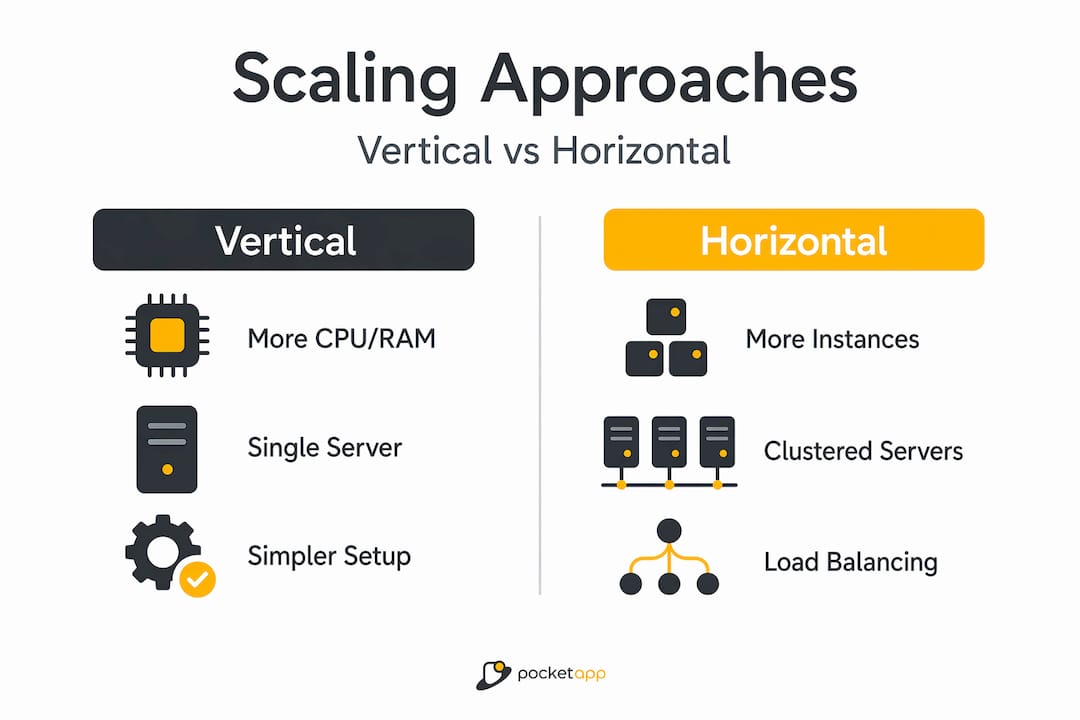
Horizontal scaling (or "scaling out") means adding more instances of your application and distributing traffic across them. Rather than one powerful server, you end up with many, all sharing the load. Vertical scaling adds capacity to a single instance and is bounded by the maximum capacity of the hardware available, whereas horizontal scaling adds instances and requires load distribution.
Here is a direct comparison:
| Factor | Vertical scaling | Horizontal scaling |
|---|---|---|
| Complexity | Lower | Higher |
| Upper capacity limit | Hardware ceiling | Effectively unlimited |
| Downtime risk | Higher (during resize) | Lower (rolling updates) |
| Cost model | Predictable | Variable, pay per use |
| State management | Simpler | Requires externalised state |
| Failure tolerance | Single point of failure | Distributed resilience |
For horizontal scaling to work, requests must be distributable across multiple instances, each capable of handling tasks in parallel, enabled by load balancing. Load balancing strategies include round-robin, least-connections, and sticky sessions for stateful workflows.
Pro Tip: If you are just getting started and traffic is predictable, vertical scaling is the faster path. Plan your architecture for horizontal scaling from the outset, even if you do not implement it immediately. Retrofitting is painful.
Autoscaling and orchestration in practice
Knowing the theory of scaling is one thing. Knowing what actually happens inside a production system is another. Modern platforms remove a lot of the manual work, but they introduce their own complexity.
Kubernetes is the most widely used container orchestration system, and its Horizontal Pod Autoscaler (HPA) is a practical example of scaling mobile applications automatically. The HPA adjusts pod replicas based on observed demand, scaling out when CPU or memory thresholds are breached and scaling back in when load drops. You configure minimum and maximum replica counts, and the system handles the rest within those bounds.

One behaviour worth understanding is downscale stabilisation. Downscale behaviour is deliberately slowed to prevent oscillation, with a default stabilisation window of 300 seconds. This means your cluster will not immediately release resources the moment traffic dips. That is intentional, avoiding rapid scale-up and scale-down cycles that waste resources and create instability.
Cloud platforms offer similar capabilities at a higher abstraction level. Automated resource provisioning through cloud elasticity gives consumers what feels like unlimited capacity, expanding and contracting based on real-time demand. Platforms like Azure App Service make this accessible, though limits do apply depending on tier. For example, Azure's standard tier supports up to 10 instances, while the premium tier extends this to 30.
For mobile app backends specifically, multi-layered scaling orchestration combining pod autoscaling with event-driven queue scaling produces the most resilient results. When a traffic spike arrives, queue-based workers absorb the burst while pod scaling catches up, preventing request loss.
Key operational disciplines to maintain:
- Set conservative minimum replicas to avoid cold starts during sudden spikes.
- Monitor custom metrics, not just CPU, as mobile workloads are often I/O bound rather than CPU bound.
- Test your scaling policies under simulated load before a real event exposes their gaps.
- Review scaling logs after every significant traffic event to refine your configuration.
Pro Tip: Autoscaling is as much about operations and configuration as it is about code. A well-configured cluster with average application code will outperform a poorly configured cluster running excellent code.
Scalable app architecture: best practices
Good scaling is not something you bolt on after launch. It is baked into the architecture from the first design decision. Here are the principles that matter most when building for scale.
-
Adopt a microservices or modular design. Monolithic apps scale as a single unit, meaning you scale everything even when only one component is under pressure. Each service or node must be able to expand or fail independently without dragging the rest of the stack down. Breaking your app into discrete services lets you scale only what needs it.
-
Externalise session state. This is the most commonly overlooked best practice for app scalability. If session state or cache are stored locally, horizontal scaling fails because each instance becomes a different version of the truth. Move session data to a shared cache like Redis or a managed database from the start. For a deeper look at cloud-based architecture benefits in this context, it is worth exploring how cloud deployments handle this by default.
-
Scale your database deliberately. The application tier is often easier to scale than the data tier. Consider read replicas to distribute query load, database sharding to partition data horizontally, and whether SQL or NoSQL fits your access patterns. NoSQL databases like MongoDB or DynamoDB are designed with horizontal scaling as a core feature, while traditional relational databases require more deliberate tuning.
-
Use geographic distribution and edge caching. For mobile apps with a distributed user base, routing requests to the nearest data centre reduces latency significantly. Content delivery networks (CDNs) and edge caching offload static and semi-static content from your origin servers, reducing the work your application tier must do on every request.
-
Match your approach to your team and business context. Throwing hardware at the problem is less effective than modular service design with independent scaling, but microservices also introduce operational complexity that small teams may not be equipped to manage. Choose the architecture that your team can actually operate well, then evolve it as you grow.
Here is a quick reference for common database scaling techniques:
| Technique | Best suited for | Trade-off |
|---|---|---|
| Read replicas | Read-heavy workloads | Replication lag on writes |
| Database sharding | Very large datasets | Increased query complexity |
| NoSQL horizontal scale | Flexible, high-volume data | Weaker consistency guarantees |
| Connection pooling | High concurrency apps | Requires careful tuning |
For broader guidance on building apps that hold up under real-world conditions, Pocketapp's application development tips cover several principles that align with scalable thinking from day one.
My honest take on where scaling goes wrong
I have seen scalability treated as a feature to add later more times than I can count. Teams ship a working product, gain traction, and then scramble when the infrastructure cannot keep up. The honest truth is that the scramble is almost always more expensive than getting the foundations right from the start.
The trap I see most often is not under-investing in hardware. It is under-investing in architecture. Over-scaled hardware with poor modular design will still buckle when one component becomes a bottleneck. I have watched well-funded teams throw cloud budget at a problem that was actually caused by a stateful session design no one had challenged since the first sprint.
The other trap is over-engineering for scale that never arrives. Building a full microservices architecture for an app with a few hundred users adds complexity without benefit. My recommendation: design your app architecture for scale from the outset, but implement incrementally. Make clean service boundaries in your code even if you deploy as a monolith initially. That way, extraction and scaling are possible without a rewrite when demand genuinely demands it.
Operational maturity matters as much as code quality. The teams that handle scale well are the ones who have practised it. They run load tests, they review their autoscaling logs, and they treat capacity planning as a recurring conversation rather than a one-off task.
— Paul
Build apps that grow with your business
Pocket App has delivered over 300 mobile projects across retail, healthcare, charity, and consumer sectors. Scalability is not an afterthought in our process. It is part of the architecture conversation from day one.

Whether you are building a new product and want to get the foundations right, or you have an existing app that is starting to show signs of strain under growing demand, Pocketapp's team can help you design and build with confidence. Our mobile app development services cover the full lifecycle from discovery through to deployment and beyond. We also offer dedicated cross-platform development for teams who need their app to scale across iOS and Android simultaneously. Get in touch to talk through your scalability requirements with our team.
FAQ
What is app scalability in simple terms?
App scalability is a system's ability to handle increasing demand, whether that is more users, more data, or more transactions, without a significant drop in performance or reliability. It describes how well an application grows without needing to be rebuilt from scratch.
What is the difference between vertical and horizontal scaling?
Vertical scaling adds more resources (CPU, RAM) to a single server, while horizontal scaling adds more server instances to share the load. Vertical scaling is simpler but has a hardware ceiling; horizontal scaling is more flexible but requires stateless design and load balancing.
Why does state management affect app scalability?
If an app stores session data or cache locally on a single instance, adding more instances creates inconsistency because each server holds different data. Externalising state to a shared cache or database is necessary for horizontal scaling to work correctly.
How does Kubernetes help with scaling mobile apps?
Kubernetes uses the Horizontal Pod Autoscaler to automatically increase or decrease the number of running application instances based on demand metrics like CPU usage. It also applies downscale stabilisation to prevent rapid fluctuations in resource allocation.
What affects app scalability the most?
Architecture is the biggest factor. Monolithic designs, local state storage, and tightly coupled components all limit how well an app can scale. Database design, load balancing strategy, and the team's ability to operate and monitor the infrastructure also play significant roles in real-world scalability outcomes.