
An application support SLA is a contract that guarantees measurable availability plus tiered response and resolution targets. Before signing anything, check whether the availability percentage, priority response times, and resolution windows are spelt out in numbers rather than vague promises. If a provider cannot show you a table of these figures, the agreement is not yet a real SLA.
TL;DR:
- Most disputes stem from unclear scope or exclusions rather than actual uptime or response time failures.
- Clear triage criteria and predefined scope boundaries are critical to prevent scope creep and billing disagreements.
- Service credits are often the only remedy offered, but negotiating operational fallback options provides more protection during outages.
- Monitoring should include both synthetic checks and real-user data, with publicly accessible status pages and documented incident logs.
- Specific response and resolution targets by incident priority, along with named escalation contacts and post-incident reports, are essential for effective SLA enforcement.
Table of Contents
- What is an app support SLA? Response vs resolution explained
- Priority tiers: what P1 to P4 should actually mean
- Scope and exclusions: keeping the SLA honest
- Monitoring and status pages: proof, not promises
- Escalation and communication during an incident
- Service credits and how remedies actually work
- The clauses your SLA checklist should not skip
- How Pocketapp scopes and runs support SLAs in practice
- Why most SLA disputes are scoping failures, not performance failures
- Get help drafting or delivering your app support SLA
- Sources
- FAQ
What is an app support SLA? Response vs resolution explained
A support SLA sets two separate clocks running the moment an issue is logged. Response time measures how long before someone acknowledges the ticket; resolution time measures how long before the issue is actually fixed. Confusing the two is the single most common cause of client frustration, because a vendor can hit a "4 hour response" target while the underlying bug stays broken for days.
Uptime figures work differently. Most vendors calculate availability as total minutes in a billing month minus downtime, excluding scheduled maintenance windows agreed in advance. Azure's App Service SLA commits to 99.95% availability on paid tiers, while Google's AppSheet SLA guarantees at least 99.9% for covered services each calendar month.
The percentages matter more than they look. A 99.9% target allows roughly 43 minutes of downtime per month. Drop to 99.95%, per Concentric's delivery playbook, and that shrinks to around 22 minutes. For a retail app during a sales peak, that difference decides whether checkout stays live.
Priority tiers: what P1 to P4 should actually mean
Every workable SLA sorts incidents into severity tiers, because a login outage and a cosmetic typo cannot share the same clock. Vendor playbooks and templates typically use a four-tier model:
- P1 / Critical: the application is down or unusable for most users. Acknowledgement within an hour, continuous work until fixed. Concentric lists a two-hour resolution target for system-down incidents.
- P2 / High: a major feature is broken but workarounds exist. Acknowledgement within 2–4 hours.
- P3 / Medium: a minor defect with limited impact. Business-day response, often next working day.
- P4 / Low: cosmetic issues or feature requests. Addressed in a future planned release, per templates such as TemplateForge's application support contract.
Assignment rules matter as much as the targets themselves. Disputes usually start when the client calls something P1 and the vendor calls it P3.
Pro Tip: Write explicit triage criteria into the SLA itself, such as "P1 = more than 25% of users unable to complete a core transaction." Vague severity language is where most SLA arguments begin.
Scope and exclusions: keeping the SLA honest
An SLA is only as good as its boundaries. Contract-drafting guidance from Law Insider stresses that precisely defining scope, including which users and technologies are covered, is what stops the agreement collapsing into scope creep.
What should sit inside the SLA:
- The application's own code and configuration.
- Supported integrations named explicitly, not implied.
- Data-handling responsibilities during incidents.
What is commonly excluded:
- Client-owned infrastructure and networks.
- Third-party services the vendor does not control.
- Unsupported browsers, devices, or operating system versions.
- New feature development, which belongs in a separate change-control process.
A clause covering integration monitoring, plus a short paragraph on customer responsibilities, closes most of the gaps that cause billing disputes later.
Monitoring and status pages: proof, not promises
Availability figures are only trustworthy when someone is actually watching for outages. Synthetic monitoring checks the application on a schedule from outside; real-user monitoring captures what genuine visitors experience, including slow load times synthetic checks might miss. Both matter, because a passing synthetic check can still sit alongside a genuinely broken user journey.
- Ask for a subscriber or public status page with a historical incident log, not just a promise of "we'll tell you."
- Confirm who owns architecture documentation, since Concentric's playbook notes that subscribing to status updates and documenting internal architecture speeds up triage considerably.
- During any integration phase, log incidents in writing as they happen rather than relying on memory once the SLA is signed.
Escalation and communication during an incident
Acknowledgement, work-start, and resolution are three distinct moments, and a support SLA should name a target for each. Reactiv's published SLA sets 24/7 acknowledgement for its most severe tier and business-hour responses for lower ones, a pattern worth borrowing.
- Acknowledgement: confirmation the ticket has been received and triaged, typically within the priority's stated window.
- Communication cadence: hourly updates for P1 incidents, every 4 hours for P2, and daily for lower tiers is a reasonable starting negotiation.
- Named escalation contacts: a second-tier contact who can be reached if the first responder misses a deadline.
- Post-incident report: a written root-cause analysis delivered within an agreed number of business days after resolution.
Skipping the report clause is a common mistake. Without it, the same failure can recur with no documented lesson learned.
Service credits and how remedies actually work
Service credits are the standard financial remedy, calculated as a percentage of the monthly fee scaled to how far availability fell short. Vendor agreements almost always cap the total credit and set a claim window.
- Both Google's AppSheet SLA and Microsoft's Azure App Service SLA treat service credits as the exclusive remedy, meaning you cannot claim additional damages on top.
- Claim windows are commonly around 30 days from the incident, and you generally need to supply evidence such as timestamps and ticket references.
- Credits alone rarely cover a high-impact outage. It is worth negotiating alternative remedies too: a free support extension, an early termination right after repeated breaches, or an escalation path into the vendor's own supplier SLA.
Most buyers never claim their credits. Claim windows are short and evidence requirements specific, so agreements that omit a clear claims process quietly favour the vendor.
The clauses your SLA checklist should not skip
A workable draft covers three groups of clauses. Get these into the statement of work before signature, not after the first incident.
- Measurable service levels: availability percentage, response and resolution windows by tier, and the exact measurement methodology, including scheduled maintenance carve-outs.
- Operational mechanics: the escalation path, named contacts by tier, the monitoring evidence required to prove a breach, and the step-by-step service-credit claim process.
- Boundaries and protections: explicit scope and exclusions, liability caps, a change-control procedure for new features, termination triggers, and data-handling obligations during and after incidents.
Pro Tip: Attach the priority table and the claims process as a schedule to the main contract, not buried in prose. Schedules get read during disputes; paragraphs get skimmed. For deeper detail on how ongoing support fits into a wider release cycle, see this guide to app maintenance.
How Pocketapp scopes and runs support SLAs in practice
Pocketapp has delivered over 300 app projects, and every one of them eventually needs a support model that survives contact with real users. Our approach pairs a documented shared-responsibility matrix with integration monitoring agreed at the scoping stage, so nobody argues about ownership once an incident hits.
In practice, that usually means business-hours support for P3 and P4 issues, with 24/7 on-call coverage for critical incidents where the client's statement of work calls for it. Full detail on how that support and maintenance structure gets built is covered in our stages of app development guide, alongside broader thinking on app lifecycle management.
Why most SLA disputes are scoping failures, not performance failures
The conventional advice on app support SLAs fixates on the uptime percentage, as though 99.9% versus 99.95% is where the real risk sits. It isn't. Having read through how vendors like Azure, Google, and independent developers structure these agreements, the pattern is clear: the disputes that actually escalate almost always trace back to a scope clause that was too thin, not an availability figure that was too low.
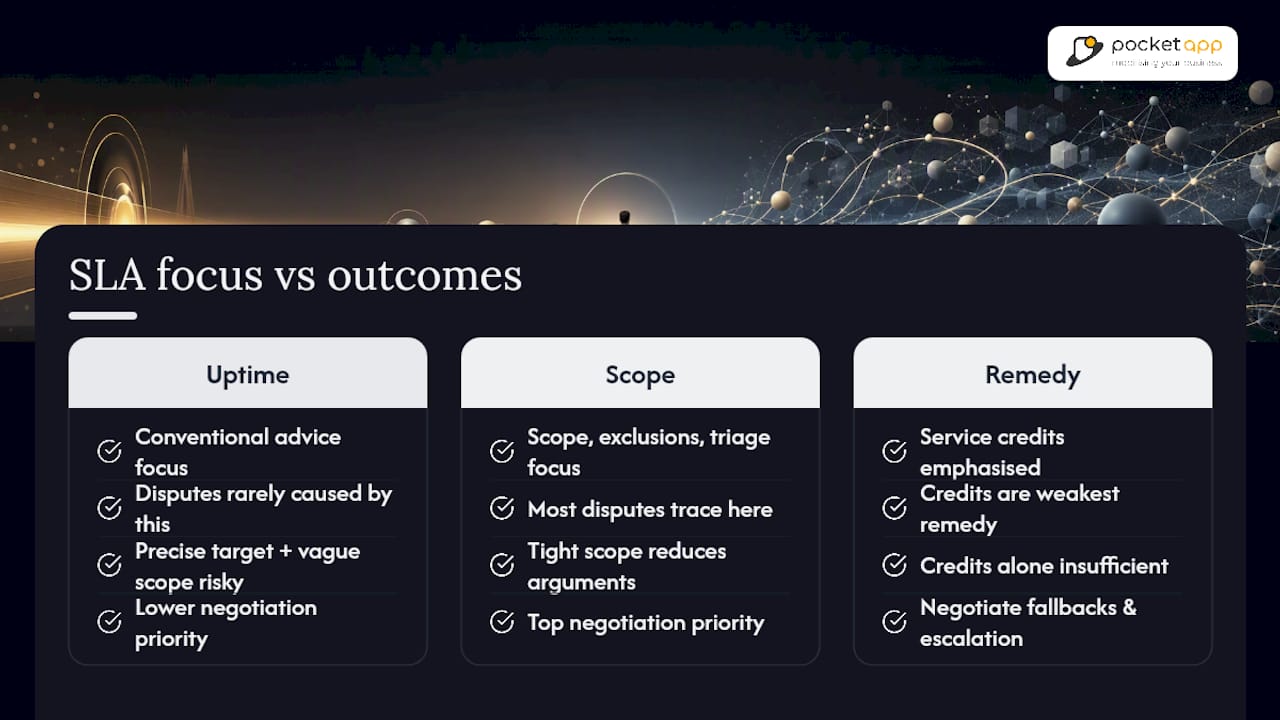
A precise uptime target with a vague scope clause is worse than a modest target with a tight one, because ambiguity is what triggers arguments about whose fault an outage was. Decision-makers should prioritise the scope, exclusions, and triage criteria before they haggle over whether 99.9% should really be 99.95%.
The other overlooked point: service credits get treated as the whole remedy, when they're really the weakest one. Negotiate the operational fallbacks, the escalation guarantees, the free support extensions, alongside the credit, not instead of asking for it.
— Paul
Get help drafting or delivering your app support SLA
We offer tailored support contracts and maintenance packages designed around how your business actually operates, avoiding one-size-availability figures copied from cloud providers' terms pages. We build tailored support contracts, SLA drafting, and maintenance packages around how your business actually operates, not a one-size availability figure copied from a cloud provider's terms page.

If you're scoping a new app or inheriting an unclear support arrangement on an existing one, the sensible next step is a discovery call where we map your integrations, priorities, and realistic response targets before anything gets signed. Our mobile app development team has worked across retail, healthcare, and charity sectors on exactly this kind of scoping, and we can also point you towards budgeting guidance in our app maintenance cost breakdown if pricing structure is your main question right now. Get in touch to request an SLA scoping document tailored to your app.
Sources
- Application support and service level agreements (SLAs) | Concentric Health
- Application support clause guidance | Law Insider
FAQ
What is an SLA in application support?
An application support SLA is a contract that defines measurable commitments for availability, response times, and resolution times, along with the scope of what the support team covers.
What does "SLA support" mean?
It means the support you receive is governed by agreed, measurable targets rather than best-effort promises, typically including priority tiers, response windows, and remedies like service credits if those targets are missed.
What does a 4 hour SLA mean?
It usually refers to a response or acknowledgement target, meaning the support team must acknowledge and begin triaging an issue within 4 hours of it being logged, most commonly applied to P2 or High-priority incidents.
What does SLA mean in a helpdesk context?
In a helpdesk, an SLA sets the maximum time allowed to acknowledge and resolve a ticket based on its priority level, giving both the support team and the client a measurable standard to hold each other to.
How is app uptime actually calculated?
Providers typically calculate uptime as total available minutes in a billing period minus unplanned downtime, excluding pre-agreed scheduled maintenance windows, with targets commonly set at 99.9% to 99.95%.