
Use the native in-app review APIs, not a custom modal. Prompt only after a clear moment of value, sentiment-gate unhappy users away from the public store, and measure the effect on your rating trend. That is the entire strategy in one sentence, and everything else in this guide is detail in service of it.
The reason this works comes down to platform mechanics as much as psychology. Apple caps the SKStoreReviewController dialogue at a limited number of prompts per year per user, and Google Play's In-App Review API runs on an undisclosed quota the system enforces on its own terms. You cannot out-nag these limits, so the only lever left is precision: ask the right person at the right moment.
Get the fundamentals right and you can expect roughly:
- A star improvement over several months can be expected from well-timed prompts, while prompts fired too often or at the wrong moment can cause sharp declines, per ASOtext's analysis.
- Fewer public 1 to 3 star reviews once a sentiment check routes unhappy users to private feedback instead of the store.
- A resilient user flow that never stalls waiting for a dialogue the operating system might silently refuse to show.
TL;DR:
- Native in-app review APIs should be used exclusively, as platform limits make frequent prompting ineffective and system dialogs cannot be customized.
- Timing prompts after meaningful milestones and at specific intervals, such as after three successful actions or key releases, significantly improves review quality and quantity.
- Sentiment gating directs happy users to the review prompt and routes negative feedback privately, reducing public negative reviews and providing valuable bug reports.
- Always include a manual fallback link to the store review page because system prompts may be suppressed or unavailable during testing.
- Avoid incentivizing reviews or prompting during moments of user frustration, such as after crashes or quick sessions, to maintain genuine feedback and compliance.
Table of Contents
- Platform mechanics for app rating prompts: quotas and system limits
- When should you ask for an app rating?
- How do you implement app rating prompts across platforms?
- What is sentiment gating and how does it work?
- How do you measure whether rating prompts are working?
- Common mistakes that damage your app's rating
- How Pocket App applies these patterns in real projects
- Why timing beats frequency for app rating prompts
- The overlooked truth about app rating prompts
- Key Takeaways
- Sources
- FAQ
Platform mechanics for app rating prompts: quotas and system limits
Both major platforms own the review dialogue completely, and neither lets you touch its design. That is the trade-off for using a trusted, familiar system control instead of a custom-built one: better conversion, zero creative control.
On iOS, Apple's requestReview(in:) API allows a limited number of prompts per user per year. Call it more often and the system simply declines to show anything. You cannot change the copy, the star icons, or the buttons. It is Apple's dialogue, rendered on Apple's terms.
Android works differently but lands in a similar place. Google Play's In-App Review API lets your app request a review flow via ReviewManager, but Google enforces a soft, undisclosed quota. Your code can ask; Play decides whether anything appears.
A few practical wrinkles matter here:
- Both prompts post reviews directly to the store, with no in-app confirmation that a submission happened.
- Test devices, simulators, and internal testing tracks frequently disable real submission entirely, so your QA team may never see the live dialogue.
- Because you cannot guarantee the prompt fires, every trigger you build must assume it might not, and your product flow needs to carry on regardless.
When should you ask for an app rating?
Timing decides almost everything. Ask a user how they feel about your app the moment they hit a genuine milestone, not five seconds after opening it for the first time.
Start by naming your app's actual "aha" moment: the specific action that signals real value delivered, not just app usage. That might be a completed booking, a finished onboarding flow, an exported report, or a third successful transaction. Generic session-count triggers ("user opened the app five times") are far weaker signals than milestone events tied to outcomes.
A workable sequence looks like this:
- Wait for at least three meaningful successes before the first prompt attempt, not just three app opens.
- Target a Day 1 to 3 window for early adopters, then a second opportunity around Day 14 to 30 for users who have built a habit.
- Reserve one prompt slot for major feature releases, since a fresh update is often when loyal users feel most goodwill.
- Never stack triggers close together. Space attempts weeks apart so you are not burning your limited Apple quota on near-duplicate moments.
Certain segments should never see a prompt, however tempting the trigger event looks. Skip anyone who has hit a crash in the last session, anyone mid-payment-failure, anyone whose session lasted under 30 seconds, and anyone who recently filed a bug report. These users are statistically likely to leave a bad review regardless of what you ask.
One policy point matters more than the rest: never phrase a prompt as "please give us five stars." Apple and Google both treat that as rating manipulation. Ask a neutral sentiment question instead, and let the system dialogue do the asking for a rating.
Pro Tip: Add a one to three second pause after the success animation completes before firing the review request. A prompt that interrupts a celebratory moment feels intrusive; one that follows it feels earned, according to Kickstart's analysis of Apple's timing rules.
How do you implement app rating prompts across platforms?
Implementation is where good timing plans either survive contact with real code or quietly fall apart. Each platform has its own call, its own quirks, and its own failure mode to design around.
On iOS, call AppStore.requestReview(in:) in SwiftUI, or the older SKStoreReviewController.requestReview(in:) in UIKit. Fire it and move on. The system may or may not display anything, and your code has no way to check which happened.
On Android, the flow has two steps. Request a ReviewInfo object from ReviewManager first, then call launchReviewFlow when you are ready to show it. Google's own integration guidance recommends pre-caching that ReviewInfo object ahead of the actual trigger moment, since it is only valid briefly, and handling any failure silently rather than surfacing an error to the user.
For Flutter builds, the in_app_review plugin wraps both native APIs behind three functions: isAvailable(), requestReview(), and openStoreListing(). Use requestReview() for the quota-limited native dialogue, but keep openStoreListing() on hand as a permanent "Rate this app" button in your settings screen, since it opens the store listing directly and bypasses quota logic entirely.
Three rules apply regardless of platform:
- Never block navigation or gate a feature behind the prompt appearing.
- Always provide a manual "Rate this app" deep link as a fallback for motivated users the system prompt missed.
- Treat every
requestReview()call as fire-and-forget: log the attempt, not the outcome, since you cannot observe the outcome.
Pro Tip: Build your settings-page "Rate us" link first, before you build the automated trigger. It is the one path guaranteed to work every time, and it costs almost nothing to ship.
What is sentiment gating and how does it work?
Sentiment gating puts one small question between your user and the native review dialogue, and it is the single highest-leverage pattern in this entire guide. Ask how someone feels before you ask them to rate you publicly.
The pattern runs in three screens:
- A quick sentiment question, phrased neutrally: "Are you enjoying [app name]?" with a simple Yes or No, or a star-free thumbs choice. Never phrase this as "Would you rate us five stars?", which drifts into the rating manipulation both Apple and Google prohibit.
- Positive responses route to the native review prompt. These are your happiest users, and this is exactly the moment the system-managed dialogue should fire.
- Negative responses route to a private feedback form instead, asking what went wrong. That feedback should flow straight to product and QA teams, where it can fix the actual issue before more users hit it.
Done well, this reduces public 1- to 3-star reviews measurably, because dissatisfied users get a private outlet instead of a public one, according to LaunchPilot's review-strategy research. It also gives your team a genuine early-warning feed for bugs, well before they show up as one-star complaints in the store.
One compliance note: never hide or disable the native review option for users who answer negatively. Sentiment gating routes attention, but it must never block access to leaving a review through legitimate channels.

Pro Tip: Tag every piece of routed negative feedback with the app version and device model. Recurring complaints tied to a specific release version are usually the fastest bugs to trace and fix.
How do you measure whether rating prompts are working?
Track the funnel from prompt to submission, not just your headline star rating. The number that matters first is: prompts shown versus reviews actually submitted, watched over weeks, not days.
Layer in these checks:
- Watch your average rating and the full distribution (not just the mean) after every release, since a stable average can hide a growing spread of 1-star and 5-star reviews cancelling out.
- A/B test the trigger event, the sentiment-gate threshold, and the timing delay. Never test the native dialogue's copy or design; you have no control over it anyway.
- Set an alert for rating velocity drops immediately after a release, and pause automated prompts if ratings fall sharply until you diagnose the cause.
- Cross-reference App Store Connect and Play Console data with your own product analytics to see whether prompted users retain and convert differently from unprompted ones.
Structured experimentation here borrows directly from broader prompt testing and optimisation methodology, and the discipline of isolating one variable at a time applies just as well to review triggers as to any other conversion flow.
Common mistakes that damage your app's rating
Most rating-prompt failures trace back to one of four habits, all of them easy to avoid once you know to watch for them.
- Offering incentives for reviews. Discounts, unlocked features, or in-app currency in exchange for a rating breach both Apple's and Google's policies outright, and both platforms actively police it.
- Treating frequency as a lever. Firing the prompt more often does nothing once you hit Apple's three-per-year ceiling or Google's undisclosed quota. The system simply stops responding.
- Prompting straight after a crash, a failed payment, or a session under 30 seconds. These are the moments users are least charitable, and the reviews reflect it.
- Blocking the app flow while waiting on the dialogue. Google's own guidance is explicit that your interface must continue functioning whether or not the prompt appears.
How Pocket App applies these patterns in real projects
Pocket App has delivered over 300 mobile projects across retail, charity, healthcare, and B2B sectors, and disciplined rating-prompt strategy is a standard part of that build process, not an afterthought bolted on at launch.
Client work spanning brands like WWF, Dechra, and Crocus has meant designing engagement flows for very different audiences, from casual consumer users to professional B2B teams, each needing its own definition of a genuine "value moment" before any prompt fires. That variation is exactly why generic, one-size-fits-all triggers tend to underperform.
- 300+ shipped projects across B2C and B2B sectors.
- Direct experience with sentiment-gating flows and cross-platform review API integration.
- Implementation audits and full development support available on request.
Why timing beats frequency for app rating prompts
Well-timed prompts paired with sentiment gating outperform frequency-based tactics because both platforms enforce quotas that make brute-force asking pointless.
| Point | Details |
|---|---|
| Use native APIs only | SKStoreReviewController on iOS and the In-App Review API on Android are system-managed and cannot be redesigned. |
| Respect the quotas | Apple caps prompts at three per 365 days; Google enforces an undisclosed soft quota either way. |
| Trigger on milestones | Fire prompts after real success events, not session counts, and space attempts weeks apart. |
| Sentiment-gate first | Route positive responses to the native dialogue and negative ones to a private feedback form. |
| Always keep a fallback | A settings-page deep link to the store review sheet works even when the system prompt is suppressed. |
The overlooked truth about app rating prompts
Most advice on this topic obsesses over the wrong variable. Teams spend weeks debating prompt copy, button colours, and dialogue design, then discover none of that is theirs to control. The native dialogues are fixed. The only genuine design surface you have is timing, segmentation, and the sentiment gate sitting in front of it.
That reframing changes where effort should go. Instead of asking "how do we word this prompt better," the better question is "which users, at which moment, have we proven are happy enough to ask?" Get that targeting wrong and no amount of clever copy saves you, because you are simply asking the wrong person at the wrong time to make a judgement they were never going to make favourably.
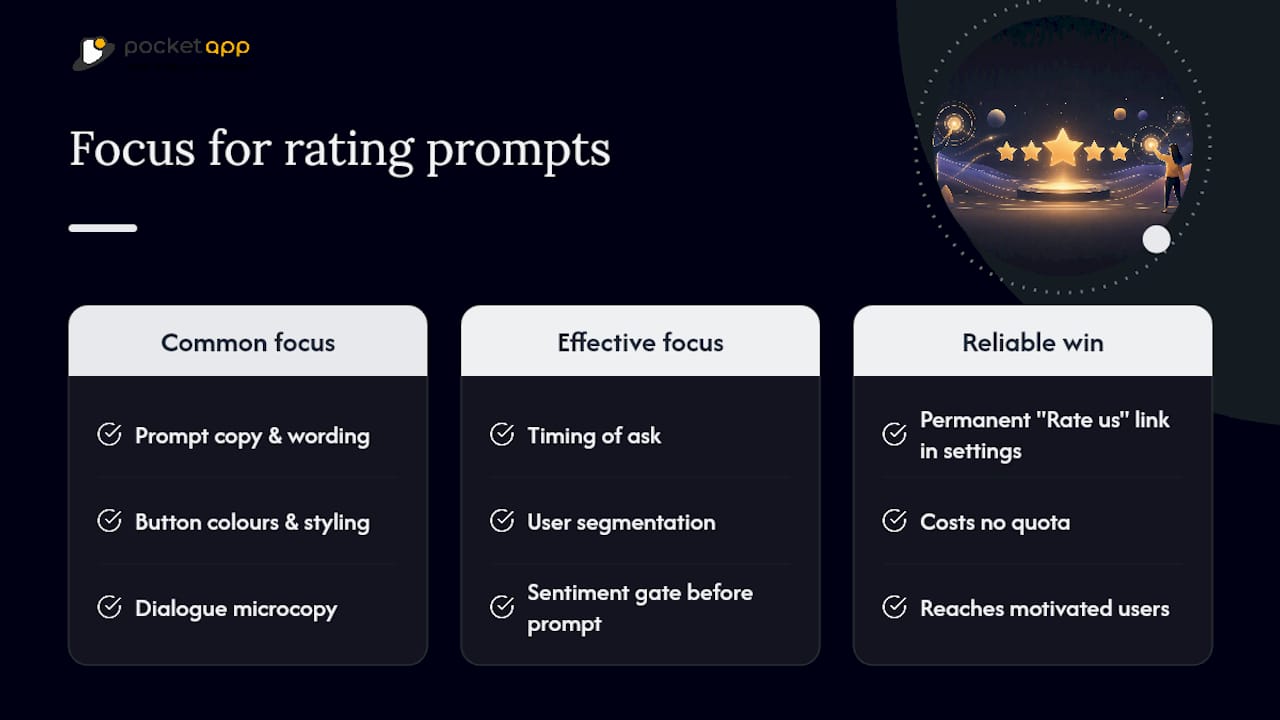
The other underrated point: a permanent, manual rate-us link in settings often outperforms expectations, precisely because it costs you nothing in quota and reaches the small but vocal group of genuinely motivated users the automated system never catches. Build that first. It is the cheapest, most reliable piece of this entire strategy, and most teams build it last, if at all.
If your team needs help translating this into working code across iOS, Android, and Flutter, Pocket App's mobile development service covers exactly this kind of implementation work, from the sentiment-gate UI through to store API integration.
— Paul
Key Takeaways
Sentiment-gated prompts fired at genuine value moments, backed by a manual fallback link, outperform any frequency-based or generically timed rating strategy.
| Point | Details |
|---|---|
| Lead with native APIs | Use SKStoreReviewController on iOS and the In-App Review API on Android rather than custom dialogues. |
| Respect strict quotas | Apple allows three prompts per 365 days; Google enforces its own undisclosed soft limit. |
| Time prompts to milestones | Trigger after completed tasks or exports, not session counts, and space attempts weeks apart. |
| Gate by sentiment first | Route happy users to the store dialogue and unhappy ones to private feedback forms. |
| Never skip the fallback | A settings-page deep link to the store listing works when the system prompt is suppressed. |
Sources
- Ratings, reviews, and responses - App Store
- Google Play In-App Reviews API | Other Play guides
- in_app_review - Dart API docs
- App Store Rating & Review Strategy | LaunchPilot
FAQ
How do I use the in-app rating prompt on iOS?
Call AppStore.requestReview(in:) (SwiftUI) or SKStoreReviewController.requestReview(in:) (UIKit) after a genuine success moment. The system decides whether to display it, capped at three times per 365 days.
What are examples of five-star review triggers?
Reviews tend to skew positive when prompted right after a completed purchase, a finished onboarding flow, or a successfully exported file, rather than at random session milestones.
How much is an app with 100,000 users worth?
Valuation depends heavily on revenue model, engagement, and retention rather than user count alone, so there is no single reliable figure to quote without those details.
How do I give a rating to any app?
On iOS or Android, open the app's store listing and scroll to the ratings section, or use the app's own "Rate this app" link if it provides one, which opens the store review screen directly.