
TL;DR:
- Nearly 1 billion people worldwide live with some form of disability, yet most mobile journeys still face accessibility barriers. Designing apps with accessibility principles like WCAG and native APIs ensures usability for all users and complies with legal requirements in regions like the UK, Europe, and the US. Integrating accessibility throughout the development lifecycle and prioritizing real user testing creates more inclusive, reliable, and high-quality mobile experiences.
Nearly 1 billion people worldwide live with some form of disability, yet 72% of mobile journeys still encounter accessibility barriers. That disconnect is striking when you consider how central smartphones have become to everyday life, from banking and healthcare to retail and social connection. App accessibility is not simply about compliance paperwork or adding a few screen-reader labels before launch. It shapes whether real people can actually use what you build, and it directly affects retention, reputation, and legal standing. This guide covers what accessibility means in a mobile context, which standards apply, where teams typically go wrong, and how to embed accessibility into every stage of your development lifecycle.
Table of Contents
- What is app accessibility and why does it matter?
- Core principles and standards for mobile accessibility
- Hidden challenges and overlooked accessibility pitfalls
- How to implement accessibility in your app development lifecycle
- The uncomfortable truth: accessibility isn't a checklist
- Take your app accessibility further with expert guidance
- Frequently asked questions
Key Takeaways
| Point | Details |
|---|---|
| Accessibility benefits everyone | Designing for access improves usability for all users, not just those with disabilities. |
| Standards need adapting | WCAG principles provide a foundation, but mobile apps require platform-specific solutions. |
| Automation only goes so far | Automated tools find some issues, but manual testing and user feedback are crucial. |
| Continuous process | Embedding accessibility in your development lifecycle ensures ongoing improvement and compliance. |
What is app accessibility and why does it matter?
Having established the sheer scale of the problem, we first need to define what app accessibility actually means and why it should be a priority.
App accessibility refers to designing and building mobile applications so they are usable by people with disabilities, following principles like WCAG's POUR framework: Perceivable, Operable, Understandable, and Robust. These principles were originally drafted for the web but have been adapted for mobile through platform-specific APIs and guidelines from Apple and Google. In practice, this means your app should work reliably with screen readers like VoiceOver and TalkBack, respond to dynamic text sizing, support keyboard or switch navigation, and present content with sufficient colour contrast.
Compliance is no longer optional. In the UK and across Europe, the European Accessibility Act (EAA) requires consumer-facing digital products to meet accessibility standards from June 2025. In the United States, the Americans with Disabilities Act (ADA) has been interpreted to apply to mobile apps, and litigation in this space has grown steadily over the past decade. Ignoring these requirements does not just create ethical problems. It creates legal exposure that can be expensive and reputationally damaging.
"Accessibility is not a special feature for a niche audience. It is a quality indicator for the entire product."
Beyond compliance, accessible design benefits everyone. Larger tap targets help one-handed users and people with motor difficulties alike. High-contrast text is easier to read in direct sunlight. Voice commands that assist blind users are equally useful for someone cooking with their hands occupied. When you build with accessibility in mind, the resulting improvements in clarity, structure, and usability tend to lift the experience for your entire user base, not just those with disabilities.
The moral and legal importance of accessibility is something product teams need to internalise early. Poor accessibility creates barriers that cause users to abandon your app, leave negative reviews, and seek alternatives. The business case is clear: a more accessible app reaches a broader audience, earns more trust, and reduces churn.
Key reasons to prioritise accessibility from day one:
- Estimated 15% of the global population lives with a disability
- Regulatory requirements such as the EAA and ADA carry financial penalties
- Accessible features improve usability for all users, not just those with disabilities
- Poor accessibility correlates with poor retention and lower app store ratings
- Inclusive design supports brand reputation in increasingly values-conscious markets
Core principles and standards for mobile accessibility
With definitions and motivations in hand, the next step is to get to grips with the standards and methodologies that successful teams rely on.
The most widely adopted benchmark is WCAG 2.2 at Level AA. Most organisations target this level because it balances comprehensive coverage with practical achievability. According to 2025 Web Almanac data, the median Lighthouse accessibility score reached 85% in 2025, yet automated tools still only catch between 20% and 40% of actual issues. That means even apps that score well in automated audits may still present significant barriers to real users.
Beyond WCAG, platform-specific guidelines add another layer. Apple's Human Interface Guidelines, combined with VoiceOver support, set expectations for iOS apps. Google's Material Design guidelines and TalkBack integration do the same for Android. Both platforms offer native accessibility APIs that, when used correctly, handle the heavy lifting of communicating with assistive technologies.
| Standard | Platform | Key focus |
|---|---|---|
| WCAG 2.2 AA | Cross-platform | Perceivable, Operable, Understandable, Robust |
| Apple Human Interface Guidelines | iOS | VoiceOver, Dynamic Type, Reduce Motion |
| Android Material Design | Android | TalkBack, content descriptions, focus order |
| WCAG2Mobile | Both | Mobile-specific adaptations of WCAG criteria |
Native UI components and semantic grouping are two of the most powerful tools you have. When you use standard system controls, those components carry built-in accessibility support that custom widgets do not. On Android, using "Semanticsto group related elements ensures TalkBack announces them coherently. On iOS,.accessibilityElement(children: .combine)` achieves the same goal. Custom actions and hints can supplement these where the default behaviour is insufficient.
A practical approach to building accessibility into your standards looks like this:
- Adopt WCAG 2.2 AA as your minimum bar and map each criterion to mobile-specific implementation guidance from WCAG2Mobile.
- Use native UI components wherever possible rather than building fully custom widgets that require manual accessibility wiring.
- Group related elements using platform semantics APIs so screen readers announce them in a logical, contextual way.
- Add descriptive labels, hints, and custom actions to interactive elements that go beyond their default visual appearance.
- Run Accessibility Scanner (Android) and Accessibility Inspector (iOS) during development to catch common issues early.
- Integrate automated accessibility checks into your CI/CD pipeline as a safety net, while acknowledging these catch only a fraction of real issues.
Pro Tip: Prioritise platform-native APIs over custom implementations for every interactive component. Native controls come pre-wired for assistive technology, which dramatically reduces the manual accessibility work required and improves reliability across OS versions.
Exploring inclusive design approaches from the earliest wireframe stage prevents expensive retrofitting later and tends to produce structurally better interfaces overall.
Hidden challenges and overlooked accessibility pitfalls
Even with standards in place, teams encounter subtler or unexpected challenges. Here is where real accessibility skill comes into play.
The issues that appear in early audits, such as missing image labels or insufficient contrast, are relatively easy to spot and fix. The harder problems emerge under specific conditions: after a modal window opens, when the user rotates the device, when an error message appears mid-form, or when a feature relies on complex gestures.
Complex gestures require alternatives under WCAG 2.5.7. Swipe-based carousels, pinch-to-zoom interactions, and drag-and-drop functionality are all potential barriers for users with motor impairments. Each of these must have an alternative interaction path that does not require fine motor precision. Similarly, dragging movements now have their own criterion under WCAG 2.2, which is frequently overlooked in mobile-focused teams who are more familiar with web accessibility conventions.

Modal focus management is one of the most persistently problematic areas. When a modal opens, assistive technology focus must move to that modal and must not be able to escape to content behind it. When the modal closes, focus must return to a logical point in the previous view. Many development teams implement modals that work visually but fail completely for screen reader users because focus leaks or does not move at all.
| Challenge | Common mistake | Recommended fix |
|---|---|---|
| Complex gestures | No alternative provided | Add button-based alternatives for all gesture interactions |
| Modal windows | Focus not trapped | Move focus to modal on open; return to trigger on close |
| Orientation changes | Content not reflowed | Avoid locking orientation; test both portrait and landscape |
| Authentication flows | Cognitive tests with no alternative | Provide WCAG 3.3.8-compliant alternatives (e.g. email link) |
| Dynamic content | Announcements not triggered | Use live regions to notify assistive technology of updates |
| Haptic feedback | Only visual or audio feedback provided | Supplement with haptics for users who are deaf or hard of hearing |
Purpose over visuals is a nuance that separates experienced accessibility practitioners from those still learning. A label that says "button 3" is technically present but functionally useless. Labels must communicate the purpose of an element, not just its type or position. Equally, decorative images and visual separators should be explicitly hidden from the accessibility tree to prevent assistive technologies from wasting users' time reading out irrelevant information.
Strategies for mobile accessibility that acknowledge these subtleties are far more effective than generic checklists applied mechanically. Combining them with thorough usability testing for accessibility helps surface issues that no automated tool can predict.
Pro Tip: Always test accessibility after every significant state change in your app. Modals, error messages, loading indicators, and success confirmations each create new accessibility contexts. These transitions are where assistive technology users most commonly encounter barriers that sighted users never notice.
How to implement accessibility in your app development lifecycle
To ensure all this knowledge makes maximum impact, it must be embedded into your app development lifecycle rather than treated as an afterthought.
The most common failure mode is attempting to retrofit accessibility after a product is feature-complete. This is costly, slow, and often produces patchy results. Accessibility embedded from discovery onwards is structurally different to accessibility bolted on later. It affects information architecture, interaction patterns, component design, and content strategy, all of which are expensive to change post-launch.
Here is how to integrate accessibility tasks across each stage:
- Discovery and planning: Define accessibility requirements alongside functional requirements. Reference WCAG 2.2 AA criteria specific to your feature set. Identify any users with disabilities in your target audience and plan to include them in research.
- Design: Apply accessible colour contrast ratios from the first mock-up. Define touch target sizes (minimum 44x44 points on iOS, 48x48dp on Android). Specify focus order in component annotations and document intended screen-reader behaviour for each interactive element.
- Development: Use native UI components as the default choice. Apply semantic grouping APIs. Write descriptive content descriptions and accessibility labels during component development, not as a separate pass. Avoid relying on colour alone to convey information.
- Testing: Run Accessibility Scanner and Inspector after every significant feature addition. Conduct manual testing with VoiceOver and TalkBack enabled. Where possible, involve users with disabilities in structured testing sessions.
- CI/CD integration: Add automated accessibility checks to your build pipeline. Tools like Deque's axe-core for mobile can catch a reliable subset of common issues on every build, preventing regressions.
- Launch and iteration: Monitor app store reviews and support channels for accessibility-related feedback. Plan regular accessibility audits as part of your release cycle, not as one-off events.
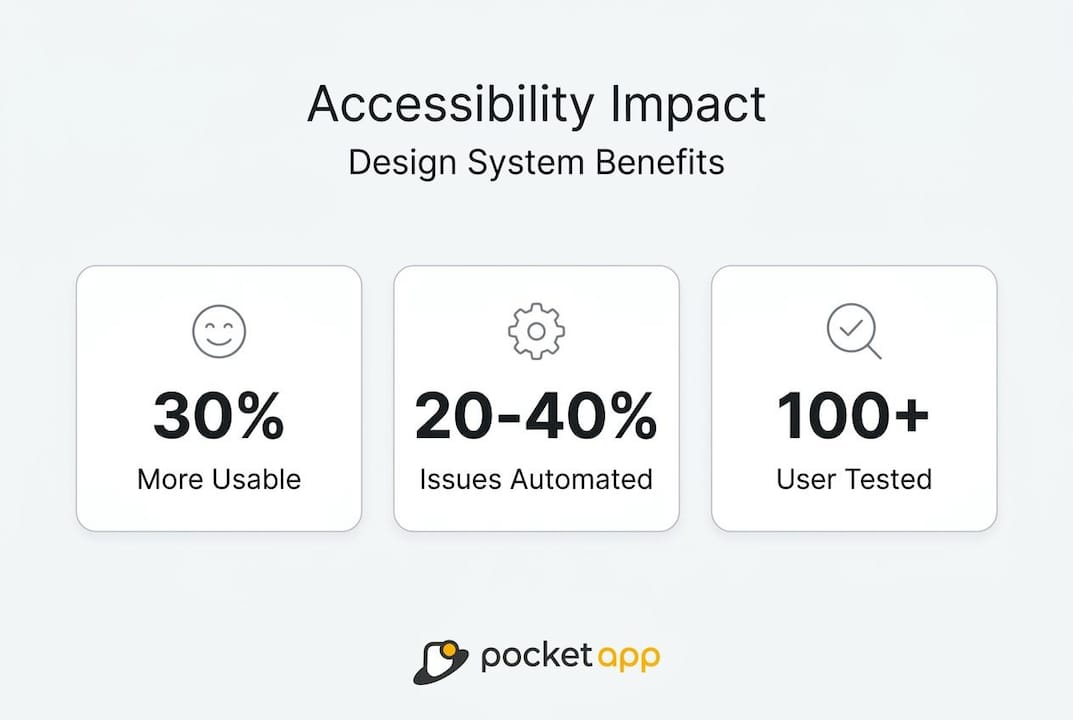
Automated tools catch only 20 to 40% of real-world accessibility issues. This figure is worth keeping visible. It means that even a perfectly passing automated audit leaves the majority of potential barriers undetected. Manual review and testing with real users are not optional extras; they are core parts of a credible accessibility process.
When designing for accessibility from the ground up, you will typically find that the design system itself becomes more coherent. Consistent component behaviour, clear labelling, and logical focus order are properties that benefit all users and make the codebase more maintainable. The work you invest in optimising mobile UX for accessibility tends to pay dividends across the wider product.
Pro Tip: Document accessibility decisions and rationale as you go. When a future developer asks why a particular component was built a certain way, that documentation prevents well-intentioned changes from accidentally removing accessibility support that was carefully added.
The uncomfortable truth: accessibility isn't a checklist
Once you understand the practical steps, it is worth confronting the underlying philosophy that will either sustain or undermine your accessibility work over the long term.
There is a persistent temptation in product development to treat accessibility as a compliance exercise. You run a scanner, fix the flagged items, tick the box, and move on. This approach produces apps that pass automated audits but fail real users routinely. We have seen this pattern across dozens of projects. The audit results look reassuring. The lived experience of a screen-reader user is often still deeply frustrating.
The appeal of third-party accessibility overlays, tools that promise to fix your app's accessibility through a single script or plugin, is understandable but ultimately misleading. These tools can address a narrow subset of surface-level issues but cannot rewire the underlying semantic structure of a poorly built interface. Accessibility overlays remain insufficient without the foundation of correct semantic markup and native API integration.
There is also something worth noting about the accessibility tree specifically. It has traditionally been the interface between your app and assistive technologies. Increasingly, it is also becoming the interface between your app and AI-powered agents that navigate on behalf of users. The accessibility tree is emerging as an API for a much broader range of automated interactions. Building a clean, accurate, and well-structured accessibility tree is therefore not just about today's screen reader users. It is about the next generation of how software is operated.
Genuine accessibility improvement comes from listening to users with disabilities, not just reading standards documents. Standards tell you what to achieve. Users tell you whether you have actually achieved it. The most impactful accessibility work we have seen comes from teams that treat disabled users as valued participants in research and testing, not as edge cases to accommodate.
Combining strong design tips for engagement with a genuine commitment to inclusive practice produces products that are better for everyone. Accessibility done well is invisible. Users simply experience something that works.
Take your app accessibility further with expert guidance
For those looking to implement best-practice accessibility or seeking guidance from experienced mobile app specialists, support is at hand.
Building accessible apps requires specialist knowledge that spans design, development, testing, and strategy. Getting it right means more than running a scanner before release.

At Pocket App, we bring over 300 projects of experience to every engagement, including work across healthcare, retail, charity, and consumer platforms. Our mobile app development services are built around accessibility from discovery through to deployment, ensuring inclusive design is never an afterthought. If you need a partner to assess your current accessibility posture or build a new product with inclusivity at its core, our accessible app design team can help you deliver experiences that work for every user. Reach out to discuss how we can support your next project.
Frequently asked questions
How do I test app accessibility on iOS and Android?
Use native tools like Accessibility Inspector (iOS) and Accessibility Scanner (Android) for automated checks, then complement these with manual testing sessions involving real users with disabilities for thorough coverage.
What are the common accessibility issues in mobile apps?
Frequent pitfalls include poor colour contrast, missing content labels, complex gestures without alternatives, and modal windows that fail to trap or return focus correctly when opened and closed.
Is automated accessibility testing enough for compliance?
No. Automated tools catch only 20 to 40% of actual issues, so manual reviews and structured testing with users who have disabilities are essential components of a credible compliance process.
Why should I use native accessibility APIs over web-like overlays?
Platform-native accessibility APIs integrate directly with assistive technologies like VoiceOver and TalkBack, providing far superior reliability and performance than third-party overlays applied over a poorly structured interface.
Recommended
- Pocket App | Ensuring App Accessibility: Designing for All Users
- Pocket App | Designing Accessible Mobile Apps: Ensuring Inclusivity for All Users
- Pocket App | Inclusive by Design: Strategies for Mobile App Accessibility
- Top app design tips for better user engagement 2026
- Ako dizajn aplikácií ovplyvňuje používateľskú spokojnosť - Blog TechWeb