
TL;DR:
- App security involves protecting mobile applications from threats to safeguard user data and maintain trust. Most apps fail basic security tests, risking breaches that can cause regulatory fines and reputational damage. Implementing security from the design stage and following standards like MASVS-L1 ensures better protection and business value.
App security is the practice of protecting mobile applications from cyber threats to secure user data, ensure privacy, and uphold business trust. Why app security is important becomes clear when you consider that 75% of mobile apps fail at least one basic security test, with the average data breach costing $4.88 million. Regulations including GDPR, PSD2, and the EU Digital Markets Act make security a legal obligation, not a preference. Standards like AES-256 encryption, TLS 1.3, and OAuth2/JWT authentication define the baseline every serious app must meet in 2026.
Why app security is important: risks you cannot ignore
Mobile applications operate in what security professionals call an adversarial environment. Unlike a web server locked in a data centre, your app runs on devices you do not control, in conditions you cannot predict.
Mobile binaries are exposed to commoditised reverse-engineering and instrumentation frameworks. This means an attacker with modest skills can inspect your app's code, extract embedded credentials, and manipulate its behaviour. The threat is not theoretical. It is the daily reality for any app distributed through the App Store or Google Play.
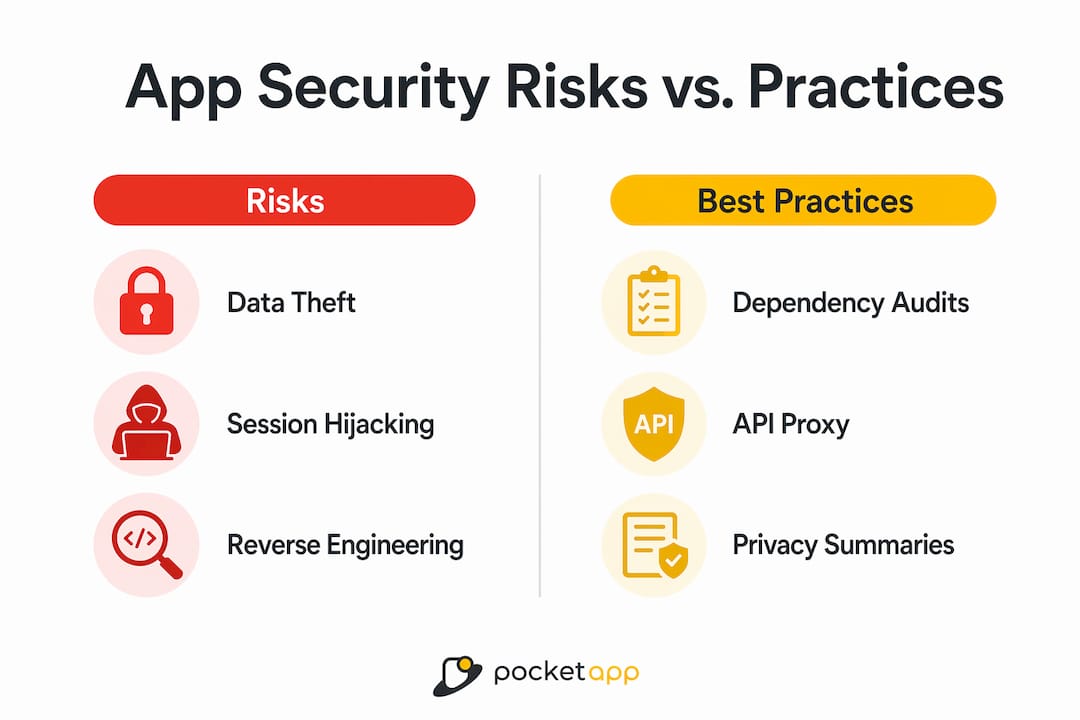
The most common vulnerabilities IT teams encounter include:
- Insecure data storage: Sensitive data written to unprotected local files or shared preferences, readable by other apps or physical device access.
- Poor session handling: Long-lived tokens without expiry, enabling session hijacking long after a user logs out.
- Outdated third-party libraries: Dependencies with known CVEs that never get patched because the update model for mobile apps is slower than for web services.
- Exposed credentials: API keys and secrets embedded in the binary, visible to anyone who decompresses the package.
- Excessive permissions: Apps requesting access to contacts, location, or camera without legitimate need, increasing the attack surface.
The consequences are not limited to a technical incident. A single breach can rapidly erode brand credibility via social media and trigger regulatory penalties that exceed the direct financial losses. For a UK business subject to GDPR, fines can reach £17.5 million or 4% of global annual turnover, whichever is higher.
Pro Tip: Run a dependency audit on your app's third-party libraries every quarter. Tools like OWASP Dependency-Check or Snyk surface known vulnerabilities in packages you may have forgotten you included.
How does strong security reduce risk and build business value?
Security built into an app from the start costs a fraction of what it costs to retrofit later. Retrofitting security after reaching 50,000 or more users requires forced logouts, data migrations, and emergency releases. Designing it in from day one requires minimal schedule impact. The business case is straightforward.
The recognised baseline standard for 2026 is MASVS-L1, defined by the OWASP Mobile Application Security Verification Standard. Apps handling regulated or high-trust data, such as financial services or healthcare platforms, require MASVS-L2 compliance or higher. These standards specify mandatory controls including AES-256 encryption at rest, TLS 1.3 for data in transit, and secure OAuth2/JWT authentication with short-lived tokens.
Here is how to approach security as a design principle rather than a retrofit:
- Define your compliance tier at discovery. Establish whether your app requires MASVS-L1 or MASVS-L2 before writing a line of code. This shapes architecture decisions from the outset.
- Encrypt everything by default. Apply AES-256 to all locally stored sensitive data. Use TLS 1.3 for every API call. Never transmit credentials in plain text.
- Implement secure authentication. Use OAuth2 with JWT tokens. Set short expiration windows. Require re-authentication for sensitive actions.
- Reduce your attack surface. Strip debug information from production builds. Conduct dependency scanning at build time. Remove unused permissions before submission.
- Treat compliance as a feature. GDPR and PSD2 compliance is not a legal checkbox. It is a selling point to privacy-conscious users and enterprise procurement teams.
Security also functions as a competitive differentiator. Privacy-conscious consumers increasingly choose apps that demonstrate data stewardship. For B2B apps, enterprise clients routinely require evidence of security controls before signing contracts. You can explore how data privacy best practices translate directly into procurement advantages.
Pro Tip: Include a brief, plain-English privacy summary on your app store listing. Users read these. Transparency about data handling increases download conversion rates.
Mobile vs web security: what makes mobile apps different?
Treating mobile app security as an extension of web security is a structural mistake. The two environments are fundamentally different, and the controls that protect a web application do not map cleanly onto a mobile binary.

| Factor | Web Application | Mobile Application |
|---|---|---|
| Code location | Runs server-side; source not exposed | Distributed as binary; inspectable by anyone |
| Update delivery | Instant server-side deployment | Dependent on user updating via app store |
| Credential exposure | Secrets stay on server | Embedded secrets visible in decompiled binary |
| Platform controls | Server firewall, WAF | Sandboxing, Keychain, Keystore (developer-dependent) |
| Threat model | Network and server attacks | Device tampering, reverse engineering, runtime hooks |
Mobile apps run as binaries on user-owned devices, exposing code and credentials to inspection and modification. iOS Keychain and Android Keystore provide strong platform-level protections, but only when developers implement them correctly. Developers frequently misuse these APIs, storing credentials in plain text or using deprecated methods that bypass hardware security modules.
The update model creates another structural problem. A web app vulnerability can be patched in minutes. A mobile app vulnerability requires a new build, app store review, and user adoption. Critical flaws can remain in production for weeks. This is why multi-layered defence across code, build time, runtime, and backend layers is not optional. Relying solely on server-side firewalls provides a false sense of security.
Pro Tip: Never embed API keys directly in your mobile binary. Use a backend proxy to handle authenticated API calls, keeping secrets entirely off the device.
Which app security best practices should you prioritise in 2026?
The importance of app security translates into a specific set of controls your development team should implement and your IT team should verify. The following practices address the most exploited vulnerabilities across iOS and Android platforms.
- Encrypt data at rest and in transit. AES-256 for local storage, TLS 1.3 for all network communication. No exceptions for internal APIs.
- Use short-lived authentication tokens. OAuth2 with JWT tokens should expire within minutes for sensitive sessions. Refresh token rotation prevents long-term session theft.
- Gate your APIs properly. Apply rate limiting, input validation, and response filtering on every endpoint. Mobile apps are not the only clients that will call your API.
- Follow the OWASP Mobile Top 10. Integrating OWASP Mobile Top 10 guidelines into your development pipeline provides a structured checklist that covers the most commonly exploited vulnerability classes.
- Run both SAST and DAST testing. Static Application Security Testing catches code-level flaws at build time. Dynamic Application Security Testing identifies runtime vulnerabilities. Both are necessary; neither alone is sufficient.
- Adopt DevSecOps. Security checks integrated into your CI/CD pipeline catch issues before they reach production. Tools like Checkmarx, Veracode, and SonarQube integrate directly into standard pipelines.
- Monitor production behaviour. Runtime tampering detection and jailbreak checks are as important as pre-launch testing. Abnormal API call patterns in production often indicate active exploitation.
- Educate users on updates. A patched app only protects users who have installed the patch. In-app prompts encouraging updates reduce the window of exposure for critical fixes.
For a structured pre-launch review, Pocketapp's guide on what to consider before launch covers authentication, data handling, and permission scoping in practical detail. You can also review advanced security strategies for apps operating in higher-risk environments.
Pro Tip: Build a Software Bill of Materials (SBOM) at every release. It gives you an instant inventory of every dependency in your app, which is critical when a zero-day vulnerability surfaces in a widely used library.
Key takeaways
App security is a foundational business requirement: organisations that build security in from the design phase avoid costly breaches, regulatory penalties, and the reputational damage that follows a public incident.
| Point | Details |
|---|---|
| Security belongs at design stage | Retrofitting security after launch is expensive and disruptive; build controls in from day one. |
| MASVS-L1 is the 2026 baseline | All production apps should meet MASVS-L1; regulated apps require MASVS-L2 or higher. |
| Mobile and web threats differ | Mobile binaries are inspectable and modifiable; server-side defences alone are insufficient. |
| Multi-layer defence is mandatory | Combine code obfuscation, build-time scanning, runtime protection, and backend API gating. |
| Security drives commercial value | Privacy-conscious users and enterprise buyers treat demonstrable security as a procurement criterion. |
Why i think most businesses still get app security wrong
After working on mobile products across retail, healthcare, and financial services, the pattern I see most often is this: security gets treated as a final checklist item rather than a design constraint. Teams spend months building features, then allocate two weeks before launch to "do security." That is not a security programme. That is a liability audit.
The uncomfortable truth is that security underpins digital trust in ways that go beyond compliance. When a breach happens, the conversation shifts from "what data was lost" to "why did you not protect it." Regulators, customers, and the press all ask the same question. The answer "we ran a penetration test before launch" is not sufficient if you have not maintained controls post-release.
The other mistake I see is treating security as a purely technical concern. The most effective security programmes I have encountered involve business owners, product managers, and developers in the same conversation. Business owners understand what data is genuinely sensitive. Product managers understand user behaviour. Developers understand what is technically feasible. Security without that cross-functional input produces controls that either fail to protect what matters or create friction that users route around.
Balancing usability and security is genuinely hard. Forcing re-authentication every five minutes protects data but destroys the user experience. The answer is risk-based design: apply friction where the risk is highest and minimise it everywhere else. That requires judgement, not just technical knowledge.
The threat landscape also does not stand still. Techniques that were specialist knowledge two years ago are now packaged into tools that require no expertise to run. Continuous monitoring and regular re-testing are not optional extras. They are the maintenance cost of operating a mobile product responsibly.
— Paul
How Pocketapp builds security into every app we deliver
Pocketapp has delivered over 300 mobile projects for clients including WWF, Dechra, and Crocus, with security integrated from discovery through to deployment.

Every project at Pocketapp begins with a security-scoped discovery phase that identifies data classification, compliance requirements, and threat model before architecture decisions are made. Our development teams apply MASVS-aligned controls, encrypted storage, and secure API design as standard practice, not optional additions. We support clients with GDPR and PSD2 compliance requirements and conduct pre-launch security reviews on every build. If you are planning a new app or reviewing the security posture of an existing one, explore our mobile app development services or speak to our team about a security-focused discovery engagement.
FAQ
What does app security actually protect against?
App security protects against threats including insecure data storage, session hijacking, reverse engineering, and API abuse. These vulnerabilities expose user credentials, personal data, and payment information to attackers.
How much does a mobile app data breach cost?
The average data breach costs $4.88 million, covering incident response, regulatory fines, and reputational damage. GDPR penalties alone can reach £17.5 million for UK businesses.
What is MASVS and why does it matter?
MASVS is the OWASP Mobile Application Security Verification Standard. MASVS-L1 is the baseline for all production apps in 2026; MASVS-L2 applies to apps handling regulated or high-trust data such as financial or health records.
Is mobile app security different from web security?
Mobile apps distribute code as binaries on user-owned devices, making them fundamentally more exposed than server-side web applications. Treating mobile security like web security leaves critical mobile-specific vulnerabilities unaddressed.
When should security be built into an app?
Security should be integrated from the design phase. Retrofitting security after a large user base is established requires forced logouts, data migrations, and costly emergency releases.