
TL;DR:
- Progressive web apps use standard web technologies to deliver app-like experiences directly through browsers. They are cost-efficient, easily discoverable via search engines, and can be added to devices without app store downloads. However, they have limited access to some device features compared to native applications.
A progressive web app (PWA) is a web application that uses standard web technologies, including HTML, CSS, and JavaScript, to deliver an experience comparable to a native mobile app directly through a browser. PWAs run on any device with a modern browser, require no app store download, and can work offline through a technology called Service Workers. The Web App Manifest standard gives each PWA its identity, defining its name, icons, and display behaviour. For business owners weighing digital investment, PWAs represent one of the most cost-efficient ways to reach users across mobile, tablet, and desktop without building separate applications for each platform.
What key features make a web app "progressive"?
Three technical criteria define a valid PWA: it must be served over HTTPS, include a valid Web App Manifest, and register a Service Worker script. Each criterion serves a specific purpose, and all three must be present for a browser to treat the application as installable.
The core features of progressive web apps include:
- HTTPS delivery. Secure connections are mandatory. Service Workers, which act as a network proxy between the browser and the server, will not activate over an unencrypted connection.
- Web App Manifest. A JSON file that tells the browser how to present the app. It defines the app name, icons, theme colour, and display mode, such as fullscreen or standalone.
- Service Workers. Background scripts that intercept network requests, cache assets, and enable offline use. They also power push notifications and background data sync.
- Home screen installation. Users can add a PWA to their device's home screen without visiting an app store, giving it an icon and a launch experience identical to a native app.
- Push notifications. PWAs can send alerts even when the browser is closed, matching a key feature of native applications.
Progressive enhancement is the design principle that ties all of this together. A PWA adapts to device capabilities, delivering a baseline experience on older browsers and unlocking richer features on modern ones. This approach means no user is excluded because of older hardware or software.
Pro Tip: Test your PWA's installability using Chrome DevTools' Application panel. The "Manifest" and "Service Workers" tabs show exactly which criteria pass or fail before you go live.

How do progressive web apps benefit businesses compared to native apps?
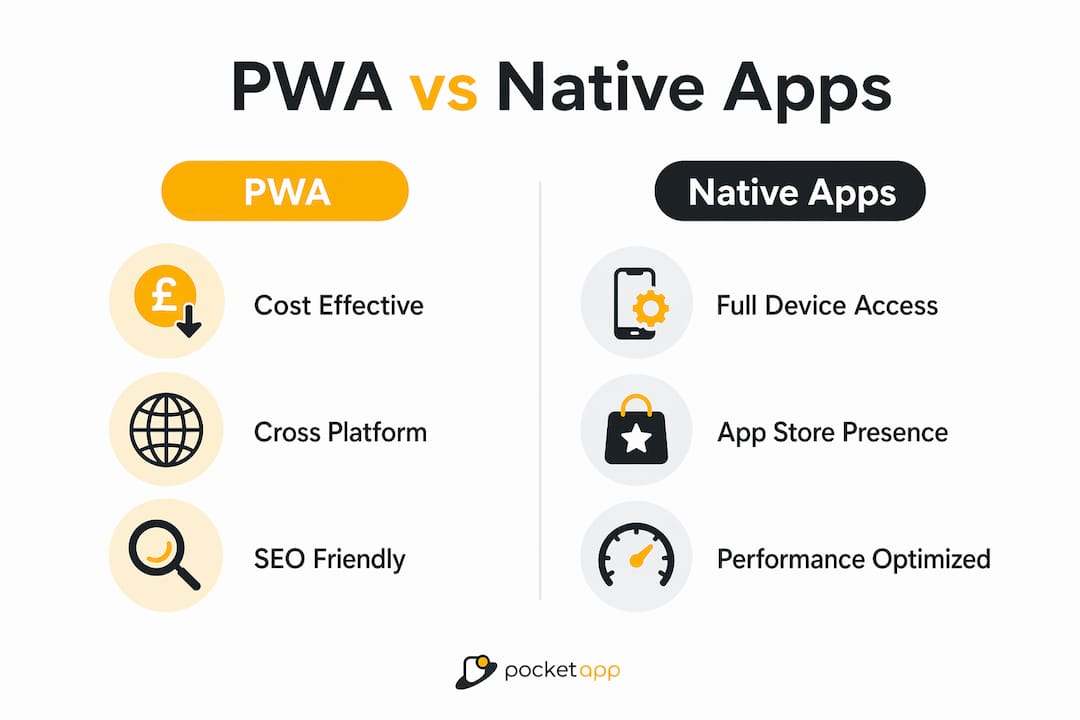
The business case for PWAs is built on cost, speed, and reach. A single codebase runs across iOS, Android, and desktop, which cuts development costs compared to maintaining separate native applications for each platform. Maintenance effort drops proportionally, since a fix or update deploys once and reaches every user instantly, bypassing app store review cycles that can take days.
Speed directly affects revenue. 53% of users abandon mobile websites that take longer than three seconds to load. PWAs use Service Worker caching to serve assets almost instantly on repeat visits, which removes one of the most common causes of drop-off. Businesses that have adopted PWAs report conversion uplifts of up to 80%, driven by faster load times and the removal of app store installation friction.
Distribution costs are also lower. Native apps sold or distributed through app stores incur commissions of 15–30% on in-app purchases. PWAs bypass this entirely. Updates go live the moment you publish them, with no waiting for store approval.
Discoverability is a further advantage that is often underestimated. PWAs are indexed by search engines in the same way as standard websites. A user searching Google for a product or service can land directly on a PWA without ever visiting an app store. For businesses that rely on organic search traffic, this is a meaningful structural benefit. You can read more about the PWA vs native app trade-offs in detail to decide which model fits your product.
The trade-offs are real but manageable. PWAs cannot access every device feature that a native app can, such as certain Bluetooth functions or advanced camera controls. For most business applications, including e-commerce, content delivery, customer portals, and internal tools, these gaps are irrelevant.
How are progressive web apps created and implemented?
Building a PWA follows a clear sequence of steps, and the good news is that you can start with what you already have.
- Build on standard web technologies. Your PWA is an ordinary website written in HTML, CSS, and JavaScript. If you already have a website, you have the foundation.
- Serve everything over HTTPS. Obtain an SSL certificate for your domain. Most hosting providers include this at no extra cost. Without HTTPS, Service Workers will not register.
- Create a Web App Manifest. Write a
manifest.jsonfile that defines your app's name, short name, icons in multiple sizes, start URL, and display mode. Link it in your HTML<head>tag. - Write and register a Service Worker. The Service Worker is a JavaScript file that runs in the background. At minimum, it should cache your core assets on installation so the app loads offline. Register it in your main JavaScript file using
navigator.serviceWorker.register(). - Test in an HTTPS environment. Local file protocols disable Service Workers, so use a local server such as Live Server or a Node.js server during development. Chrome DevTools' Lighthouse tool audits your PWA against all installability criteria.
- Add features incrementally. Start with basic caching and installability. Add push notifications, background sync, and advanced offline logic as your product matures.
Pro Tip: Run a Lighthouse audit in Chrome DevTools before launch. It scores your PWA across performance, accessibility, and installability, and flags exactly what needs fixing.
One important technical nuance applies to iOS devices. iOS imposes stricter Service Worker persistence, and the operating system may purge cached data if the app has not been used for a period of time. This means offline functionality can break until the user visits the site again. Design your PWA to handle this gracefully, displaying a clear message rather than a blank screen when cached content is unavailable.
PWAs support incremental adoption, which is one of their most practical advantages. A business can add a manifest file to an existing website to unlock basic installability, then layer in Service Worker logic over subsequent development cycles. There is no requirement to rebuild from scratch. For a broader view of cross-platform development approaches, including where PWAs sit alongside hybrid and native options, the trade-offs are worth understanding before committing to a build strategy.
What are real-world examples and use cases of progressive web apps?
PWAs have proven their value across a wide range of industries. The pattern is consistent: faster load times and offline capability produce measurable gains in engagement and conversion.
- E-commerce. Retail PWAs load product pages from cache, reducing bounce rates on slow mobile connections. The PWA approach for e-commerce is particularly effective for markets where users frequently switch between Wi-Fi and mobile data.
- News and media. Publishers use PWAs to serve cached articles offline, keeping readers engaged even without a connection. Push notifications bring readers back to breaking stories without requiring a native app download.
- Internal business tools. Field teams using stock management, inspection checklists, or CRM tools benefit from offline-capable PWAs that sync data when connectivity is restored. These tools require no app store deployment, which simplifies distribution to staff.
- Customer portals. Account management, booking systems, and loyalty programmes work well as PWAs. Users can install them to their home screen for quick access without the friction of an app store visit.
- Social platforms. Lighter PWA versions of social applications load faster on low-end devices, expanding reach into markets where high-end smartphones are less common.
The common thread across these examples is that PWAs perform best where network reliability is variable, installation friction is a barrier, or cross-device continuity matters. A user who starts browsing on a desktop can pick up exactly where they left off on a mobile device, because the PWA lives on the web rather than in a device-specific silo.
Key takeaways
A progressive web app delivers native app performance through standard web technologies, making it the most cost-efficient path to cross-platform digital engagement for most businesses.
| Point | Details |
|---|---|
| Three technical criteria | HTTPS, a valid Web App Manifest, and a registered Service Worker are all required for a PWA to be installable. |
| Cost advantage | A single codebase replaces separate iOS and Android builds, cutting development and maintenance costs significantly. |
| Speed drives conversion | PWAs use Service Worker caching to load near-instantly on repeat visits, directly reducing abandonment rates. |
| Incremental adoption | Businesses can add PWA features to an existing website gradually, without a full rebuild. |
| iOS limitations | iOS may purge cached data after inactivity, so PWAs must handle offline failures gracefully with clear user messaging. |
Why I think most businesses are still underestimating PWAs
The technical case for PWAs has been settled for years. What still surprises me is how often the conversation stalls at the organisational level rather than the technical one. Businesses resist PWAs primarily because they fear losing their app store presence, not because PWAs cannot do the job. That fear is understandable, but it is often misplaced.
Web search discoverability frequently delivers greater reach than an app store listing. A user who has never heard of your brand will not browse the App Store looking for you. They will search Google. A PWA puts you directly in that path. A native app does not.
The incremental adoption model is also underused. I have seen businesses treat PWA development as an all-or-nothing decision, when the reality is that adding a manifest file and a basic Service Worker to an existing site takes days, not months. The value starts accruing immediately, and complexity can be added as confidence grows.
My honest recommendation: if you serve customers on mobile and your website is your primary digital touchpoint, a PWA is the most direct investment you can make in engagement and retention. The role of PWAs in the mobile ecosystem is only growing, and the businesses that treat them as a genuine product rather than a technical checkbox will pull ahead.
— Paul
How Pocketapp can help you build a PWA
Pocketapp has delivered over 300 digital products for clients including WWF, Dechra, and Crocus, spanning retail, healthcare, and consumer engagement. That depth of experience translates directly into PWA projects, where the right decisions at the architecture and UX stages determine whether a product performs or stalls.

Whether you need a PWA built from the ground up or want to extend an existing web product with offline capability and home screen installation, Pocketapp's team covers strategy, design, and mobile app development end to end. For businesses weighing PWA against native or hybrid options, Pocketapp also offers cross-platform app development services that match the right technology to your audience and budget.
FAQ
What is a progressive web app in simple terms?
A progressive web app is a website built with HTML, CSS, and JavaScript that behaves like a mobile app. It can be installed on a device's home screen, work offline, and send push notifications, all without going through an app store.
What are the main benefits of progressive web apps for businesses?
PWAs reduce development costs by using one codebase across all platforms, load faster than standard mobile websites, and bypass app store commissions and review delays. They are also indexed by search engines, which improves organic discoverability.
How does a progressive web app work offline?
A Service Worker script caches the app's core assets during the first visit. On subsequent visits, the PWA serves those assets from cache rather than the network, so the app loads even without an internet connection.
What is the difference between a progressive web app and a native app?
A native app is built specifically for one platform, such as iOS or Android, and distributed through an app store. A PWA runs in any modern browser, uses a single codebase across platforms, and is installed directly from the web, though it has more limited access to device hardware than a native app.
Do progressive web apps work on iPhones?
PWAs work on iOS via Safari, but with some limitations. Apple's operating system may clear cached data after a period of inactivity, which can disrupt offline functionality until the user visits the site again. Well-built PWAs handle this with clear messaging rather than blank screens.