
SAP supports enterprise mobile integration through SAP Mobile Services on SAP BTP, paired with native SDKs and the Mobile Development Kit (MDK) for app-building. For on-premise landscapes, the Mobile Application Integration Framework (MAIF) handles synchronisation with S/4HANA and SAP ERP, while Joule Work gives users one mobile entry point across apps and tasks. Security is not optional: SAML or OIDC single sign-on and MDM/UEM integration belong in the plan from day one, not bolted on before launch.
TL;DR:
- For reliable on-premise synchronization, configure MAIF with background jobs, delta tokens, and correct destinations, and test full sync on slow networks before pilots.
- Use SAP Mobile Services for app lifecycle management, push notifications, and offline storage, with destination settings and URL rewriting crucial for offline apps.
- Choose MDK for quick configuration-driven app development, native SDKs for performance and device-specific features, and Mobile Cards or Fiori for dashboard interfaces.
- Implement strong security with single sign-on, test remote wipe capabilities with MDM or UEM, and monitor push and sync jobs to prevent backlog failures.
- Conduct discovery workshops, request proper entitlements, and keep pilot groups under twenty users to identify sync and authentication issues early in SAP mobile projects.
Table of Contents
- What SAP mobile integration actually covers
- Architecture: OData, Cloud Connector and destination settings
- Choosing your development runtime: MDK, SDKs and Cloud Build
- MAIF and on-premise integration: what to prepare before you install
- Offline sync and push notifications done properly
- Security and device management you cannot skip
- Implementation checklist: from discovery to pilot
- How Pocketapp approaches SAP mobile integration projects
- Why most SAP mobile projects fail before they reach production
- Get a clear plan for your SAP mobile project
- Documentation worth keeping open while you build
- Sources
- FAQ
What SAP mobile integration actually covers
SAP Mobile Services is the cloud hub that most integration work runs through. It handles app lifecycle management, push abstraction and offline storage from a single administration cockpit, which saves engineering teams from building those pieces from scratch. Native SDKs for SAP BTP SDK for iOS and Android sit alongside MDK, letting developers build enterprise apps without reinventing authentication or data sync every time.
SAP also ships official apps, including Ariba, Concur, SuccessFactors and Service and Asset Manager, most of which already support offline use and device-level features. Reuse one of these before building custom when the workflow matches. The decision points look like this:
- Reuse an official SAP app when your process maps closely to an existing module.
- Build with MDK when you need speed and a configuration-driven approach.
- Go native with SDKs when you need full control over device APIs or performance.
Architecture: OData, Cloud Connector and destination settings
OData V2 remains the standard integration surface for most SAP mobile apps, exposing backend business objects in a format mobile clients can consume without custom middleware. Cloud Connector then bridges SAP BTP destinations to on-premise systems, tunnelling requests securely without opening inbound firewall ports.
Getting destinations right matters more than most teams expect:
- Confirm the destination's authentication method matches what the backend system expects.
- Verify the Cloud Connector mapping resolves to the correct virtual host and port.
- Check proxy type settings align with whether the app needs OnPremise or Internet routing.
Pro Tip: Enable "Rewrite URL" (sometimes shown as "Rewrite URL on Back End") in your destination configuration. Skipping it is one of the most common reasons offline-capable apps fail to resolve resources once a device switches between online and offline states.
Choosing your development runtime: MDK, SDKs and Cloud Build
MDK suits teams that need to ship quickly using a configuration-driven client rather than writing native code for every screen. Native SDKs make more sense when an app needs deep device integration, custom UI performance, or platform-specific features MDK doesn't expose.
Mobile Services supports Cloud Build for compiling and packaging apps in the cloud, plus preview landscapes such as eu10 for testing before wider release. The app catalogue then manages over-the-air distribution, letting you stage rollouts to pilot groups before pushing to the whole workforce.
- Use MDK for internal workflow apps with tight delivery timelines.
- Use native SDKs (see our iOS and Android development approaches) when performance or device access is critical.
- Use Mobile Cards or Fiori components to speed delivery of dashboard-style screens.
- Use the app catalogue to control staged, OTA rollout across device fleets.
MAIF and on-premise integration: what to prepare before you install
MAIF exists for organisations running S/4HANA or SAP ERP on-premise that need offline-capable mobile apps synchronised reliably against those systems. It provides oMDO, xChange and a push framework purpose-built for that synchronisation, rather than relying on generic OData polling.
Before installation, work through this sequence:
- Confirm your SAP release is supported and check the prerequisite notes for MAIF.
- Request the correct entitlements in your BTP subaccount for mobile services.
- Configure oMDO for the business objects your app will synchronise.
- Set up system aliases connecting MAIF to the correct backend system.
- Schedule background jobs for purge and push processing, and monitor them from day one.
Offline sync and push notifications done properly
Delta sync is what keeps offline apps fast at scale. MAIF's delta-token mechanism ($deltatoken) pulls only changed records after the first full sync, and server-side paging (via $skiptoken) prevents large datasets from overwhelming a device on a poor connection.
Push and sync only stay healthy with active monitoring, not a "set it and forget it" configuration:
- Schedule purge jobs to clear stale sync queues before they grow unmanageable.
- Monitor push background jobs for failures, particularly after backend upgrades.
- Test the first full sync deliberately on a slow network. It is usually the longest and most fragile operation an app performs.
- Test conflict resolution paths where two devices edit the same record offline.
Mobile Services centralises much of this monitoring in one administration cockpit, which is considerably less overhead than building bespoke sync dashboards per app.
Security and device management you cannot skip
Single sign-on via SAML or OIDC should be the default for any enterprise SAP mobile rollout, not an afterthought added before go-live. Joule Work integrates with common identity providers for exactly this reason, giving users one authenticated entry point across apps and tasks rather than separate logins per app.
Device management needs equal attention:
- Test role and claim mappings thoroughly. A user with the wrong role sees the wrong data, or none at all.
- Set session lifetimes deliberately. Too long risks exposure on lost devices; too short frustrates field users.
- Integrate MDM or UEM for conditional access, app-level protection and remote wipe capability.
- Validate backend authorisations and content security policy settings to reduce data-exfiltration risk.
Pro Tip: Run a lost-device drill before launch. Confirm remote wipe actually removes cached offline data, not just app access, within your MDM policy window.
Implementation checklist: from discovery to pilot
A structured path from discovery through to a working pilot avoids the most expensive mistakes, which almost always surface late rather than early.
- Discovery: map use cases, offline requirements, target device inventory, the SAP objects involved, and the SLAs the business expects.
- Decisions: choose whether to reuse an official SAP app or build custom, pick MDK or native SDK, and settle on cloud versus on-premise connectivity via MAIF.
- Entitlements: request the correct Mobile Services entitlements and set up development and test subaccounts.
- Pilot: run a small group of real users through the app, instrument monitoring from the start, and capture sync and push failures as they happen rather than after the fact.
Pro Tip: Keep your pilot group under twenty users initially. It is large enough to surface real sync and authentication issues, small enough to fix them without a support backlog forming.
How Pocketapp approaches SAP mobile integration projects
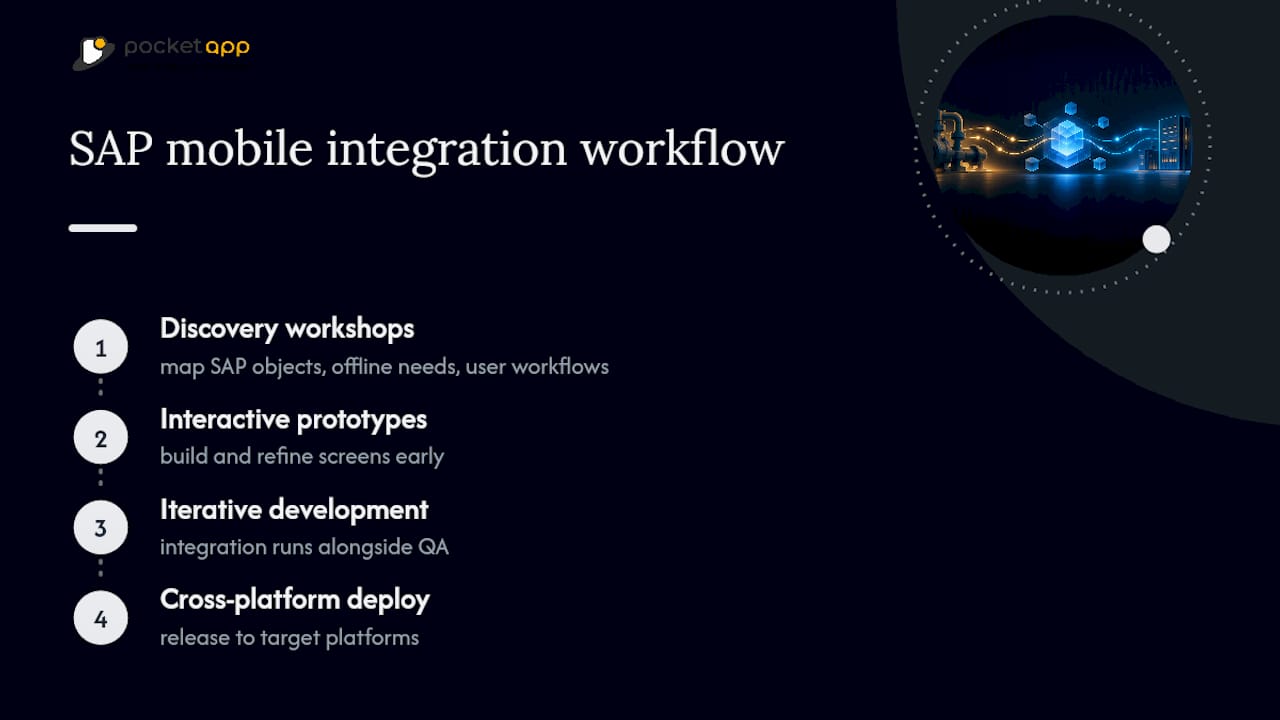
We start every project with discovery workshops that map the SAP objects, offline requirements and user workflows before a single screen gets designed. From there, we build interactive prototypes, iterate through development with the integration layer running alongside QA rather than bolted on at the end, and deploy across platforms.
With over 300 projects delivered for brands across retail, healthcare and charity sectors, we bring practical experience of what breaks in production, not just in a demo. For teams still scoping their SAP mobile requirements, a focused discovery engagement is usually the fastest way to a workable plan.
Why most SAP mobile projects fail before they reach production
The technical documentation for SAP Mobile Services, MDK and MAIF is thorough. What it rarely tells you is that most failed rollouts don't fail on the SAP side at all. They fail on decisions made too early, usually the choice between MDK and native SDKs, made before anyone has properly scoped offline requirements or device inventory.
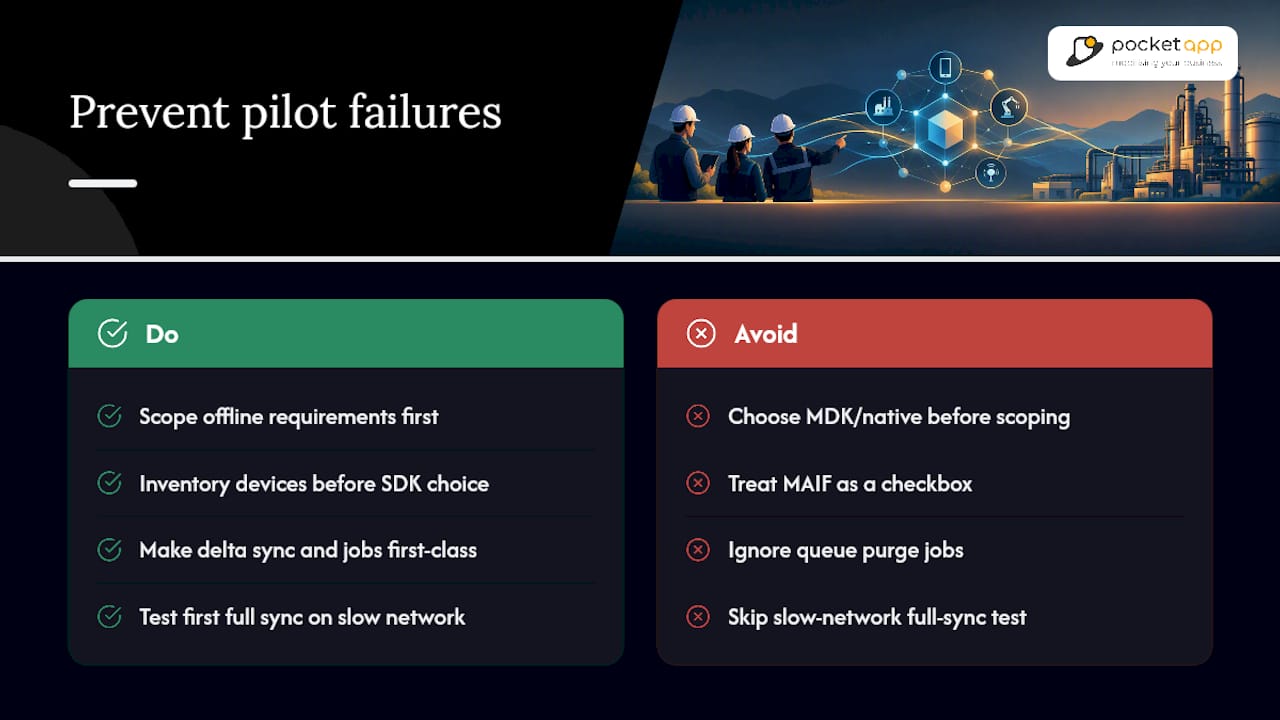
Conventional advice treats MAIF as a checkbox: install it, configure oMDO, move on. In practice, the projects that go smoothly are the ones that treat delta sync and background job monitoring as first-class engineering work, not a footnote after the app ships. A queue that silently backs up because nobody scheduled a purge job is far more common than any dramatic security failure, and far more likely to end a pilot early.
If there's one thing worth prioritising above all else, it's this: test the first full sync on a genuinely slow network before any pilot user does. That single test surfaces more architecture problems, in destination configuration, in paging, in push handling, than a week of unit tests ever will. Everything else in this guide supports that one moment working properly.
— Paul
Get a clear plan for your SAP mobile project
Working out whether to reuse SAP's own apps, build with MDK, or go fully native with SDKs is exactly the kind of decision that benefits from an outside pair of eyes before code gets written. We run Mobile App Clinics, short focused sessions to pressure-test integration approaches, offline requirements and security plans before committing significant engineering resources.

Our Discover, Design, Develop and Deploy process is designed to produce a working prototype and integration plan efficiently, typically within weeks rather than months. If you're scoping a SAP mobile integration and want a second opinion on architecture before development starts, get in touch to book a Mobile App Clinic session.
Documentation worth keeping open while you build
Bookmark SAP Mobile Services for platform capabilities, the MAIF technical guide for on-premise sync configuration, and SAP's developer portal for MDK and SDK references. Performance considerations for mobile UX are covered well in this mobile SEO and performance guide.
Sources
FAQ
Can we use SAP on mobile?
Yes. SAP supports mobile access through official apps like Concur and SuccessFactors, plus custom development using SAP Mobile Services, SDKs and MDK on SAP BTP. On-premise systems connect via MAIF or OData exposed through Cloud Connector.
Is SAP CPI the same as BTP?
No. SAP Cloud Platform Integration (CPI) is one integration service that runs on SAP BTP, which is the broader cloud platform hosting Mobile Services, CPI, and other tools together. BTP is the platform; CPI is one component on it, focused on process integration rather than mobile app delivery specifically.
Is SAP CPI difficult to learn?
CPI has a learning curve tied to integration concepts like message mapping and adapters, but it's approachable for developers already familiar with SAP's ecosystem. Most teams find it more accessible than building custom middleware from scratch.
What are the four main types of mobile applications?
The common categories are native apps, hybrid apps, web apps, and progressive web apps, each with different trade-offs in performance and device access. In the SAP context, this maps to native SDK development, MDK-built apps, and browser-based Fiori access, with the choice depending on offline needs and device feature requirements.
Does Pocketapp build SAP-integrated mobile apps?
Our services include custom mobile app design and development, including backend integration and enterprise connectivity. Current service details and pricing are available on the process page, with a Mobile App Clinic recommended as a first step for scoping SAP-specific requirements.