Mobile app MFA means adding a second proof of identity, on top of a password, before someone gets into an app. The strongest approach for most apps combines an authenticator app generating time-based codes or a push approval, gated by a fingerprint or face scan, with the secret stored in hardware-backed storage. SMS should be a fallback, never the main method, and every check must be confirmed on the server, not just the device.
TL;DR:
- Using offline TOTP apps with secure backup options is recommended to prevent account access loss if a device is lost without recovery methods.
- Managed push solutions with biometric verification and device attestation provide stronger security for business environments than simple TOTP apps.
- Storing sensitive MFA secrets in platform-specific secure storage and implementing thorough audit and recovery processes are essential to prevent vulnerabilities.
- SMS-based MFA remains vulnerable to SIM swap attacks and should only serve as a backup method, not the primary authentication factor.
- Effective MFA implementation requires careful planning of user experience, recovery flows, and layered security measures to mitigate common pitfalls.
Table of Contents
- What mobile app MFA actually looks like in practice
- Choosing an authenticator app or factor that fits your risk
- Implementing MFA in a mobile app: a practical developer checklist
- Security controls and common implementation pitfalls
- Pocketapp's view from building MFA into client apps
- The gap between MFA advice and MFA reality
- Sources
- FAQ
What mobile app MFA actually looks like in practice
Three factor types dominate mobile app MFA today, and each behaves differently once it reaches a real user's hands.
TOTP (time-based one-time password) is the oldest and most portable of the three. An authenticator app generates a six-digit code that rotates every 30 seconds and works entirely offline, because the code comes from a shared secret and the current time, not a network round-trip. That offline behaviour is why security teams like it: there's no SMS network to intercept and no push notification to spoof.
Push authentication flips the interaction. Instead of typing a code, the user gets a prompt on a trusted device and taps "approve," usually after a fingerprint or face check confirms it's really them. This is where biometric gating earns its keep. Combined properly, push plus biometrics tends to reduce phishing risk and gets better user acceptance than typing codes, simply because there's nothing to copy into a fake login page.
Passkeys are the newest entrant, using device-bound cryptographic key pairs rather than shared secrets at all, and Pocketapp has covered how they compare to traditional passkeys for apps in more detail elsewhere.
Then there's SMS, still common because it needs no app install. The problem is well documented: SIM-swap attacks let a fraudster convince a carrier to move a victim's number onto a new SIM, after which every SMS code goes straight to the attacker. SMS still has a place as an emergency recovery channel, but never as a primary factor for anything holding money, health data, or sensitive business information.
- TOTP: offline, portable, no network dependency, but requires typing a code
- Push: fast, biometric-gated, needs connectivity and a trusted device
- Passkeys: cryptographic, phishing-resistant, still gaining broad support
- SMS: convenient but vulnerable to SIM-swap, acceptable only as a fallback
Choosing an authenticator app or factor that fits your risk
For individuals, the decision usually comes down to portability. Look for offline TOTP generation so codes still work without signal, and check how the app handles backups. Losing a phone without a backup path means losing access to every account enrolled, which is worse than the vulnerability MFA was meant to fix.
Businesses evaluating options for staff or customers face a different calculus:
- Check backup and transfer support first. Some authenticator apps sync encrypted backups to the cloud; others rely purely on manual QR re-scanning, which is painful at scale.
- Weigh managed push against plain TOTP for staff apps. Enterprise-grade push solutions add device attestation and admin-level revocation, useful when an employee leaves or a device is lost.
- Consider open-source options for transparency. Bitwarden Authenticator is one example of an open-source app that generates standard TOTP codes locally across iOS and Android, letting security teams audit exactly how secrets are handled.
- Plan for device loss before it happens. Print or securely store recovery codes at enrolment, and test the transfer process on a spare device rather than discovering gaps during an actual emergency.
Pro Tip: Test your MFA recovery flow on a decommissioned or spare phone before rolling anything out to real users. Most enrolment problems only surface when someone tries to recover access, not when they first set it up.
Implementing MFA in a mobile app: a practical developer checklist
Enrolment design shapes adoption more than the cryptography does. Mandatory enrolment at signup gets everyone covered immediately but raises drop-off; progressive enrolment, where MFA becomes required only once an account holds something valuable, tends to convert better. Pocketapp's guidance on mobile app security best practices covers this trade-off in more depth for product teams weighing the two.
For TOTP, generate a proper cryptographic secret server-side, present it as a QR code during enrolment, and verify the user's first code before activating the factor. Clock drift between devices is a genuine headache: Firebase's TOTP implementation recommends checking adjacent time windows rather than a single exact window, so a phone clock running a few seconds fast doesn't lock a user out.
Push implementations need cryptographically signed approval requests tied to a specific login attempt, not a generic "someone tried to log in" ping. Pair the approval with biometric gating on the receiving device, and use platform attestation APIs to confirm the request is reaching a genuine, uncompromised device rather than an emulator.
None of this matters if the server trusts the client. Every enrolment and verification step needs independent server-side validation, session binding, and a defined recovery path for lost devices, because a client that can approve its own MFA check can be tampered with.
- Store TOTP secrets and session tokens using platform Keychain (iOS) or Keystore (Android), never plain preferences files
- Check Firebase's minimum SDK version requirements before enabling TOTP MFA on iOS
- Build a documented recovery flow (backup codes, admin reset) before launch, not after the first support ticket
- Log enrolment and verification events server-side for audit and anomaly detection
Security controls and common implementation pitfalls
OWASP's Mobile Application Security Verification Standard splits requirements into two levels. L1 covers essential controls every app should meet: secure storage, basic network protections, sensible session handling. L2 adds advanced measures like TLS certificate pinning, aimed at apps handling higher-value data such as banking or health records. Defence-in-depth means layering both, not picking one and calling it finished.
The pitfalls that undo good MFA design tend to repeat across projects:
- Hardcoded secrets. API keys or enrolment secrets baked into the app binary can be extracted with basic reverse-engineering tools.
- Client-only validation. If the app decides locally whether MFA passed, an attacker who controls the device controls the outcome. OWASP is explicit that the client is a delivery mechanism, not the authority.
- Leaning on SMS by default. Convenient to build, but it inherits every SIM-swap weakness described earlier.
- No secret rotation. A compromised TOTP seed or API key with no rotation plan stays compromised indefinitely.
Android's own developer guidance recommends storing sensitive data in internal storage or the platform keystore, applying network security configuration, and keeping dependencies current, since an outdated library is one of the more common routes attackers use to bypass otherwise sound MFA logic. Pocketapp's notes on protecting user data in mobile app development go into the storage side of this in more detail.
Pocketapp's view from building MFA into client apps
Across projects, the recurring tension isn't cryptography, it's the pull between security, user experience, and adoption. A bank app can mandate TOTP at signup and accept some drop-off; a loyalty app asking casual users to install an authenticator will lose people at the first friction point.
It is commonly recommended to use push with biometric gating for consumer apps with a broad, less technical user base, and TOTP or passkeys where users are already comfortable with authenticator apps, such as internal staff tools. Enrolment UX and threat modelling get worked through early in discovery, before a line of code gets written, because retrofitting MFA onto a finished app is always harder than designing around it.
Teams weighing these trade-offs on a live project can bring the specifics to a Mobile App Clinic or start with Pocketapp's structured discovery and design process.
The gap between MFA advice and MFA reality
Most guidance on mobile app MFA treats it as a binary: on or off, secure or not. That framing misses the real decision, which is about where to place friction. Too much of it at enrolment and users abandon the app before MFA ever protects anything; too little and the second factor becomes theatre, a box ticked for compliance without changing an attacker's odds.
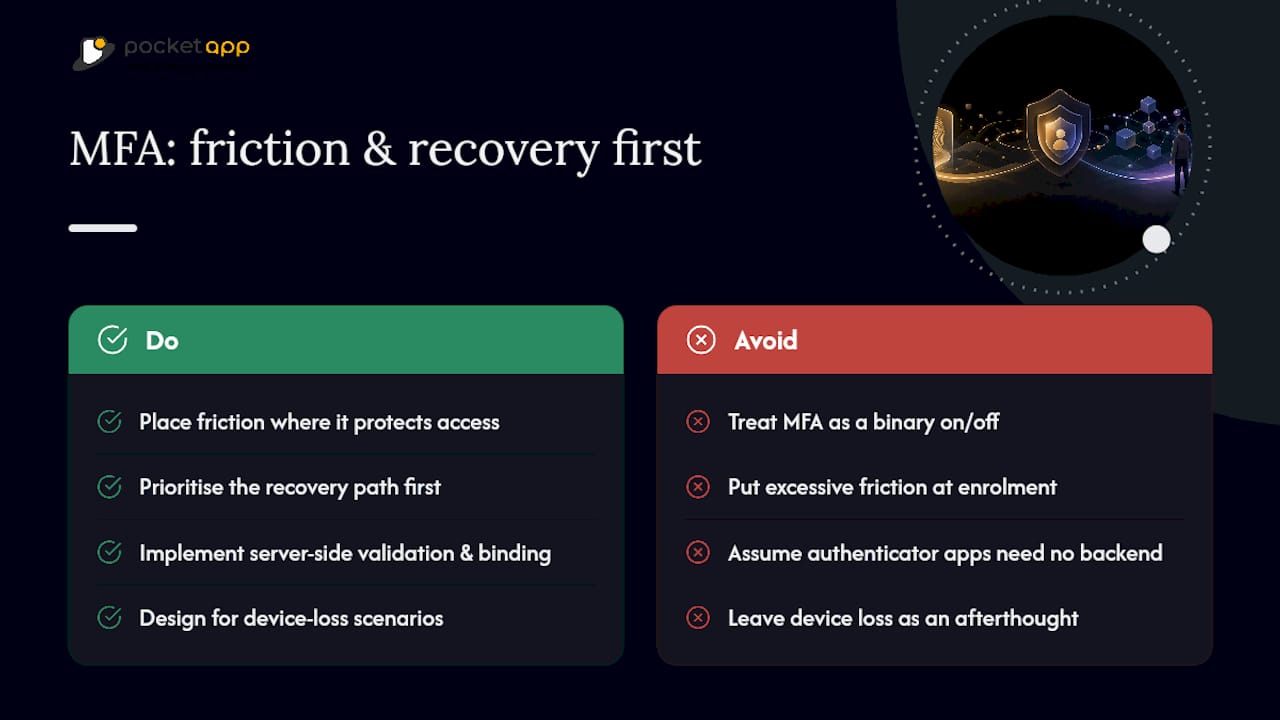
The conventional advice to "just add an authenticator app" also understates how much server-side work MFA demands. The interesting engineering isn't the QR code or the six-digit prompt; it's the validation, session binding, and recovery logic sitting behind it, which is exactly what gets skipped under deadline pressure.
If there's one thing worth prioritising above the rest, it's the recovery path. Teams spend weeks polishing the enrolment screen and then leave device loss as an afterthought, which is precisely the moment users are most vulnerable and most likely to contact support in a panic. Design for the bad day first, and the good day takes care of itself.
— Paul
Sources
FAQ
What is the best mobile app for MFA?
There isn't a single universal answer, because the right choice depends on whether you need offline TOTP codes, managed push for a workforce, or passkey support. Authenticator apps that generate standard TOTP codes locally, such as Bitwarden Authenticator, work well for individuals wanting an open, portable option.
Is there a mobile app for Microsoft Authenticator?
Yes, Microsoft Authenticator is a dedicated mobile app that supports push approvals and TOTP-style codes for Microsoft and third-party accounts. It's one of several authenticator apps businesses commonly deploy alongside enterprise identity systems.
Is it okay to have the MFA app on your phone for work?
Using a personal phone for a work authenticator app is common and generally fine, provided the organisation has a clear policy on device loss and account recovery. The bigger risk isn't the app itself but the absence of a tested recovery process if that phone is lost, stolen, or replaced.
What is a mobile app authenticator?
A mobile app authenticator is an app that generates or receives the second proof of identity used in multi-factor authentication, typically a rotating TOTP code or a push approval request. It works independently of SMS, which makes it more resistant to SIM-swap attacks than text-message codes.